Hồi mới bắt đầu làm game với Unity, mình từng có thói quen nhét tất cả mọi thứ vào PlayerPrefs. Từ điểm số màn chơi, âm lượng, cấp độ nhân vật, cho đến cả danh sách trang bị trong kho đồ. Cứ mỗi lần người chơi nhặt được một thanh kiếm hay qua màn, chỉ cần gõ một dòng PlayerPrefs.SetString() hay PlayerPrefs.SetInt() là xong ngay. Lúc làm prototype thấy tiện và nhanh đến kỳ lạ.
Thế nhưng khi trò chơi bước vào giai đoạn thử nghiệm diện rộng, những vấn đề bắt đầu phát sinh:
- File lưu game của người chơi bị chỉnh sửa dễ dàng bằng các công cụ can thiệp registry hoặc plist, làm hỏng toàn bộ nền kinh tế game.
- Khi người chơi đang lưu game mà điện thoại đột ngột sập nguồn hoặc tắt ứng dụng, toàn bộ file save bị lỗi cú pháp và biến mất vĩnh viễn không để lại dấu vết.
- Cấu trúc kho đồ ngày càng phức tạp với hàng trăm vật phẩm có chỉ số ngẫu nhiên, khiến chuỗi string nhồi vào
PlayerPrefsphình to bất thường, gây nghẽn luồng chính (Main Thread) mỗi khi ghi xuống đĩa.
Lúc này, câu hỏi quen thuộc thường được đặt ra giữa các anh em trong team: “Nên dùng PlayerPrefs, JsonUtility, Newtonsoft.Json hay Binary Serializer?”.
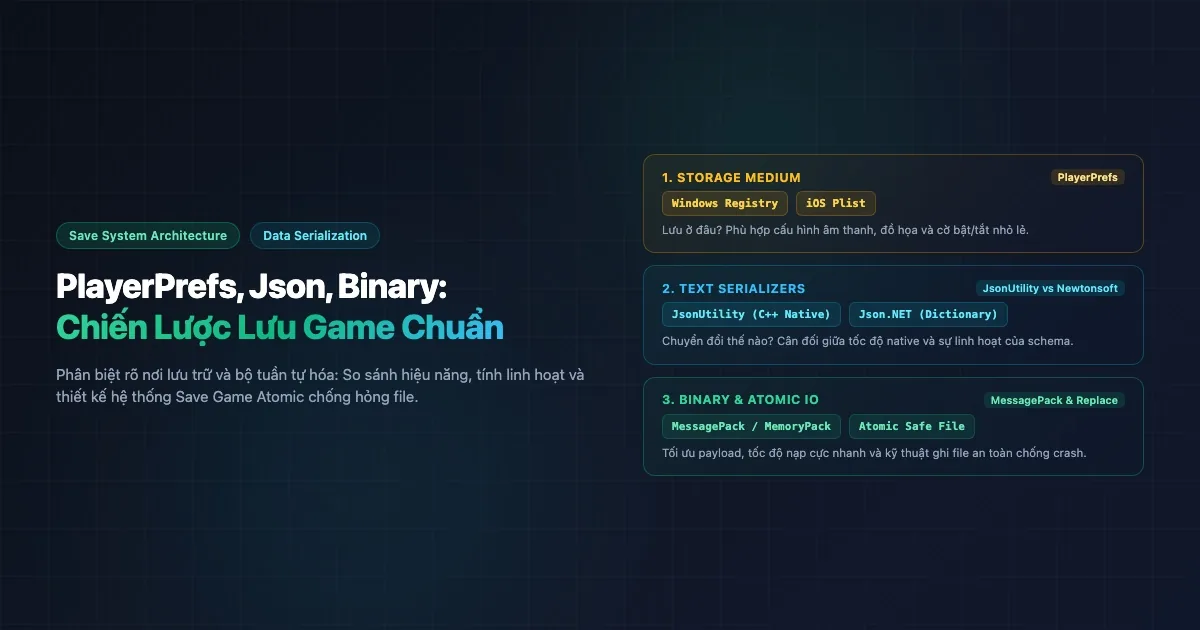
Để trả lời câu hỏi này một cách thấu đáo, chúng ta phải tách bạch rõ ràng hai tầng trách nhiệm độc lập: Nơi lưu trữ dữ liệu (Storage Medium) và Định dạng tuần tự hóa dữ liệu (Serialization Format).
1. Tách bạch ranh giới: Lưu ở đâu vs Chuyển đổi thế nào?
Nhiều người thường nhầm lẫn khi so sánh PlayerPrefs với JsonUtility hay Binary Serializer. Thực tế, chúng không nằm cùng một tầng kiến trúc:
flowchart LR
    subgraph SerializationLayer["Tầng Định Dạng (Serialization Format)"]
        F1["JsonUtility<br/>C++ Native, Phẳng"]
        F2["Newtonsoft.Json<br/>Linh hoạt, Dictionary"]
        F3["Binary Format<br/>MessagePack, MemoryPack"]
    end

    subgraph StorageLayer["Tầng Vận Chuyển & Lưu Trữ (Storage Medium)"]
        S1["PlayerPrefs Key-Value<br/>Registry, Plist"]
        S2["Disk File I/O<br/>Application.persistentDataPath"]
        S3["Cloud Save API<br/>Backend Remote Storage"]
    end

SerializationLayer -->|"Xuất chuỗi ký tự hoặc mảng byte"| StorageLayer- PlayerPrefs trả lời câu hỏi: Dữ liệu được lưu trữ ở đâu? Nó là một cơ chế Key-Value đơn giản trỏ vào Registry trên Windows, file
.plisttrên iOS/macOS, hoặcSharedPreferencestrên Android. - JsonUtility, Newtonsoft.Json hay Binary trả lời câu hỏi: Cấu trúc object trong RAM được chuyển đổi sang dạng chuỗi hoặc mảng byte như thế nào?
Chúng ta hoàn toàn có thể dùng Newtonsoft.Json để chuyển đổi cả một kho đồ thành chuỗi JSON rồi nhét chuỗi đó vào PlayerPrefs. Nhưng liệu làm như vậy có hợp lý trong một dự án thương mại dài hơi? Chúng ta hãy cùng mổ xẻ từng ứng cử viên.
2. Phân tích chuyên sâu 4 giải pháp lưu trữ
1. PlayerPrefs: Phù hợp cho cấu hình người dùng và cờ trạng thái nhỏ
PlayerPrefs chỉ hỗ trợ trực tiếp ba kiểu dữ liệu nguyên thủy: int, float, và string.
- Ưu điểm: Có sẵn, không cần cài đặt thêm package, cực kỳ tiện lợi cho các cờ cài đặt giao diện (Settings).
- Điểm nghẽn kỹ thuật:
- Không có cơ chế mã hóa bảo vệ: Trên Windows, dữ liệu nằm lộ thiên trong
HKCU\Software\[Company]\[Product]. Bất kỳ người chơi nào cũng có thể mởregeditlên để sửaGold = 999999trong 5 giây. - Lệnh
PlayerPrefs.Save()ghi đồng bộ (synchronous disk I/O) thẳng xuống ổ cứng. Nếu gọi liên tục trong vòng lặp game hoặc nhồi nhét chuỗi JSON dung lượng lớn, game sẽ bị drop frame ngay lập tức. - Không hỗ trợ atomic write: Nếu quá trình ghi bị ngắt quãng giữa chừng, toàn bộ file settings có nguy cơ bị hỏng.
- Không có cơ chế mã hóa bảo vệ: Trên Windows, dữ liệu nằm lộ thiên trong
- Phạm vi sử dụng tối ưu: Âm lượng âm thanh (
VolumeMaster), ngôn ngữ hiển thị (LanguageCode), chất lượng đồ họa, hoặc cờ hướng dẫn tân thủ (TutorialCompleted).
2. JsonUtility: Tốc độ Native C++ cực nhanh nhưng hạn chế tính năng
UnityEngine.JsonUtility được Unity phát triển trực tiếp bằng C++ native bên dưới engine.
- Ưu điểm:
- Tốc độ parse JSON nhanh hơn các thư viện C# thuần nhờ chạy bằng mã C++ đã tối ưu.
- Cực kỳ tiết kiệm bộ nhớ Managed Heap. Đặc biệt, hàm
JsonUtility.FromJsonOverwrite(json, existingObject)cho phép nạp đè dữ liệu lên một instance có sẵn mà không cần cấp phát thêm bộ nhớ mới, giúp hạn chế rác cho Garbage Collector.
- Hạn chế cố hữu:
- Kế thừa toàn bộ luật lệ khắt khe của Unity Serializer: Không hỗ trợ
Dictionary, không hỗ trợ mảng lồng nhau (List<List<int>>), không hỗ trợ tự động lớp đa hình (Polymorphism). - Không thể serialize mảng hoặc danh sách ở cấp cao nhất (Root Array). Nếu muốn serialize một
List<Item>, chúng ta bắt buộc phải tạo một class wrapper trung gian.
- Kế thừa toàn bộ luật lệ khắt khe của Unity Serializer: Không hỗ trợ
- Phạm vi sử dụng tối ưu: Dữ liệu có cấu trúc phẳng, schema cố định, không dùng
Dictionary, ưu tiên tối ưu tốc độ đọc ghi trên thiết bị di động tầm trung.
3. Newtonsoft.Json: Sự linh hoạt tối đa cho dữ liệu phức tạp
Còn được biết đến với tên gọi Json.NET, hiện đã có package chính thức của Unity (com.unity.nuget.newtonsoft-json).
- Ưu điểm:
- Hỗ trợ toàn diện mọi cấu trúc dữ liệu C#:
Dictionary<TKey, TValue>, kiểuNullable, enum dạng chuỗi, và cấu trúc cây phân cấp sâu. - Cho phép viết các
JsonConvertertùy biến để xử lý những cấu trúc dữ liệu đặc thù. - Hỗ trợ lưu trữ đa hình thông qua
TypeNameHandling, giúp phục hồi chính xác các class con kế thừa.
- Hỗ trợ toàn diện mọi cấu trúc dữ liệu C#:
- Cái giá phải trả (Trade-off):
- Sử dụng cơ chế Reflection của .NET nên thời gian parse và tuần tự hóa thường chậm hơn
JsonUtility. - Cấp phát nhiều bộ nhớ trên Managed Heap (tạo ra nhiều rác chuỗi và mảng tạm thời), đòi hỏi phải chú ý kiểm soát tần suất lưu game.
- Sử dụng cơ chế Reflection của .NET nên thời gian parse và tuần tự hóa thường chậm hơn
- Phạm vi sử dụng tối ưu: Hệ thống Save/Load kho đồ RPG phức tạp, dữ liệu nhiệm vụ đa nhánh, hoặc giao tiếp API với Game Server.
4. Binary Serializer: Nhỏ gọn, tốc độ cao nhưng cần phân biệt rõ ràng
Khi nhắc đến Binary, nhiều tài liệu cũ thường đưa ra ví dụ về BinaryFormatter. Tuy nhiên, đây là cạm bẫy cực kỳ nguy hiểm.
- Cảnh báo sống còn về
BinaryFormatter: Microsoft đã chính thức đánh dấuBinaryFormatterlà không an toàn (Obsolete/Insecure) trên các phiên bản .NET hiện đại do tiềm ẩn lỗ hổng bảo mật nghiêm trọng (Deserialization Vulnerability cho phép thực thi mã độc). Tuyệt đối không dùngBinaryFormattertrong các dự án game mới! - Các giải pháp Binary hiện đại thay thế:
- MessagePack for C#: Chuẩn định dạng nhị phân siêu gọn nhẹ, có hỗ trợ sinh mã AOT (Ahead-of-Time code generation) tương thích hoàn hảo với Unity IL2CPP.
- Protocol Buffers (Protobuf): Chuẩn dữ liệu của Google với schema rõ ràng và hệ số đánh dấu field tag, cực kỳ thích hợp cho game online cần tương thích ngược giữa các phiên bản.
- MemoryPack: Thư viện tối ưu hiệu năng tận dụng tính năng
Span<T>của C# hiện đại, cho tốc độ tuần tự hóa nhị phân gần như tức thì.
- Trade-off: File save có dung lượng nhỏ nhất và tốc độ nạp nhanh nhất, nhưng dữ liệu không thể đọc bằng mắt thường (human-readable), gây khó khăn khi debug lỗi file save của người chơi. Cần lưu ý rằng: Binary chỉ là một định dạng nhị phân, nó không đồng nghĩa với việc chống hack hay mã hóa.
3. Kiến trúc hệ thống Save Game Atomic chống hỏng file
Một hệ thống lưu game chuẩn mực trong dự án thực tế không chỉ dừng lại ở việc chọn Serializer nào, mà còn phải bảo vệ dữ liệu người chơi trước các sự cố sập nguồn hoặc tắt ứng dụng đột ngột.
Kỹ thuật cốt lõi ở đây là Ghi tệp nguyên tử (Atomic File Writing) kết hợp mã băm kiểm tra tính toàn vẹn (Checksum):
flowchart LR
    subgraph MemoryState["RAM"]
        Data["Player Save Profile"]
    end

    subgraph AtomicProcess["Quy Trình Ghi Nguyên Tử (Atomic Write)"]
        Temp["1. Ghi ra file tạm<br/>save.dat.tmp"]
        Swap["2. Hoán đổi an toàn<br/>File.Replace / Move"]
        Final["3. File Save chính thức<br/>save.dat"]
    end

    Data --> Temp
    Temp --> Swap
Swap --> Final- Bước 1: Tuần tự hóa và tính Checksum: Chuyển đổi dữ liệu sang định dạng mong muốn (JSON hoặc Binary), sau đó tính toán mã băm SHA-256 để chống can thiệp file trái phép.
- Bước 2: Ghi vào file tạm thời (
.tmp): Toàn bộ dữ liệu được ghi vào một file tạm thời (ví dụ:save.dat.tmp). Nếu máy bị mất điện hoặc game bị crash ở bước này, file save chính thức trước đó vẫn còn nguyên vẹn 100%. - Bước 3: Hoán đổi file an toàn (Atomic Swap): Sau khi ghi và flush dữ liệu xuống đĩa thành công, sử dụng
File.ReplacehoặcFile.Moveđể thay thế file tạm thành file save chính thức. Thao tác này được hệ điều hành xử lý ở cấp độ con trỏ file trong hệ thống tập tin, diễn ra gần như tức thì và không bị rủi ro ghi đè dở dang.
4. Code demo và Kiểm chứng kỹ thuật bằng Unit Test
Dưới đây là một kiến trúc Save System hoàn chỉnh: tách rời hợp đồng tuần tự hóa qua interface ISaveSerializer, triển khai cho cả JsonUtility và Newtonsoft.Json, cùng với cơ chế ghi file nguyên tử kèm mã băm SHA-256.
using System;
using System.IO;
using System.Text;
using System.Security.Cryptography;
using System.Collections.Generic;
using UnityEngine;
using Newtonsoft.Json;
using NUnit.Framework;

// Dữ liệu profile người chơi mẫu
[Serializable]
public class PlayerSaveProfile
{
    public string PlayerId;
    public int Level;
    public int Gold;
    public Dictionary<string, int> Inventory = new Dictionary<string, int>();

    public PlayerSaveProfile() { }

    public PlayerSaveProfile(string playerId, int level, int gold)
    {
        PlayerId = playerId;
        Level = level;
        Gold = gold;
    }
}

// Wrapper hỗ trợ JsonUtility khi cần xử lý dữ liệu có danh sách phẳng
[Serializable]
public class SimpleGameSettings
{
    public float MasterVolume = 1.0f;
    public string LanguageCode = "vi";
    public bool HapticEnabled = true;
}

// Hợp đồng bộ tuần tự hóa độc lập
public interface ISaveSerializer
{
    byte[] Serialize<T>(T data);
    T Deserialize<T>(byte[] bytes);
}

// Triển khai Newtonsoft.Json hỗ trợ đầy đủ Dictionary
public class NewtonsoftSaveSerializer : ISaveSerializer
{
    public byte[] Serialize<T>(T data)
    {
        string json = JsonConvert.SerializeObject(data, Formatting.None);
        return Encoding.UTF8.GetBytes(json);
    }

    public T Deserialize<T>(byte[] bytes)
    {
        string json = Encoding.UTF8.GetString(bytes);
        return JsonConvert.DeserializeObject<T>(json);
    }
}

// Triển khai JsonUtility tối ưu tốc độ cho schema phẳng trong Unity Runtime
public class JsonUtilitySaveSerializer : ISaveSerializer
{
    public byte[] Serialize<T>(T data)
    {
        string json = JsonUtility.ToJson(data);
        return Encoding.UTF8.GetBytes(json);
    }

    public T Deserialize<T>(byte[] bytes)
    {
        string json = Encoding.UTF8.GetString(bytes);
        return JsonUtility.FromJson<T>(json);
    }
}

// Triển khai Binary Serializer siêu tốc sử dụng BinaryWriter/BinaryReader
public class BinaryPayloadSerializer : ISaveSerializer
{
    public byte[] Serialize<T>(T data)
    {
        if (data is PlayerSaveProfile profile)
        {
            using var ms = new MemoryStream();
            using var writer = new BinaryWriter(ms, Encoding.UTF8);
            writer.Write(profile.PlayerId ?? string.Empty);
            writer.Write(profile.Level);
            writer.Write(profile.Gold);
            writer.Write(profile.Inventory.Count);
            foreach (var kvp in profile.Inventory)
            {
                writer.Write(kvp.Key);
                writer.Write(kvp.Value);
            }
            return ms.ToArray();
        }
        throw new NotSupportedException($"Kiểu {typeof(T).Name} chưa đăng ký bộ đọc nhị phân.");
    }

    public T Deserialize<T>(byte[] bytes)
    {
        if (typeof(T) == typeof(PlayerSaveProfile))
        {
            using var ms = new MemoryStream(bytes);
            using var reader = new BinaryReader(ms, Encoding.UTF8);
            var profile = new PlayerSaveProfile
            {
                PlayerId = reader.ReadString(),
                Level = reader.ReadInt32(),
                Gold = reader.ReadInt32()
            };
            int count = reader.ReadInt32();
            for (int i = 0; i < count; i++)
            {
                string key = reader.ReadString();
                int val = reader.ReadInt32();
                profile.Inventory[key] = val;
            }
            return (T)(object)profile;
        }
        throw new NotSupportedException($"Kiểu {typeof(T).Name} chưa đăng ký bộ đọc nhị phân.");
    }
}

// Trình quản lý lưu file nguyên tử (Atomic Save File Manager)
public class AtomicSaveFileManager
{
    private readonly ISaveSerializer _serializer;

    public AtomicSaveFileManager(ISaveSerializer serializer)
    {
        _serializer = serializer ?? throw new ArgumentNullException(nameof(serializer));
    }

    public void SaveAtomic<T>(string filePath, T data)
    {
        byte[] payload = _serializer.Serialize(data);
        string tempPath = filePath + ".tmp";
        string backupPath = filePath + ".bak";

        // 1. Ghi ra file tạm thời
        File.WriteAllBytes(tempPath, payload);

        // 2. Hoán đổi an toàn sang file chính thức
        if (File.Exists(filePath))
        {
            File.Replace(tempPath, filePath, backupPath);
            if (File.Exists(backupPath))
            {
                File.Delete(backupPath);
            }
        }
        else
        {
            File.Move(tempPath, filePath);
        }
    }

    public T Load<T>(string filePath)
    {
        if (!File.Exists(filePath))
        {
            throw new FileNotFoundException($"Save file not found at: {filePath}");
        }

        byte[] bytes = File.ReadAllBytes(filePath);
        return _serializer.Deserialize<T>(bytes);
    }

    public static string ComputeSha256Checksum(byte[] data)
    {
        using var sha256 = SHA256.Create();
        byte[] hash = sha256.ComputeHash(data);
        return BitConverter.ToString(hash).Replace("-", "").ToLowerInvariant();
    }
}

[TestFixture]
public class SaveSystemArchitectureTests
{
    private string _testDirectory;

    [SetUp]
    public void SetUp()
    {
        _testDirectory = Path.Combine(Path.GetTempPath(), "SaveSystemTests_" + Guid.NewGuid().ToString("N"));
        Directory.CreateDirectory(_testDirectory);
    }

    [TearDown]
    public void TearDown()
    {
        if (Directory.Exists(_testDirectory))
        {
            Directory.Delete(_testDirectory, true);
        }
    }

    [Test]
    public void NewtonsoftSerializer_RoundTrip_PreservesDictionaryData()
    {
        var serializer = new NewtonsoftSaveSerializer();
        var profile = new PlayerSaveProfile("player_hero_01", 15, 5000);
        profile.Inventory["sword_flame"] = 1;
        profile.Inventory["potion_mana"] = 20;

        byte[] serializedBytes = serializer.Serialize(profile);
        PlayerSaveProfile loadedProfile = serializer.Deserialize<PlayerSaveProfile>(serializedBytes);

        Assert.IsNotNull(loadedProfile);
        Assert.AreEqual("player_hero_01", loadedProfile.PlayerId);
        Assert.AreEqual(15, loadedProfile.Level);
        Assert.AreEqual(5000, loadedProfile.Gold);
        Assert.AreEqual(2, loadedProfile.Inventory.Count);
        Assert.AreEqual(20, loadedProfile.Inventory["potion_mana"]);
    }

    [Test]
    public void BinarySerializer_RoundTrip_PacksCompactPayload()
    {
        var serializer = new BinaryPayloadSerializer();
        var profile = new PlayerSaveProfile("archer_77", 25, 1250);
        profile.Inventory["arrow_fire"] = 100;

        byte[] binaryBytes = serializer.Serialize(profile);
        PlayerSaveProfile loadedProfile = serializer.Deserialize<PlayerSaveProfile>(binaryBytes);

        Assert.IsNotNull(loadedProfile);
        Assert.AreEqual("archer_77", loadedProfile.PlayerId);
        Assert.AreEqual(25, loadedProfile.Level);
        Assert.AreEqual(1250, loadedProfile.Gold);
        Assert.AreEqual(100, loadedProfile.Inventory["arrow_fire"]);
        // Dung lượng binary gọn gàng, nhỏ hơn JSON thông thường
        Assert.Less(binaryBytes.Length, 100);
    }

    [Test]
    public void AtomicSaveFileManager_SaveAndLoad_WritesAndReadsCorrectly()
    {
        var serializer = new NewtonsoftSaveSerializer();
        var manager = new AtomicSaveFileManager(serializer);
        string savePath = Path.Combine(_testDirectory, "slot_1.dat");

        var profile = new PlayerSaveProfile("knight_99", 50, 100000);
        profile.Inventory["shield_aegis"] = 1;

        // Lưu dữ liệu nguyên tử
        manager.SaveAtomic(savePath, profile);

        Assert.IsTrue(File.Exists(savePath));
        Assert.IsFalse(File.Exists(savePath + ".tmp"));

        // Nạp lại và kiểm tra
        PlayerSaveProfile loadedProfile = manager.Load<PlayerSaveProfile>(savePath);
        Assert.AreEqual("knight_99", loadedProfile.PlayerId);
        Assert.AreEqual(50, loadedProfile.Level);
        Assert.AreEqual(1, loadedProfile.Inventory["shield_aegis"]);
    }

    [Test]
    public void ChecksumValidation_DetectsPayloadTampering()
    {
        byte[] originalData = Encoding.UTF8.GetBytes("PlayerGold:1000;Gem:50");
        string originalChecksum = AtomicSaveFileManager.ComputeSha256Checksum(originalData);

        // Giả lập người chơi can thiệp sửa file tăng vàng lên 9999
        byte[] tamperedData = Encoding.UTF8.GetBytes("PlayerGold:9999;Gem:50");
        string tamperedChecksum = AtomicSaveFileManager.ComputeSha256Checksum(tamperedData);

        Assert.AreNotEqual(originalChecksum, tamperedChecksum);
    }
}
5. Bảng so sánh Trade-off giữa các giải pháp lưu trữ
Dưới đây là ma trận đối chiếu toàn diện giúp anh em đưa ra quyết định kiến trúc chính xác:
| Tiêu chí | PlayerPrefs | JsonUtility | Newtonsoft.Json | Binary (MessagePack/Protobuf) |
|---|---|---|---|---|
| Bản chất cốt lõi | Key-Value Store nền tảng | Bộ tuần tự hóa JSON C++ Native | Bộ tuần tự hóa JSON C# BCL | Bộ tuần tự hóa nhị phân hiện đại |
| Hỗ trợ Dictionary | Không | Không | Có (Đầy đủ mọi loại Key) | Có (Tối ưu hóa bảng băm) |
| Tốc độ thực thi | Nhanh với biến nhỏ lẻ | Cực nhanh (Native C++) | Trung bình (Reflection) | Siêu tốc (AOT Byte Stream) |
| Cấp phát Heap (GC) | Không đáng kể | Rất thấp (FromJsonOverwrite) | Đáng kể (Tạo chuỗi và DTO) | Cực thấp (Zero/Low Allocation) |
| Khả năng đọc/Debug | Khó (Nằm trong Registry) | Dễ (Đọc trực tiếp file JSON) | Dễ (Format đẹp, dễ sửa lỗi) | Khó (Cần tool chuyển sang JSON) |
| Độ an toàn dữ liệu | Kém (Dễ can thiệp Registry) | Cần thêm lớp mã hóa AES | Cần thêm lớp mã hóa AES | Khó chỉnh sửa tay bằng text editor |
| Trường hợp lý tưởng | Cấu hình UI, âm lượng, cờ | Dữ liệu phẳng, cần nạp nhanh | Dữ liệu RPG sâu, Save game chính | Game nhiều data, nhiều lượt save/load |
6. Chiến lược thực tế khi lựa chọn giải pháp lưu trữ
Trong một dự án game quy mô thương mại, chúng ta không nhất thiết phải chọn một giải pháp duy nhất cho toàn bộ hệ thống. Mô hình phối hợp thực tế thường bao gồm:
- Sử dụng
PlayerPrefscho cài đặt thiết bị (Local Device Preferences): Chỉ dùng để lưu các tùy chọn không ảnh hưởng tới tiến trình gameplay: âm lượng, độ sáng màn hình, bật tắt rung, ngôn ngữ, định danh tài khoản đăng nhập lần cuối. - Sử dụng
JsonUtilitycho các bảng cấu hình tĩnh: Nếu chúng ta nạp hàng nghìn dòng dữ liệu nhiệm vụ hoặc chỉ số quái vật từ file JSON đóng gói sẵn trong streaming assets,JsonUtilitylà lựa chọn tuyệt vời nhờ tốc độ native C++ và cơ chế ghi đè bộ nhớ hạn chế rác. - Sử dụng
Newtonsoft.Jsoncho Save Game người chơi trong giai đoạn Production: Khi game đang trong quá trình phát triển tính năng, dữ liệu thay đổi liên tục, việc dùng file JSON giúp lập trình viên và Game Designer dễ dàng mở file kiểm tra, sửa trực tiếp state để tái hiện bug. - Chuyển sang Binary (MessagePack/Protobuf) khi tối ưu Release:
Khi cấu trúc dữ liệu đã ổn định và game có nhu cầu tối ưu dung lượng tải về, tốc độ nạp màn chơi (Loading Time) và giảm thiểu tình trạng người chơi can thiệp file save thô, hãy nâng cấp lên MessagePack thông qua việc thay thế interface
ISaveSerializermà không cần sửa đổi gameplay logic.
7. Lời kết
PlayerPrefs giải quyết bài toán nơi lưu trữ cấu hình đơn giản. Còn JsonUtility, Newtonsoft.Json và Binary Serializer giải quyết bài toán chuyển hóa cấu trúc object trong bộ nhớ.
Không có giải pháp nào vượt trội trong mọi hoàn cảnh. Một kiến trúc Save System bền vững là kiến trúc biết bóc tách rõ ràng giữa định dạng dữ liệu và thao tác I/O xuống đĩa, đồng thời trang bị đầy đủ cơ chế ghi file nguyên tử và kiểm tra checksum để bảo vệ an toàn tuyệt đối cho tiến trình chơi của game thủ.

