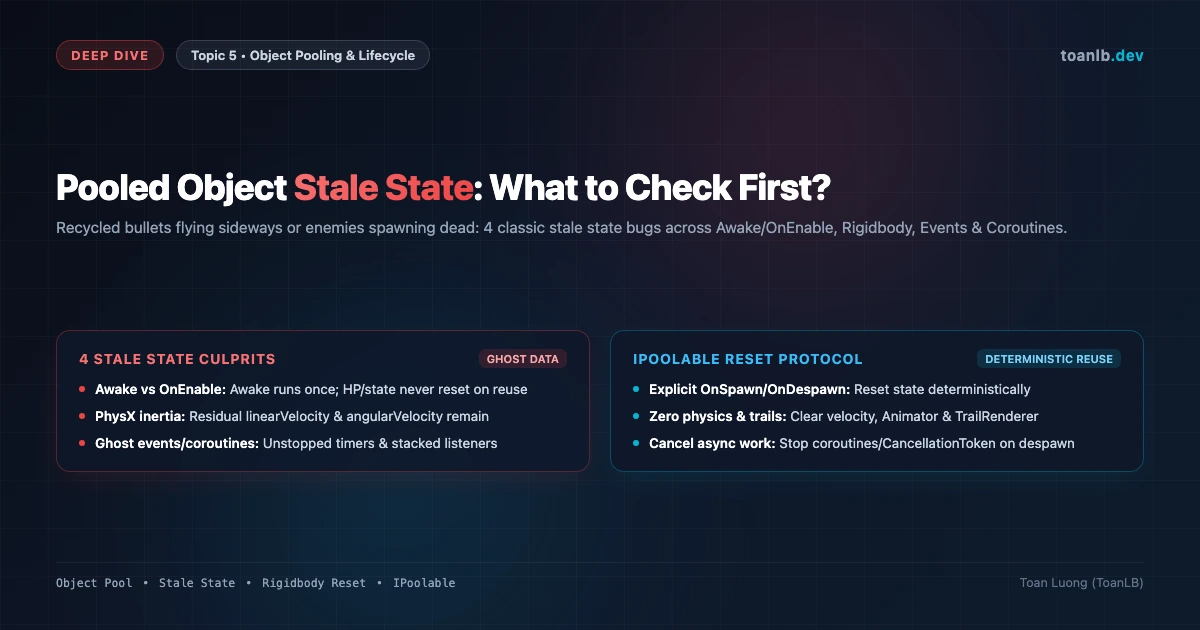
There is a bizarre category of bugs that almost every developer who builds an Object Pool in Unity eventually encounters.
The game runs smoothly, the first wave of enemies appears and is defeated without issue. But as wave two begins, a newly recycled enemy collapses dead the instant it spawns; a projectile flying out of a barrel explodes prematurely; or a health bar displays a negative value carried over from a previous encounter. Worse yet, an enemy re-spawned from the pool might take double or triple damage from a single bullet.
In technical terms, these glitches are classified as Stale State.
The fundamental premise of Object Pooling is eliminating C++ native allocation costs by reusing existing instances instead of destroying them. However, this “never-dying” characteristic completely invalidates the lifecycle assumptions developers rely on when using Instantiate and Destroy.
When an object retrieved from a pool exhibits corrupted state, what should you suspect first? What is the most effective debugging checklist to isolate the root cause?
1. Prime Culprit: Lifecycle Confusion Between Awake, Start, and OnEnable
If you must inspect a single place first when investigating stale state, open Awake() and Start().
In conventional Unity development using Instantiate and Destroy, the script lifecycle maps one-to-one with the entity’s presence in the scene:
flowchart LR
    subgraph INSTANTIATE_FLOW["1. Instantiate & Destroy Flow"]
        direction TB
        I1["Instantiate() Creates Fresh Instance"]
        I2["Awake & Start Execute Once"]
        I3["Death -> Destroy() Frees Completely"]
        I1 --> I2 --> I3
    end

    subgraph POOL_FLOW["2. Object Pool Flow"]
        direction TB
        P1["Awake & Start RUN ONLY ONCE EVER"]
        P2["SetActive(true) -> Only Fires OnEnable"]
        P3["Recycled: Awake Remains Silent"]
        P1 --> P2 --> P3
    end

    INSTANTIATE_FLOW -->|"Transition to Pooling"| POOL_FLOW
With Destroy, the C# instance and its native counterpart are destroyed. The next Instantiate call generates a pristine instance, executing Awake() and Start() afresh.
With an Object Pool:
- The C# instance and C++ native object never die throughout the scene’s duration.
Awake()andStart()execute exactly once across the entire application lifecycle (when the object is initially pre-warmed or instantiated).- On subsequent activations, calling
gameObject.SetActive(true)invokesOnEnable()exclusively;Awake()andStart()remain completely silent!
The consequence: Placing dynamic state initialization inside Awake() creates an immediate bug:
public class StaleAwakeDemo : MonoBehaviour
{
    private int _currentHealth;
    private int _maxHealth = 100;
    private bool _isDead;
    private float _attackCooldownTimer;

    private void Awake()
    {
        // DEADLY TRAP IN POOLING:
        // This line runs only once when the pool is created!
        _currentHealth = _maxHealth;
        _isDead = false;
        _attackCooldownTimer = 0f;
    }
}
When an enemy dies in wave one (where _currentHealth = 0 and _isDead = true), it returns to the pool retaining those exact values. When retrieved for wave two, because Awake() does not rerun, the enemy spawns with _isDead = true and triggers its death routine on frame zero.
Clear Separation of Concerns:
Awake(): Strictly for caching immutable references. Cache components viaGetComponent<T>(), map child transforms, or initialize internal collections. These references never change between reuse cycles.OnEnable()or an explicitResetState()method: The only appropriate location to initialize mutable gameplay state (health, flags, timers, status effects).
Moving initialization to Start() offers no remedy. Start() also runs only once prior to the object’s first Update. Moving code from Awake to Start merely delays the flaw by one frame; on subsequent pool retrievals, Start() never executes again.
2. Second Culprit: Stale State Inside Native Engine Subsystems
Frequently, developers verify that every C# variable is properly reassigned in OnEnable(), yet the object still behaves abnormally: projectiles drift backward, enemies freeze in death poses, or neon trails stretch across the arena.
This occurs because native C++ memory structures inside built-in engine components do not automatically reset when toggling SetActive().
flowchart LR
    subgraph CSHARP_LAYER["Managed C# Layer"]
        direction TB
        C1["C# Reassigns hp = maxHp"]
        C2["C# Reassigns isDead = false"]
        C1 --- C2
    end

    subgraph NATIVE_LAYER["Forgotten Native C++ Subsystems"]
        direction TB
        N1["PhysX: Retained Rigidbody.linearVelocity"]
        N2["Graphics: TrailRenderer Retains Old Vertices"]
        N3["Mecanim: Animator Stuck in Death State"]
        N1 --- N2 --- N3
    end

    CSHARP_LAYER -.->|"Does Not Auto-Reset"| NATIVE_LAYER
A. Rigidbody and PhysX Simulation
Calling gameObject.SetActive(false) removes the Rigidbody from the active broadphase simulation, but its linear velocity (linearVelocity) and angular velocity (angularVelocity) remain intact.
When the projectile is repositioned at the barrel tip and set active, it immediately inherits the velocity and angular momentum from its previous trajectory unless explicitly zeroed.
B. TrailRenderer and ParticleSystem
- TrailRenderer: Stores an internal list of world-space curve vertices in native memory. When teleported from its previous despawn point to a new spawn position, failing to call
trailRenderer.Clear()causes the engine to connect the old coordinates with the new position, producing a blinding light beam across the camera. - ParticleSystem: Requires calling
particleSystem.Clear(true)prior to emission, or residual particles remaining in buffers will render for one frame.
C. Animator and Mecanim State Machines
The Animator stores its active state machine node in native memory. When an entity dies, the Animator halts in the “Die” state. Reactivating it without issuing state transitions causes the entity to remain frozen on the ground. The standard solution is calling animator.Rebind() or animator.Play("Idle", 0, 0f).
3. Third Culprit: Asymmetric OnEnable and OnDisable (Event Leaks)
This explains why an enemy spawned from a pool might take triple damage from a single explosive round.
Consider this standard implementation:
public class BrokenEventLifecycleDemo : MonoBehaviour
{
    public static System.Action OnGlobalExplosion;

    private void OnEnable()
    {
        // Subscribes when spawned
        OnGlobalExplosion += TakeDamage;
    }

    private void OnDestroy()
    {
        // FATAL MISTAKE: OnDestroy NEVER RUNS with Object Pooling!
        OnGlobalExplosion -= TakeDamage;
    }

    private void TakeDamage() { }
}
Because pooled objects are never destroyed during gameplay, OnDestroy() is never invoked.
The resulting cascade:
- First spawn:
OnEnableruns and registersTakeDamageto the event delegate invocation list. - Enemy dies and returns to pool:
OnDestroydoes not execute.TakeDamageremains inside the invocation list. - Second spawn:
OnEnableregistersTakeDamagea second time. The delegate now holds two identical pointers to the same method. - Third spawn: Accumulated subscriptions reach three.
When the explosion event fires, TakeDamage executes three times concurrently on that single instance in one frame.
Golden Rule: Lifecycle Symmetry
OnEnable() and OnDisable() must be strict mirror images. Any event registered with += in OnEnable() must be unregistered with -= inside OnDisable().
4. Fourth Culprit: Silent Coroutine Termination on SetActive(false)
Another subtle trap stems from Unity’s coroutine execution rules.
When invoking gameObject.SetActive(false) on a GameObject hosting an active Coroutine, Unity immediately terminates that coroutine without throwing warnings or exceptions.
Coroutines are not paused; they are permanently halted. Calling SetActive(true) later does not resume the coroutine.
This creates serious logic state corruption:
public class InterruptedCoroutineDemo : MonoBehaviour
{
    private bool _isAttacking;
    private Collider _collider;

    private IEnumerator AttackDashRoutine()
    {
        _isAttacking = true;
        if (_collider != null) _collider.enabled = false;

        yield return new WaitForSeconds(1.5f);

        // IF THE OBJECT IS RETURNED TO THE POOL DURING THESE 1.5 SECONDS:
        // Every line below NEVER EXECUTES!
        if (_collider != null) _collider.enabled = true;
        _isAttacking = false;
    }
}
If the player eliminates the enemy while it is dashing (during the 1.5s yield window), the system immediately calls SetActive(false).
The cleanup logic scheduled after yield return is aborted. The enemy enters the pool with _collider.enabled = false and _isAttacking = true. When reused, it becomes completely invincible and unable to initiate further actions.
Production Code Sample: Clean Lifecycle Architecture
To address all four failure modes, consider an Action RPG scenario with elite enemies possessing shield buffs, dashing mechanics, and particle trails.
We implement PooledEnemyController ensuring:
- Clear separation between immutable caching and dynamic state resets.
- Complete zeroing of native physics velocities and graphics trails.
- Strict symmetrical event subscription.
- Safe coroutine termination and state recovery within
OnDisable().
using System.Collections;
using UnityEngine;

public class PooledEnemyController : MonoBehaviour
{
    [SerializeField] private Rigidbody _rigidbody;
    [SerializeField] private TrailRenderer _trailRenderer;
    [SerializeField] private Collider _hitCollider;

    private int _maxHealth = 100;
    private int _currentHealth;
    private bool _isDead;
    private bool _isAttacking;
    private Coroutine _attackRoutine;

    public static System.Action<int> OnGlobalDamageAlert;

    // 1. Awake: CACHE IMMUTABLE REFERENCES ONLY
    private void Awake()
    {
        if (_rigidbody == null) _rigidbody = GetComponent<Rigidbody>();
        if (_trailRenderer == null) _trailRenderer = GetComponent<TrailRenderer>();
        if (_hitCollider == null) _hitCollider = GetComponent<Collider>();
    }

    // 2. OnEnable: BEGIN NEW LIFECYCLE - RESET DYNAMIC GAMEPLAY STATE
    private void OnEnable()
    {
        ResetGameplayState();
        OnGlobalDamageAlert += HandleDamageAlert;
    }

    // 3. OnDisable: END LIFECYCLE - PERFORM CLEANUP
    private void OnDisable()
    {
        // Unsubscribe symmetrically to eliminate event leaks
        OnGlobalDamageAlert -= HandleDamageAlert;

        // Terminate running coroutines cleanly
        if (_attackRoutine != null)
        {
            StopCoroutine(_attackRoutine);
            _attackRoutine = null;
        }

        // Restore safe default flags
        _isAttacking = false;
        if (_hitCollider != null)
        {
            _hitCollider.enabled = true;
        }
    }

    public void OnSpawnFromPool(Vector3 spawnPosition, int configuredHealth)
    {
        transform.position = spawnPosition;
        _maxHealth = configuredHealth;
        _currentHealth = configuredHealth;
        _isDead = false;

        // 4. RESET NATIVE SUBSYSTEMS EXPLICITLY
        if (_rigidbody != null)
        {
            _rigidbody.linearVelocity = Vector3.zero;
            _rigidbody.angularVelocity = Vector3.zero;
        }

        if (_trailRenderer != null)
        {
            _trailRenderer.Clear();
        }
    }

    private void ResetGameplayState()
    {
        _currentHealth = _maxHealth;
        _isDead = false;
        _isAttacking = false;
        if (_hitCollider != null)
        {
            _hitCollider.enabled = true;
        }
    }

    public void TriggerAttackDash()
    {
        if (!gameObject.activeInHierarchy || _isDead) return;
        _attackRoutine = StartCoroutine(AttackDashRoutine());
    }

    private IEnumerator AttackDashRoutine()
    {
        _isAttacking = true;
        if (_hitCollider != null) _hitCollider.enabled = false;

        yield return new WaitForSeconds(0.5f);

        if (_hitCollider != null) _hitCollider.enabled = true;
        _isAttacking = false;
        _attackRoutine = null;
    }

    private void HandleDamageAlert(int damage)
    {
        if (_isDead) return;

        _currentHealth -= damage;
        if (_currentHealth <= 0)
        {
            _isDead = true;
            gameObject.SetActive(false);
        }
    }

    public int GetCurrentHealth() => _currentHealth;
    public bool IsDead() => _isDead;
    public bool IsAttacking() => _isAttacking;
}
Automated Verification with NUnit
We verify reset integrity, event symmetry, and recycling behavior via NUnit:
using NUnit.Framework;
using UnityEngine;

// Isolated domain model for unit testing
public class EnemyStateModel
{
    public int MaxHealth { get; private set; }
    public int CurrentHealth { get; private set; }
    public bool IsDead { get; private set; }
    public Vector3 Velocity { get; private set; }
    public int EventSubscriptionCount { get; private set; }

    public EnemyStateModel(int maxHealth)
    {
        MaxHealth = maxHealth;
        CurrentHealth = maxHealth;
        IsDead = false;
        Velocity = Vector3.zero;
        EventSubscriptionCount = 0;
    }

    public void OnEnable()
    {
        EventSubscriptionCount++;
    }

    public void OnDisable()
    {
        EventSubscriptionCount--;
    }

    public void OnSpawn(int health, Vector3 initialVelocity)
    {
        MaxHealth = health;
        CurrentHealth = health;
        IsDead = false;
        Velocity = initialVelocity;
    }

    public void OnDespawn()
    {
        Velocity = Vector3.zero;
        IsDead = true;
    }

    public void TakeDamage(int damage)
    {
        if (IsDead) return;

        CurrentHealth -= damage;
        if (CurrentHealth <= 0)
        {
            CurrentHealth = 0;
            IsDead = true;
        }
    }
}

[TestFixture]
public class PoolStateResetTests
{
    [Test]
    public void RecycledEnemy_OnSpawn_ResetsHealthAndDeadFlagProperly()
    {
        var enemy = new EnemyStateModel(100);

        enemy.TakeDamage(150);
        Assert.IsTrue(enemy.IsDead);
        Assert.AreEqual(0, enemy.CurrentHealth);

        enemy.OnDespawn();
        enemy.OnSpawn(health: 200, initialVelocity: Vector3.forward * 5f);

        Assert.IsFalse(enemy.IsDead);
        Assert.AreEqual(200, enemy.CurrentHealth);
        Assert.AreEqual(new Vector3(0, 0, 5), enemy.Velocity);
    }

    [Test]
    public void Despawn_WipesResidualVelocityToZero()
    {
        var enemy = new EnemyStateModel(100);
        enemy.OnSpawn(100, new Vector3(10, 0, 15));

        enemy.OnDespawn();

        Assert.AreEqual(Vector3.zero, enemy.Velocity);
    }

    [Test]
    public void LifecycleSymmetry_MaintainsSingleEventSubscription()
    {
        var enemy = new EnemyStateModel(100);

        // Lifecycle 1
        enemy.OnEnable();
        Assert.AreEqual(1, enemy.EventSubscriptionCount);
        enemy.OnDisable();
        Assert.AreEqual(0, enemy.EventSubscriptionCount);

        // Lifecycle 2 (Recycled from pool)
        enemy.OnEnable();
        Assert.AreEqual(1, enemy.EventSubscriptionCount);
        enemy.OnDisable();
        Assert.AreEqual(0, enemy.EventSubscriptionCount);
    }
}
Troubleshooting Checklist: Priority Order When Debugging Pooled Entities
| Investigation Step | Suspect Component | Common Symptoms | Standard Remedy |
|---|---|---|---|
| Step 1 (Highest Priority) | Initialization in Awake / Start | Spawns dead, health bar carries old values, logic flags wrong on frame 0 | Shift dynamic assignments to OnEnable() or explicit Init() |
| Step 2 | Event Leaks (OnEnable/OnDisable) | Takes multiplied damage, duplicate audio triggers, extra logic executions | Verify every += in OnEnable has an exact mirror -= in OnDisable |
| Step 3 | Native Subsystems | Bullets inherit old momentum, trail streaks across screen, frozen animator | Reset linearVelocity = Vector3.zero, call trail.Clear(), and animator.Rebind() |
| Step 4 | Aborted Coroutines | Permanent invulnerability, disabled colliders, inability to attack on reuse | Stop active coroutines and restore safe state flags inside OnDisable() |
Practical Takeaways
Adopting Object Pooling is an architectural trade-off: we trade automated memory reclamation for manual lifecycle responsibility.
Awakeexecutes only once: Never rely onAwakeorStartto reset state for pooled entities.- Symmetry is essential: Mirror every activation call with a deactivation counterpart. Neglecting
OnDisableproduces catastrophic event leaks. - Reset the native layer: C# variables are only part of the equation. Rigidbodies, TrailRenderers, and Animators retain state deep within C++ that must be explicitly cleared before an object re-enters the active scene.

