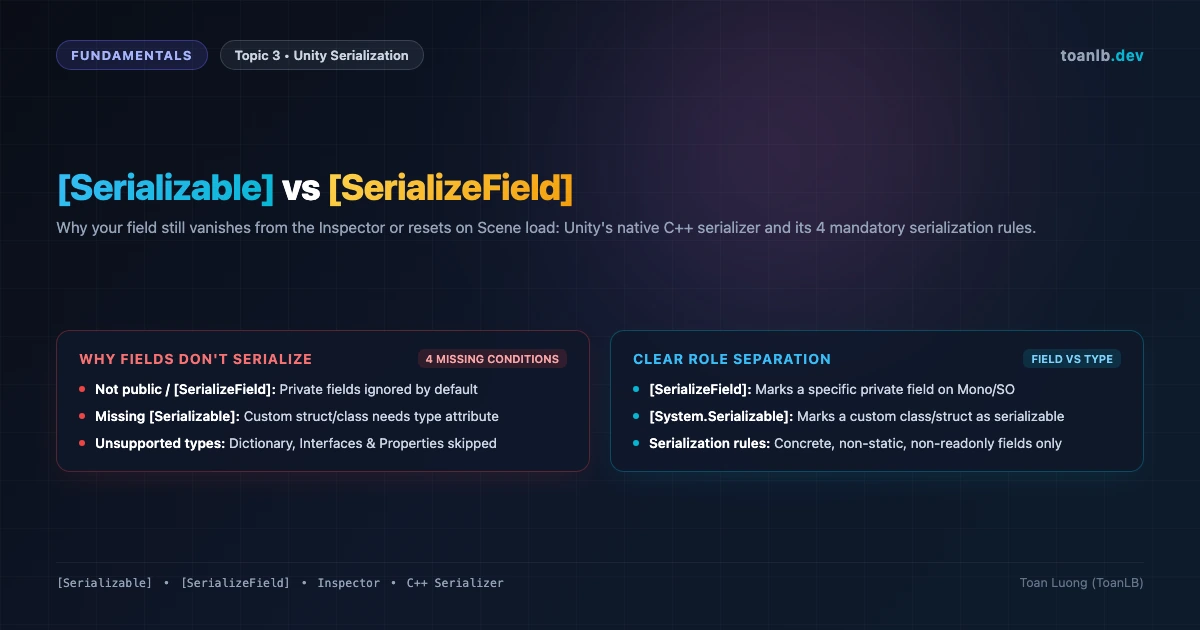
During game development in Unity, nearly every engineer encounters an unexpected scenario: C# code compiles cleanly without a single compiler error or warning, yet switching to the Unity Editor reveals that a freshly declared variable is missing entirely from the Inspector. Or worse, configuration data meticulously typed into a scene or prefab unexpectedly vanishes after a scene transition or reload.
The instinctive reaction is often to slap [SerializeField] in front of the field, or add [Serializable] above the class definition. Yet in many instances, even with both attributes in place, the variable remains stubbornly absent.
The root cause is straightforward: Unity does not utilize standard .NET serializers (such as System.Text.Json or BinaryFormatter). Instead, Unity executes an internal C++ Native Serialization Pipeline that operates under strict, idiosyncratic rules. If a variable fails any criteria within this pipeline, Unity silently ignores it.
This article breaks down the architectural distinction between [Serializable] and [SerializeField], unpacks the four strict filtration layers that cause fields to disappear, and presents proven patterns for handling non-serializable structures such as Dictionary collections and polymorphic class hierarchies.
1. Core Distinction: Field Decorator vs Type Qualifier
To prevent confusion, we must clearly differentiate the scope and target of each attribute:
flowchart LR
    subgraph TargetField["1. Field Level Target"]
        F1["UnityEngine.SerializeField<br/>Target: Private / Protected Field<br/>Purpose: Opens access to Unity Serializer"]
    end

    subgraph TargetType["2. Type Level Target"]
        T1["System.Serializable<br/>Target: Custom Class or Struct<br/>Purpose: Qualifies composite data layout"]
    end
1. [SerializeField] Decorates the Field
- Resides in the
UnityEnginenamespace. - Primary purpose: Instructs Unity’s native C++ serializer to serialize a non-public (private or protected) instance variable, save it into scene/prefab/asset YAML files, and expose it in the Inspector UI.
[SerializeField]cannot decorate classes or structs, and does not alter the internal serializability of a type.
2. [Serializable] Qualifies the Data Type
- Belongs to the standard .NET Base Class Library (
Systemnamespace). - Primary purpose: Signals to the runtime and serializer that a custom class or struct possesses a layout that can be decomposed into primitive values for serialization.
[Serializable]decorates class and struct definitions. It cannot be applied to an individual field to force Inspector exposure.
Mental Model:
[SerializeField]marks the storage container (Field).[Serializable]certifies the cargo packed inside (Custom Type).
2. The Four Serialization Filters
Applying attributes is merely a prerequisite. For a variable to be serialized to disk (within Scene, Prefab, or .asset files), it must pass four successive filters:
flowchart LR
    subgraph Pipeline["Unity Serialization Pipeline"]
        L1["Filter 1: Field Eligibility<br/>Instance Field, Non-Static"]
        L2["Filter 2: Supported Data Type<br/>Primitives, Unity Objects, Lists"]
        L3["Filter 3: Value vs Reference<br/>Inline Value Semantics"]
        L4["Filter 4: Recursion Limit<br/>Serialization Depth Guard"]
    end

    L1 --> L2
    L2 --> L3
    L3 --> L4
Filter 1: Field Structural Eligibility
Unity Serializer works directly on memory buffers allocated for instance fields. It categorically rejects:
- C# Properties with get/set:
Developers accustomed to clean C# property syntax often addusing UnityEngine; public class PropertyAntiPattern : MonoBehaviour { // REJECTED: Unity does not serialize C# Auto-Properties [SerializeField] public int CurrentHp { get; set; } }[SerializeField]to auto-properties and wonder why they never appear. Unity’s serializer never invokes getter/setter methods, nor does it bind to compiler-generated backing fields. Serialization requires explicit instance fields:[SerializeField] private int _currentHp;. static,const, orreadonlyVariables: Static fields belong to the type rather than specific scene instances. Unity only persists the state of concrete scene entities.
Filter 2: Type Serialization Whitelist
Unity does not natively understand every valid C# type:
- Supported Out of the Box:
- Primitive types:
int,float,double,bool,string,char. - Unity math structs:
Vector2,Vector3,Quaternion,Color,Bounds,Matrix4x4. UnityEngine.Objectderivations:GameObject,Transform,MonoBehaviour,ScriptableObject,Texture2D,AudioClip.- 1D Arrays (
T[]) or single-level lists (List<T>) of supported types.
- Primitive types:
- NOT Supported Natively:
Dictionary<TKey, TValue>: Unity Serializer cannot map key-value hash collections.- Nested collections:
List<List<int>>or multi-dimensional arraysint[,]. - Open or unbound generic classes.
- Interfaces or abstract classes without explicit reference attributes.
Filter 3: Inline Value vs Reference Semantics
This represents the most critical conceptual trap in Unity serialization:
- When serializing classes deriving from
UnityEngine.Object(such as Prefabs or ScriptableObjects), Unity stores a managed reference pointer (InstanceID / GUID) pointing to the asset. - However, when serializing a custom pure C# class marked
[Serializable], Unity treats it as an Inline Value. Unity embeds the entire payload directly into the enclosing object.
Consequences of Inline Value Semantics:
- Loss of Shared References (Accidental Clones): If two separate fields reference the exact same C# object instance in RAM, after serialization and deserialization from a scene, they become two disconnected, duplicated clones. Modifying one no longer affects the other.
- Polymorphism Slicing: If you declare
[SerializeField] private BaseSkill _skill;and assign a derived instanceFireSkill : BaseSkill, Unity serializes only the base fields defined onBaseSkill. All derived properties onFireSkillare sliced away.
Filter 4: Recursion Depth Limits
If a [Serializable] class includes a field referencing its own type (such as a node in a linked list public Node next;), the serializer enters an infinite recursive loop when traversing the data structure. To prevent stack overflows and memory exhaustion, Unity enforces a hard depth ceiling (typically 7 to 10 levels). Fields exceeding this depth are truncated or omitted with editor warnings.
3. Resolving Two Common Dilemmas: Dictionaries and Polymorphism
In production game systems, gameplay programmers repeatedly face two technical demands:
- Fast, indexed data lookup by ID (
Dictionary<string, ItemData>) providing query performance. - Polymorphic ability or effect systems (
Polymorphism) that remain fully editable in the Inspector.
Bridging Dictionaries via ISerializationCallbackReceiver
Because Unity cannot serialize hash tables, we apply a bidirectional bridge using ISerializationCallbackReceiver:
- For Editor & Disk Storage: Maintain a serializable
List<TEntry>that the Inspector and YAML files process normally. - For Runtime Gameplay: Reconstruct an in-memory
Dictionary<TKey, TValue>immediately after deserialization (OnAfterDeserialize), delivering fast lookups without losing Inspector editability.
flowchart LR
    subgraph StorageLayer["Inspector & Disk Storage"]
        L["List of Entries<br/>Serializable List"]
    end

    subgraph RuntimeMap["Runtime Memory O(1)"]
        D["Dictionary<string, ItemData><br/>Fast indexed lookup"]
    end

    L -->|"OnAfterDeserialize()"| D
    D -->|"OnBeforeSerialize()"| L
Preserving Polymorphism via [SerializeReference]
Introduced in Unity 2019.3, [SerializeReference] replaces inline value embedding with true managed reference pointers. This attribute instructs Unity to serialize pure C# instances while preserving concrete derived types, polymorphism, and true null states.
4. Production C# Implementation: Fast Inventory Registry & Polymorphic Effects
Below is a complete, decoupled C# implementation providing both an dictionary registry and a polymorphic skill effect hierarchy, accompanied by NUnit unit tests.
1. Fast Serializable Dictionary Registry
The ItemInventoryRegistry enables designers to configure items in the Inspector while gameplay code queries items by ID in time, safely handling accidental key duplicates:
using System;
using System.Collections.Generic;
using UnityEngine;

// Serializable item data entry
[Serializable]
public class InventoryItemEntry
{
    [SerializeField] private string _itemId;
    [SerializeField] private int _quantity;
    [SerializeField] private int _powerScore;

    public string ItemId => _itemId;
    public int Quantity => _quantity;
    public int PowerScore => _powerScore;

    public InventoryItemEntry(string itemId, int quantity, int powerScore)
    {
        _itemId = itemId;
        _quantity = quantity;
        _powerScore = powerScore;
    }
}

// Registry bridging Unity's serializable List with an O(1) runtime Dictionary
[Serializable]
public class ItemInventoryRegistry : ISerializationCallbackReceiver
{
    [SerializeField] private List<InventoryItemEntry> _serializedItems = new List<InventoryItemEntry>();

    // Runtime O(1) hash map, excluded from direct Unity serialization
    private readonly Dictionary<string, InventoryItemEntry> _runtimeLookup = new Dictionary<string, InventoryItemEntry>();

    public int Count => _runtimeLookup.Count;

    public void AddItem(InventoryItemEntry item)
    {
        if (item == null || string.IsNullOrEmpty(item.ItemId)) return;
        _runtimeLookup[item.ItemId] = item;
    }

    public bool TryGetItem(string itemId, out InventoryItemEntry item)
    {
        return _runtimeLookup.TryGetValue(itemId, out item);
    }

    // Invoked by Unity immediately prior to saving to Scene / Prefab
    public void OnBeforeSerialize()
    {
        _serializedItems.Clear();
        foreach (var pair in _runtimeLookup)
        {
            _serializedItems.Add(pair.Value);
        }
    }

    // Invoked by Unity immediately following deserialization into RAM
    public void OnAfterDeserialize()
    {
        _runtimeLookup.Clear();
        for (int i = 0; i < _serializedItems.Count; i++)
        {
            var item = _serializedItems[i];
            if (item != null && !string.IsNullOrEmpty(item.ItemId))
            {
                // Gracefully resolve accidental duplicate keys from manual Inspector entry
                _runtimeLookup[item.ItemId] = item;
            }
        }
    }

    // Test utility method to simulate deserialization in headless environments
    public void LoadFromSerializedList(List<InventoryItemEntry> items)
    {
        _serializedItems = items ?? new List<InventoryItemEntry>();
        OnAfterDeserialize();
    }
}
2. Polymorphic Skill Effects Hierarchy
Below is a polymorphic combat skill hierarchy. When serialized using [SerializeReference], derived classes preserve their specialized parameters without slicing:
using System;
using UnityEngine;

// Abstract base class for polymorphic skill effects
[Serializable]
public abstract class BaseSkillEffect
{
    [SerializeField] private string _effectName;
    public string EffectName => _effectName;

    protected BaseSkillEffect(string effectName)
    {
        _effectName = effectName;
    }

    public abstract int CalculateCombatImpact(int casterPower);
}

// Concrete effect 1: Instant burst damage
[Serializable]
public class InstantDamageEffect : BaseSkillEffect
{
    [SerializeField] private float _damageMultiplier;

    public InstantDamageEffect(string name, float multiplier) : base(name)
    {
        _damageMultiplier = multiplier;
    }

    public override int CalculateCombatImpact(int casterPower)
    {
        return (int)Math.Round(casterPower * _damageMultiplier);
    }
}

// Concrete effect 2: Flat healing with scaling
[Serializable]
public class FlatHealingEffect : BaseSkillEffect
{
    [SerializeField] private int _flatHealAmount;

    public FlatHealingEffect(string name, int flatHeal) : base(name)
    {
        _flatHealAmount = flatHeal;
    }

    public override int CalculateCombatImpact(int casterPower)
    {
        // Base flat heal plus 10% caster power
        return _flatHealAmount + (int)Math.Round(casterPower * 0.1f);
    }
}
3. Automated Technical Verification via NUnit
We verify serialization callbacks, collision handling, and polymorphic execution using fast NUnit test fixtures:
using System.Collections.Generic;
using NUnit.Framework;

[TestFixture]
public class SerializationArchitectureTests
{
    [Test]
    public void ItemInventoryRegistry_OnAfterDeserialize_PopulatesDictionaryAccurately()
    {
        var registry = new ItemInventoryRegistry();
        var rawList = new List<InventoryItemEntry>
        {
            new InventoryItemEntry("sword_iron", 1, 100),
            new InventoryItemEntry("shield_wood", 1, 40),
            new InventoryItemEntry("potion_health", 5, 20)
        };

        registry.LoadFromSerializedList(rawList);

        Assert.AreEqual(3, registry.Count);
        Assert.IsTrue(registry.TryGetItem("sword_iron", out var sword));
        Assert.AreEqual(100, sword.PowerScore);
        Assert.AreEqual(1, sword.Quantity);
    }

    [Test]
    public void ItemInventoryRegistry_DuplicateKeys_GracefullyHandlesCollision()
    {
        var registry = new ItemInventoryRegistry();
        var rawListWithDuplicates = new List<InventoryItemEntry>
        {
            new InventoryItemEntry("gem_ruby", 2, 50),
            new InventoryItemEntry("gem_ruby", 5, 120) // Designer accidentally pasted duplicate key
        };

        registry.LoadFromSerializedList(rawListWithDuplicates);

        // Dictionary avoids throwing ArgumentException and preserves the latest entry
        Assert.AreEqual(1, registry.Count);
        Assert.IsTrue(registry.TryGetItem("gem_ruby", out var gem));
        Assert.AreEqual(120, gem.PowerScore);
        Assert.AreEqual(5, gem.Quantity);
    }

    [Test]
    public void ItemInventoryRegistry_OnBeforeSerialize_SyncsFromDictionaryBackToList()
    {
        var registry = new ItemInventoryRegistry();
        registry.AddItem(new InventoryItemEntry("bow_recurve", 1, 85));

        registry.OnBeforeSerialize();

        Assert.IsTrue(registry.TryGetItem("bow_recurve", out var bow));
        Assert.AreEqual(85, bow.PowerScore);
    }

    [Test]
    public void PolymorphicEffects_CalculateImpact_ExecutesDerivedLogicCorrectly()
    {
        BaseSkillEffect damageSkill = new InstantDamageEffect("Fireball", 2.5f);
        BaseSkillEffect healSkill = new FlatHealingEffect("FirstAid", 50);

        int casterPower = 40;

        // Fireball: 40 * 2.5 = 100 damage
        int damageImpact = damageSkill.CalculateCombatImpact(casterPower);
        // FirstAid: 50 + (40 * 0.1) = 54 healing
        int healImpact = healSkill.CalculateCombatImpact(casterPower);

        Assert.AreEqual(100, damageImpact);
        Assert.AreEqual(54, healImpact);
    }
}
5. Architectural Attribute Trade-Off Matrix
The matrix below compares each serialization mechanism to assist in choosing the appropriate tool for specific project requirements:
| Dimension | [SerializeField] | [Serializable] | [SerializeReference] |
|---|---|---|---|
| Applicable Target | Instance Field | Class or Struct | Instance Field |
| Intended Scope | Private / Protected fields | Custom data types | Interfaces or Abstract Classes |
| Storage Mechanism | Unity native serialized layout | Inline Value (Embedded payload) | Managed Reference (Pointer tracking) |
| Polymorphism Support | No (Child fields sliced away) | No | Yes (Preserves concrete subclasses) |
| Nullable Support | No (Initializes empty instance) | No | Yes (Preserves true null values) |
| Memory Overhead | Minimal, highly optimized C++ | Minimal, no pointer overhead | Slight metadata overhead per instance |
| Common Pitfall | Decorating C# Auto-Properties | Expecting fields to auto-serialize | Deep cyclic references causing loops |
6. Practical Inspector Troubleshooting Checklist
When a variable fails to render within the Unity Inspector, run through this diagnostic checklist:
- Verify Declaration Syntax:
- Is it declared as an auto-property
{ get; set; }? (If so, convert to a backing field). - Is it modified with
static,const, orreadonly? (If so, remove the modifier or expose via separate accessor).
- Is it declared as an auto-property
- Verify Type Compatibility:
- Is the type a
Dictionaryor multi-dimensional arrayList<List<T>>? (If so, implementISerializationCallbackReceiveror wrapper structs).
- Is the type a
- Verify Composite Type Definitions:
- If it is a custom class or struct, is
[Serializable]present on the class header? Are all nested custom types also qualified with[Serializable]?
- If it is a custom class or struct, is
- Verify Inheritance & Polymorphism:
- Is the variable typed as an interface or abstract base class? (If so, replace
[SerializeField]with[SerializeReference]).
- Is the variable typed as an interface or abstract base class? (If so, replace
7. Summary
[SerializeField] and [Serializable] are complementary tools rather than substitutes. One unlocks serializer access for an encapsulated private field, while the other certifies that a custom data structure can be decomposed for serialization.
Understanding Unity’s native serialization pipeline provides complete control over data lifecycles, eliminates mysterious data loss across scene transitions, and establishes robust foundations for scalable gameplay architectures.

