There is a predictable psychological phase that almost every Unity developer traverses at some point in their career.
It starts when you first suffer the pain of frame-rate stutter caused by the Garbage Collector performing emergency sweep passes after repeated Instantiate and Destroy calls in the game loop. Then, you discover the Object Pool pattern. It feels like discovering an absolute engineering truth: frame rates stabilize, and the Profiler graph smooths into a flat line. From that eureka moment, a rigid dogma takes root: “From this day onward, Instantiate and Destroy are banned. Everything that spawns must be pooled!”.
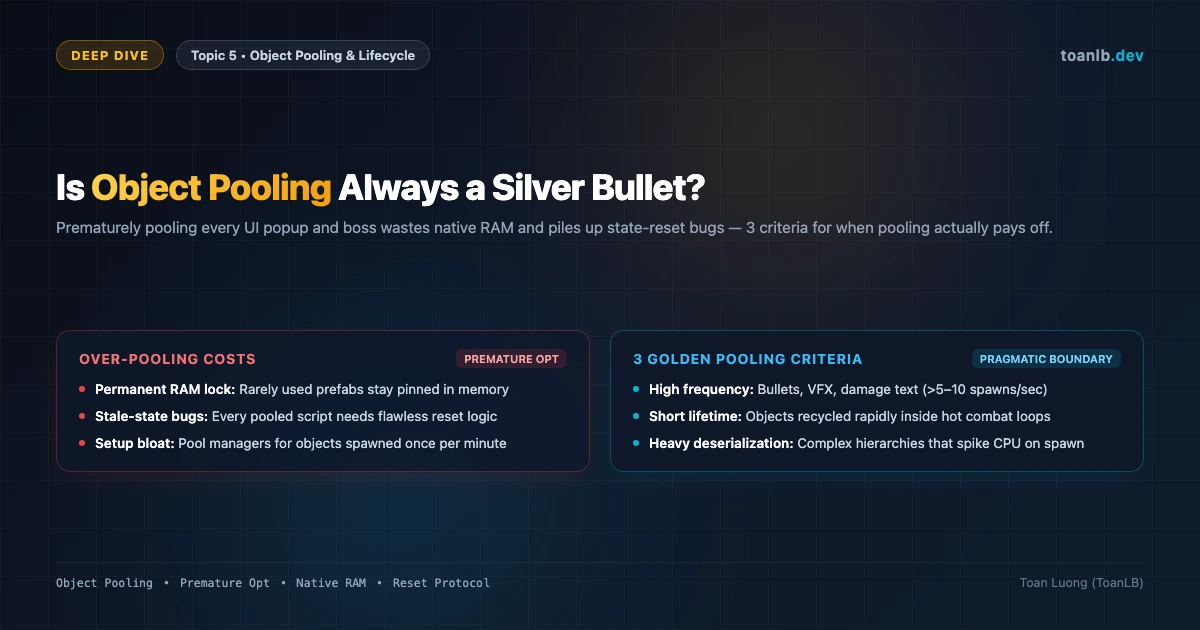
Before long, a wave of over-pooling engulfs the codebase: projectiles are pooled, enemies are pooled, impact sparks are pooled, and then Settings menus, Shop modals, Leaderboards, cutscene rigs, and even the unique boss appearing once at the end of stage 5 get their own custom pools.
Yet months into production, puzzling symptoms surface: the game’s RAM footprint on mobile swells uncontrollably, memory never drops even while idling in the main menu, and erratic stale state bugs multiply because old instances retain dirty residual state.
Is Object Pooling truly a universal silver bullet for every performance bottleneck? Where is the technical boundary between pragmatic optimization and premature over-engineering?
1. The Two Hidden Costs of Over-Pooling
In software engineering, every architectural solution is a trade-off. When we substitute Instantiate and Destroy with an Object Pool, we purchase CPU frame-time consistency at the expense of two steep penalties:
flowchart LR
    subgraph OVERPOOL["1. Over-Pooling Trap (Blind Dogma)"]
        direction TB
        O1["Pool Everything (Bosses & UI)"]
        O2["Permanent Asset Memory Locking"]
        O3["Stale State Maintenance Debt"]
        O1 --> O2 --> O3
    end

    subgraph PRAGMATIC["2. Pragmatic Architecture (Categorized)"]
        direction TB
        P1["Pool: High frequency & short life"]
        P2["Cache: Single instance for heavy UI"]
        P3["Addressables: Load & Release Bosses"]
        P1 --> P2 --> P3
    end

    OVERPOOL -->|"Architectural Shift"| PRAGMATIC
Penalty 1: Permanent Asset Locking in Memory
When an entity resides inside an Object Pool, it is an immortal instance. Even when deactivated via gameObject.SetActive(false), its Native C++ components and C# managed shell remain resident in memory.
The far greater danger lies within the asset dependency graph:
- A Boss prefab typically bundles heavy dependencies: high-resolution meshes, 4K/2K textures, dozens of complex animation clips, and high-fidelity audio clips.
- When that Boss is pooled inside a persistent scene manager, the prefab remains held by a permanent strong reference.
- The consequence: Even while the player is on stage 1 with hours to go before meeting the Boss, 30MB to 50MB of heavy graphic assets remain permanently loaded and locked in physical RAM. Cleanup calls like
Resources.UnloadUnusedAssets()are completely impotent because the pool instance maintains active references to the underlying assets.
On mid-range mobile devices with constrained memory budgets, permanently locking tens of megabytes of dormant assets simply to avoid a 15ms spawn hitch during a level transition is the fastest shortcut to out-of-memory crashes.
Penalty 2: Stale State Maintenance Debt
With standard Instantiate and Destroy, state lifecycle cleanup is handled automatically by the runtime: when an instance is destroyed, all fields, timers, and coroutines perish with it. Every instantiation provides a pristine, clean slate.
When pooling an object, the entire burden of state cleanliness falls squarely on the developer:
- A projectile has minimal state: position, velocity, and damage. Writing a reset routine takes 3 lines of code.
- Conversely, a full-featured Shop modal or Settings dialog contains: 15 buttons, 4 category tabs, 2 virtualized ScrollViews, UI tween sequences, countdown discount timers, and multiple event subscriptions listening for currency updates.
If a developer on the team forgets to reset a single boolean flag, or fails to kill an orphaned Coroutine, the reused modal will display corrupted values, register double-purchase callbacks, or soft-lock user input. The engineering hours spent tracing intermittent stale state bugs inevitably dwarf the time required to build the feature in the first place.
2. Three Golden Criteria for Object Pooling
To avoid the over-pooling trap, an entity must satisfy all three conditions simultaneously to qualify for an Object Pool:
flowchart LR
    A["Evaluate Entity"] --> B{"Spawn Frequency?"}
    B -->|"Low (< 5 times/min)"| C["Reject Pool"]
    B -->|"Very High (multiple/sec)"| D{"Instance Lifespan?"}
    D -->|"Long (minutes to entire stage)"| E["Reject Pool"]
    D -->|"Short (frames to seconds)"| F{"Reset Complexity?"}
    F -->|"Complex & Deep Dependencies"| G["Reject Pool"]
F -->|"Cheap & Clean"| H["QUALIFIED FOR OBJECT POOL"]- Very High Spawn Frequency: The entity spawns continuously every frame or second within the core game loop (machine gun bullets, spark particles, shell casings, floating damage numbers, horde mobs). At this cadence, the C++ allocation and GC Alloc overhead of
Instantiate/Destroytriggers immediate frame drops without a pool. - Short Lifespan: The entity exists for only a few frames to a few seconds before expiring (a projectile travels for 1.5 seconds, an impact spark flashes for 0.2 seconds). Rapid turnover ensures the allocated pool capacity is actively recycled.
- Cheap and Clean State Reset: The internal state is trivial, easily reset to default inside
OnEnableor a dedicatedResetStatemethod without risk of dangling event delegates or corrupted logic.
3. Three Categories Never (or Rarely) to Pool
Knowing what NOT to pool is just as critical as knowing how to implement one properly. The following three categories should rarely be placed in a standard multi-instance pool:
Category 1: Infrequent UI Popups and Static Modals
Windows such as: Settings, Leaderboards, Achievement dialogs, or the in-game Shop.
These dialogs open only when the user explicitly clicks a menu button. At that moment, gameplay pacing has already paused or slowed down. A minor 10ms instantiation hitch during menu transition has zero negative impact on combat gameplay. Upon closing, calling Destroy reclaims the texture memory immediately, avoiding hundreds of lines of error-prone reset code.
The Proper Solution for Heavy UI: If a popup is exceptionally heavy (such as a shop with hundreds of items) and opening it causes a perceptible stutter, the answer is not a multi-instance Object Pool, but a Single-Instance Lazy Cache (instantiate exactly 1 instance on first open, then toggle visibility via
CanvasGrouporSetActive).
Category 2: Unique and Heavy Game Entities
Including: Stage Bosses, cinematic cutscene rigs, or large level geometry chunks.
These entities appear only once during a specific gameplay section. Pooling them is an unjustifiable waste of RAM. The industry standard approach is Addressables: asynchronously load assets when entering the section, and invoke Addressables.Release to completely purge both instances and bundled assets from RAM once the encounter concludes.
Category 3: Entities with Deep Nested State Graphs
Entities coupled with multi-branch dialogue systems, complex multi-tier AI state machines, or components subscribed to dozens of global event buses.
The maintenance and testing cost of writing bulletproof ResetState routines for these entities is prohibitively high. Explicitly destroying and recreating them guarantees state isolation and eliminates latent regression bugs.
4. Production C# Implementation and Unit Testing
To translate this layered philosophy into production architecture, we construct a LifecycleStrategySelector paired with a clean SingleInstanceUiCache<T> coordinator.
By evaluating runtime metrics (spawn frequency, lifespan, memory footprint, and state complexity), the system routes entities to their optimal lifecycle mechanism:
using System;
using System.Collections.Generic;
using NUnit.Framework;

public enum SpawnLifecycleCategory
{
    MultiInstancePool,
    SingleInstanceCache,
    DirectTransient,
    AddressableAsync
}

public record EntityLifecycleProfile(
    string EntityType,
    float SpawnsPerMinute,
    float AverageLifespanSeconds,
    int MemoryFootprintKb,
    bool HasComplexNestedState
);

public class LifecycleStrategySelector
{
    public static SpawnLifecycleCategory DetermineCategory(EntityLifecycleProfile profile)
    {
        if (profile == null) throw new ArgumentNullException(nameof(profile));

        // Category 1: Unique entities with large assets (> 10MB) -> Addressables async
        if (profile.MemoryFootprintKb >= 10240)
        {
            return SpawnLifecycleCategory.AddressableAsync;
        }

        // Category 2: High frequency (> 30/min), short lifespan (< 10s), simple state -> Object Pool
        if (profile.SpawnsPerMinute >= 30f && profile.AverageLifespanSeconds <= 10f && !profile.HasComplexNestedState)
        {
            return SpawnLifecycleCategory.MultiInstancePool;
        }

        // Category 3: Low frequency, heavy footprint (> 1MB) or complex state -> Single-Instance Cache
        if (profile.MemoryFootprintKb > 1024)
        {
            return SpawnLifecycleCategory.SingleInstanceCache;
        }

        // Category 4: Lightweight, infrequent entities -> Direct Instantiate & Destroy
        return SpawnLifecycleCategory.DirectTransient;
    }
}

public class SingleInstanceUiCache<T> where T : class
{
    private readonly Func<T> _factory;
    private readonly Action<T> _onShow;
    private readonly Action<T> _onHide;
    private T _cachedInstance;

    public bool IsInstantiated => _cachedInstance != null;
    public bool IsVisible { get; private set; }

    public SingleInstanceUiCache(Func<T> factory, Action<T> onShow, Action<T> onHide)
    {
        _factory = factory ?? throw new ArgumentNullException(nameof(factory));
        _onShow = onShow ?? throw new ArgumentNullException(nameof(onShow));
        _onHide = onHide ?? throw new ArgumentNullException(nameof(onHide));
    }

    public T Show()
    {
        if (_cachedInstance == null)
        {
            _cachedInstance = _factory();
        }

        IsVisible = true;
        _onShow(_cachedInstance);
        return _cachedInstance;
    }

    public void Hide()
    {
        if (_cachedInstance == null || !IsVisible) return;

        IsVisible = false;
        _onHide(_cachedInstance);
    }

    public void DestroyInstance(Action<T> destroyAction)
    {
        if (_cachedInstance == null) return;

        if (IsVisible)
        {
            Hide();
        }

        destroyAction?.Invoke(_cachedInstance);
        _cachedInstance = null;
    }
}

[TestFixture]
public class LifecycleStrategyTests
{
    [Test]
    public void ProjectileAndSpark_SelectsMultiInstancePool()
    {
        var bullet = new EntityLifecycleProfile(
            EntityType: "PlasmaBullet",
            SpawnsPerMinute: 300f,
            AverageLifespanSeconds: 1.5f,
            MemoryFootprintKb: 32,
            HasComplexNestedState: false
        );

        var category = LifecycleStrategySelector.DetermineCategory(bullet);
        Assert.AreEqual(SpawnLifecycleCategory.MultiInstancePool, category);
    }

    [Test]
    public void HeavyShopPopup_SelectsSingleInstanceCache()
    {
        var shopModal = new EntityLifecycleProfile(
            EntityType: "InGameShopUI",
            SpawnsPerMinute: 0.5f,
            AverageLifespanSeconds: 45f,
            MemoryFootprintKb: 4096, // 4MB textures and scrollviews
            HasComplexNestedState: true
        );

        var category = LifecycleStrategySelector.DetermineCategory(shopModal);
        Assert.AreEqual(SpawnLifecycleCategory.SingleInstanceCache, category);
    }

    [Test]
    public void EndStageBoss_SelectsAddressableAsync()
    {
        var dragonBoss = new EntityLifecycleProfile(
            EntityType: "DragonBossStageFinal",
            SpawnsPerMinute: 0.05f,
            AverageLifespanSeconds: 120f,
            MemoryFootprintKb: 25600, // 25MB meshes, textures, animations
            HasComplexNestedState: true
        );

        var category = LifecycleStrategySelector.DetermineCategory(dragonBoss);
        Assert.AreEqual(SpawnLifecycleCategory.AddressableAsync, category);
    }

    [Test]
    public void RareDropChest_SelectsDirectTransient()
    {
        var chest = new EntityLifecycleProfile(
            EntityType: "TreasureChestPickup",
            SpawnsPerMinute: 1f,
            AverageLifespanSeconds: 20f,
            MemoryFootprintKb: 128,
            HasComplexNestedState: false
        );

        var category = LifecycleStrategySelector.DetermineCategory(chest);
        Assert.AreEqual(SpawnLifecycleCategory.DirectTransient, category);
    }

    [Test]
    public void SingleInstanceCache_ReusesExactSameInstance_WithoutDuplicates()
    {
        int factoryCallCount = 0;
        string testModal = "ShopModalInstance";

        var cache = new SingleInstanceUiCache<string>(
            factory: () =>
            {
                factoryCallCount++;
                return testModal;
            },
            onShow: _ => { },
            onHide: _ => { }
        );

        Assert.IsFalse(cache.IsInstantiated);

        // Open modal first time: factory invoked
        var inst1 = cache.Show();
        Assert.AreEqual(1, factoryCallCount);
        Assert.IsTrue(cache.IsVisible);

        // Hide modal
        cache.Hide();
        Assert.IsFalse(cache.IsVisible);
        Assert.IsTrue(cache.IsInstantiated);

        // Open modal second time: reuses existing instance without calling factory
        var inst2 = cache.Show();
        Assert.AreEqual(1, factoryCallCount);
        Assert.AreSame(inst1, inst2);
    }
}
Architectural Trade-off Matrix: Four Lifecycle Mechanisms in Unity
The following matrix compares the engineering trade-offs across the 4 primary lifecycle strategies:
| Mechanism | CPU Impact | RAM Impact | Code Maintenance Cost | Recommended Context |
|---|---|---|---|---|
| Direct Instantiate & Destroy | High during gameplay loop due to C++ alloc & GC Alloc | Lowest, memory reclaimed immediately when disposed | Lowest, no reset state logic to maintain | Lightweight entities, rare spawns, simple menu transitions |
| Single-Instance Lazy Cache | Near zero after first load (visibility toggling only) | Retains memory of exactly 1 instance | Moderate, simple show/hide lifecycle management | Heavy UI modals opened repeatedly within the same scene |
| Multi-Instance Object Pool | Near zero during combat, eliminates runtime allocations | High, retains resident RAM for dozens or hundreds of instances | High, requires exhaustive reset state methods | Bullets, mob minions, explosion sparks, damage text |
| Addressables Async Lifecycle | Negligible in combat, incurs upfront asynchronous I/O | Optimal, unloads both Native instances and AssetBundles | High, requires asynchronous handle and RefCount management | End-of-stage Bosses, cinematic cutscene characters, large chunks |
Key Takeaways
Performance optimization in game development is an exercise in context and balance, not a contest of dogmatic pattern compliance.
- No Pattern is Universally Applicable: Object Pooling solves high-frequency runtime allocations; it was never intended as a blanket storage bin for every entity in the game.
- Distinguish Pool from Cache: When you need many rapid duplicates, use an Object Pool. When you need a single heavy dialog opened repeatedly, use a Single-Instance Cache.
- Embrace Instantiate at Natural Rest Points: For actions occurring outside the combat loop (opening settings, buying items, changing levels), the simplicity of
InstantiateandDestroydelivers the highest reliability and lowest maintenance burden. - Let the Profiler Guide Architecture: Always profile on target mobile hardware to verify whether an allocation is an actual bottleneck before introducing another pooling system.

