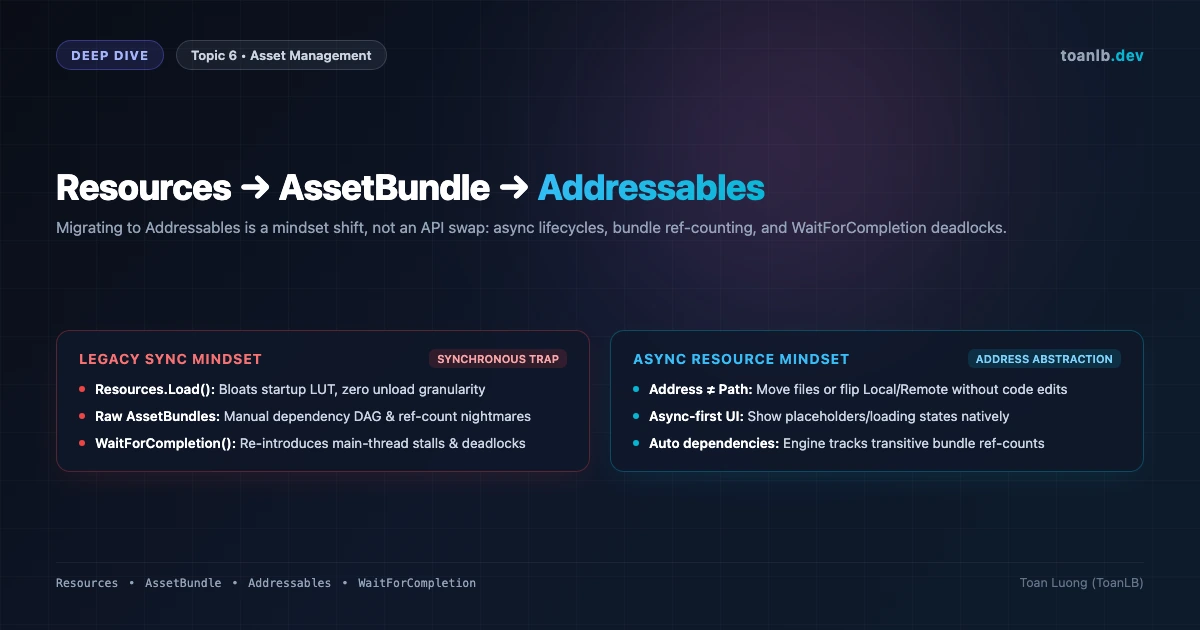
When spinning up a new Unity project, almost every developer has relished the frictionless simplicity of Resources.Load.
You create a folder named Resources, drop your character prefabs, weapon sprites, or audio clips inside, and from any arbitrary script in your codebase, you write a single synchronous line:
var prefab = Resources.Load<GameObject>("Characters/Hero");
Instantly, the entity materializes on screen within the same frame. No loading delays, no bundle partitioning, no CDN infrastructure. In game jams or rapid prototypes operating under strict day-long deadlines, this pattern feels completely effortless.
Yet as projects expand into full-scale commercial productions featuring thousands of assets, dozens of intricate levels, and live-ops content updates, the black box of Resources transforms into an architectural anchor weighing down the entire engine: game launches stall for seconds just constructing lookup tables, application binary sizes breach app store limits, and tweaking a single numeric value on a prefab demands a complete client rebuild and re-submission to Google Play or Apple App Store.
To solve this, Unity introduced AssetBundles, later refined into the modern Addressables framework. Many engineers approaching Addressables treat it merely as an API swap: replacing Resources.Load with Addressables.LoadAssetAsync. However, once deployed into production, baffling symptoms appear: calling release functions fails to reduce RAM usage, invoking Destroy destroys GameObjects while the underlying asset bundle stays permanently locked in memory, and the game experiences violent hitching from misused WaitForCompletion calls.
Addressables is not merely a modern API wrapper. It demands a fundamental mindset shift: transitioning from synchronous loading with implicit lifecycles to asynchronous streaming with explicit reference-counted memory governance.
1. Three Generations of Asset Management in Unity
To understand why modern game architecture converges toward Addressables, we must inspect the underlying mechanics across each generation:
flowchart LR
    subgraph S1["1. Resources Era"]
        direction TB
        R1["Hard-packed into Binary"]
        R2["Blocking Synchronous I/O"]
        R3["Startup Index Construction"]
        R1 --> R2 --> R3
    end

    subgraph S2["2. Raw AssetBundle Era"]
        direction TB
        A1["Decoupled Data from Code"]
        A2["Streamed from Remote CDN"]
        A3["Manual Dependency Hell"]
        A1 --> A2 --> A3
    end

    subgraph S3["3. Addressables Era"]
        direction TB
        D1["Abstracted by Address"]
        D2["Automated Dependencies"]
        D3["Bundle-Level Ref Counting"]
        D1 --> D2 --> D3
    end

    S1 -->|"Decouple Data"| S2
    S2 -->|"Abstract & Automate"| S3
Generation 1: Resources and the Closed Black Box
Under the hood of the Unity Engine, every asset placed inside any folder named Resources is aggregated and serialized into monolithic binary archives named resources.assets inside the application build.
This architecture introduces three critical bottlenecks as the project scales:
- Startup Hitching: Upon initial game launch, before the first Scene or splash screen displays, the engine must parse and construct the entire lookup index tree of every asset inside
Resourcesinto memory. The more files placed in Resources, the longer players stare at black loading screens. - Build Bloating: Every asset residing in a
Resourcesdirectory, even if no longer referenced anywhere in your scenes or code, is unconditionally packaged into the game binary. This eliminates any opportunity to trim initial download sizes for mobile app stores. - Rigid Against Live-ops: All resources are immutably baked into the local executable package. Fixing a corrupted texture or balancing weapon stats requires recompiling and re-submitting the entire binary through platform certification.
Generation 2: AssetBundles - Decoupled Data with High Cognitive Burden
Unity introduced AssetBundles to decouple game data from executable binaries. Assets are archived into standalone compressed files (LZ4 or LZMA format), hosted on cloud CDN buckets, and downloaded on demand.
However, raw AssetBundles impose severe architectural burdens on the development team:
- Dependency Hell: If a character prefab in
Bundle Ashares a material located inBundle B, your code must manually loadBundle Binto memory prior to loading the prefab fromBundle A. Loading out of order or forgetting a dependency produces broken references or magenta unlit shaders. - Silent Asset Duplication: If two separate bundles reference an asset (such as a shared texture) without explicitly assigning that texture to its own dedicated bundle, Unity’s build pipeline clones the texture into both bundles. When the client loads both bundles simultaneously, that texture is downloaded twice and consumes duplicate native RAM.
- The Unload Dilemma: Developers face a treacherous choice between two APIs:
bundle.Unload(false): Discards the bundle header while leaving loaded assets alive in RAM. These assets become orphaned: if the bundle is loaded again later, Unity creates duplicate asset copies in memory, leaking RAM.bundle.Unload(true): Destroys the bundle and forcibly purges all loaded assets. If an active Scene or UI hierarchy still displays a sprite or material from that bundle, it immediately turns into a Missing Reference or triggers a render crash.
Generation 3: Addressables - Address Abstraction and Lifecycle Automation
Addressables does not replace AssetBundles; rather, it is a high-level orchestration framework built on top of the AssetBundle pipeline, resolving the fundamental flaws of prior generations:
- Decoupling Addresses from Physical Locations: Gameplay code no longer cares whether an asset lives inside
StreamingAssets, local device cache, or a cloud CDN. All queries resolve through a unified string Address or type-safeAssetReference. - Automated Dependency Resolution: The framework consults catalog manifests (
catalog.json) to determine bundle dependencies, streaming and mounting required bundles in correct sequence without manual intervention. - Reference-Counted Lifecycles: Addressables automatically tracks how many systems reference an asset to determine precisely when bundles can be safely unloaded.
2. The Nature of Reference Counting: Two Memory Retention Traps
A frequent misconception when engineers transition to Addressables is assuming: “When I call Addressables.Release(handle) on an asset, that asset’s memory footprint is immediately reclaimed by the OS”.
Under the hood of the Unity Engine, that is not how provider memory governance works.
Trap 1: Asset RefCount Reaches 0, yet Bundle RAM Remains Allocated
At the native C++ level, Unity’s low-level engine API Resources.UnloadAsset(Object assetToUnload) can theoretically unload single individual assets (such as a Texture2D, Mesh, or AudioClip). However, within the Addressables Provider architecture, the engine deliberately manages lifecycles at the granularity of entire AssetBundles rather than individual assets to guarantee dependency graph integrity.
Consequently, Addressables only purges an AssetBundle from native RAM (via AssetBundle.Unload(true)) when the aggregated ReferenceCount across all assets residing within that bundle simultaneously drops to 0.
flowchart LR
    subgraph BUNDLE["AssetBundle: dungeon_pack.bundle"]
        direction TB
        A1["Asset 1: BossMesh (45MB)\nHandle: Released (RefCount = 0)"]
        A2["Asset 2: FootstepSfx (120KB)\nHandle: In Use (RefCount = 1)"]
        SUM["Bundle Total RefCount = 1\n(Bundle Remains Active in RAM)"]
        A1 --> SUM
        A2 --> SUM
    end

    RAM["Native RAM\nRetains Full ~45.1MB\nPartial Unload Impossible!"]

    SUM -->|"Locked in"| RAM
Consider this practical RPG production scenario:
- You configure an Addressable Group with default settings (
Bundle Mode: Pack Together). - Inside this group reside two assets: a high-fidelity 45MB Boss mesh and a lightweight 120KB footstep audio clip.
- When the boss encounter concludes and the level changes, gameplay code calls
Addressables.Releaseon the Boss mesh. The mesh’s individual RefCount reaches 0. - However, your background AudioManager still holds an active handle to the footstep audio clip to play during level transitions.
- The outcome: Because the bundle’s aggregated RefCount remains at 1, the entire 45MB Boss mesh stays permanently resident in native RAM!
In Addressables, your Group partitioning strategy and Bundle Mode settings (Pack Together, Pack Separately, Pack Together By Label) dictate memory boundaries, not merely calling Release. Golden rule: Only bundle assets that share identical lifecycles (loaded together, unloaded together) into the same AssetBundle.
Trap 2: Invoking Object.Destroy instead of Addressables.ReleaseInstance
This is the most common habit-driven pitfall when transitioning from Resources.Load:
- When you spawn a GameObject via
Addressables.InstantiateAsync, Addressables creates an internal tracking handle and increments the RefCount on both the source prefab and its containing bundle by 1. - When despawning, developers instinctively invoke:
Destroy(weaponInstance); - Technical Consequence: The GameObject is removed from the Scene hierarchy, but the Addressables reference-counting manager receives zero notification. The internal RefCount remains locked at 1. Consequently, the AssetBundle hosting that weapon prefab remains immortal in native memory, creating an invisible, permanent memory leak.
- The Correct Approach: Always despawn Addressable instances through the dedicated API:
Addressables.ReleaseInstance(weaponInstance);This executesObject.Destroyon the Scene GameObject while accurately decrementing the internal bundle reference counter.
3. The WaitForCompletion Trap and Asynchronous Migration
When transitioning an existing codebase from Resources to Addressables, the greatest psychological friction is handling asynchronous flows. Legacy code is accustomed to synchronous execution:
var sword = Resources.Load<GameObject>("Weapons/FireSword");
Equip(sword);
To avoid refactoring architectural flows toward async/await or callbacks, developers often rely on an escape hatch provided by Addressables:
var handle = Addressables.LoadAssetAsync<GameObject>("Weapons/FireSword");
var sword = handle.WaitForCompletion();
Equip(sword);
While WaitForCompletion() offers a seemingly convenient bridge back to synchronous habits, the technical penalties in production are severe:
1. Main Thread Stuttering
WaitForCompletion() forces the Unity Main Thread to stall, waiting for disk I/O reads, decompression, and native object deserialization. On mid-range mobile devices, this drops frame rates from 60 down to 0 for several frames, producing jarring hitches.
2. Queue Flushing Hazard
Under the C++ engine hood, Unity’s asynchronous loading operates via a sequential priority queue. When you invoke WaitForCompletion() on an individual handle, the engine does not merely complete that single request; it forces all pending asynchronous operations currently scheduled in the queue to flush synchronously on the Main Thread immediately.
You might believe you are merely forcing a 20KB weapon icon to load, but if the engine was concurrently streaming a 50MB background level texture in the background, that entire 50MB payload is yanked into the Main Thread to deserialize synchronously, causing a multi-second freeze.
3. WebGL Platform Incompatibility
WebGL executes within a single-threaded JavaScript browser environment where thread-blocking APIs are fundamentally prohibited. Calling WaitForCompletion() in a WebGL build throws an immediate runtime exception, breaking gameplay.
4. Lifecycle Safety: Async Continuations and CancellationTokens
When transitioning to pure asynchronous flows, a new hazard emerges: Zombie Continuations. If a player navigates away or an entity is destroyed while Addressables.InstantiateAsync is still in flight, the continuation resumes seconds later and attempts to access destroyed MonoBehaviour instances (MissingReferenceException), spawning orphaned GameObjects into the wrong scene.
Always bind asynchronous routines to destroyCancellationToken (supported natively on MonoBehaviour in Unity 2022.2+ and Unity 6) to cancel pending operations before completion.
4. Production Code: Equipment Loader and Pure C# Simulator
To master Addressables, we must observe both sides of the architecture: standard production implementation inside a MonoBehaviour component, and how reference-counting mechanics operate under the hood via a pure C# simulator verifiable through unit tests.
Production Example: Safe Equipment Loader with Addressables
In an Action RPG running at 60 FPS, here is how to structure an equipment loader utilizing Addressables.InstantiateAsync, managing safe release via ReleaseInstance, and protecting against zombie tasks using destroyCancellationToken:
using System.Threading;
using System.Threading.Tasks;
using UnityEngine;
using UnityEngine.AddressableAssets;
using UnityEngine.ResourceManagement.AsyncOperations;

public class AddressableEquipmentLoader : MonoBehaviour
{
    [SerializeField] private AssetReferenceGameObject _weaponReference;
    private GameObject _currentWeaponInstance;
    private AsyncOperationHandle<GameObject> _inFlightLoadHandle;

    public async Task<bool> EquipWeaponAsync(AssetReferenceGameObject newWeaponRef, CancellationToken cancellationToken)
    {
        if (newWeaponRef == null || !newWeaponRef.RuntimeKeyIsValid())
        {
            Debug.LogWarning("Invalid weapon AssetReference.");
            return false;
        }

        // 1. Clean up existing weapon instance before loading the replacement
        ReleaseCurrentWeapon();

        // 2. Initiate non-blocking asynchronous instantiation
        _weaponReference = newWeaponRef;
        _inFlightLoadHandle = Addressables.InstantiateAsync(newWeaponRef, transform);

        try
        {
            var instance = await _inFlightLoadHandle.Task;

            if (cancellationToken.IsCancellationRequested)
            {
                // If entity was destroyed during stream, release instance immediately
                Addressables.ReleaseInstance(instance);
                return false;
            }

            _currentWeaponInstance = instance;
            return true;
        }
        catch (System.Exception ex)
        {
            Debug.LogError($"Addressables weapon load failed: {ex.Message}");
            return false;
        }
    }

    public void ReleaseCurrentWeapon()
    {
        if (_currentWeaponInstance != null)
        {
            // MANDATORY: Call ReleaseInstance to decrement internal bundle refcount
            Addressables.ReleaseInstance(_currentWeaponInstance);
            _currentWeaponInstance = null;
        }
    }

    private void OnDestroy()
    {
        ReleaseCurrentWeapon();
    }
}
Pure C# Architecture Simulator: Deconstructing Bundle Reference Counting
The following pure C# implementation models reference counting and bundle retention without engine dependencies. This serves as an architectural mental model to prove bundle retention mechanics through unit testing.
The simulation comprises:
AssetBundleContainer: Models an archive tracking contained asset addresses and managingReferenceCount.AssetHandle<T>: Represents a lease granted to callers, providing safe disposal while preventing double release.AssetLifecycleManager: Orchestrates catalog lookups, mounts bundles, and evicts cached entries when bundle refcounts reach zero.
using System;
using System.Collections.Generic;
using System.Threading.Tasks;
using NUnit.Framework;

public record AssetCatalogItem(string Address, string BundleName, int SizeBytes);

public class NativeAssetWrapper
{
    public string AssetName { get; }
    public int SizeBytes { get; }

    public NativeAssetWrapper(string assetName, int sizeBytes)
    {
        AssetName = assetName;
        SizeBytes = sizeBytes;
    }
}

public class AssetBundleContainer
{
    public string BundleName { get; }
    public int ReferenceCount { get; private set; }
    public bool IsLoadedInMemory { get; private set; }
    private readonly HashSet<string> _containedAddresses;

    public AssetBundleContainer(string bundleName, IEnumerable<string> addresses)
    {
        BundleName = bundleName;
        _containedAddresses = new HashSet<string>(addresses);
        ReferenceCount = 0;
        IsLoadedInMemory = false;
    }

    public void AddAddress(string address) => _containedAddresses.Add(address);
    public bool ContainsAddress(string address) => _containedAddresses.Contains(address);

    public void Retain()
    {
        ReferenceCount++;
        IsLoadedInMemory = true;
    }

    public void Release()
    {
        if (ReferenceCount <= 0)
        {
            throw new InvalidOperationException($"Bundle '{BundleName}' already has ReferenceCount of 0.");
        }

        ReferenceCount--;
        if (ReferenceCount == 0)
        {
            // Bundle only unloads from RAM when all contained asset handles are released
            IsLoadedInMemory = false;
        }
    }
}

public class AssetHandle<T> : IDisposable where T : class
{
    private readonly Action _onRelease;
    public T Result { get; }
    public string Address { get; }
    public bool IsValid { get; private set; }

    public AssetHandle(T result, string address, Action onRelease)
    {
        Result = result;
        Address = address;
        _onRelease = onRelease;
        IsValid = true;
    }

    public void Release()
    {
        if (!IsValid)
        {
            throw new InvalidOperationException($"Handle for asset '{Address}' was already released.");
        }

        IsValid = false;
        _onRelease?.Invoke();
    }

    public void Dispose()
    {
        if (IsValid)
        {
            Release();
        }
    }
}

public class AssetLifecycleManager
{
    private readonly Dictionary<string, AssetCatalogItem> _catalog = new();
    private readonly Dictionary<string, AssetBundleContainer> _bundles = new();
    private readonly Dictionary<string, NativeAssetWrapper> _assetInstances = new();

    public int TotalLoadedBundlesCount
    {
        get
        {
            int count = 0;
            foreach (var b in _bundles.Values)
            {
                if (b.IsLoadedInMemory) count++;
            }
            return count;
        }
    }

    public void RegisterAsset(string address, string bundleName, int sizeBytes)
    {
        _catalog[address] = new AssetCatalogItem(address, bundleName, sizeBytes);

        if (!_bundles.TryGetValue(bundleName, out var container))
        {
            container = new AssetBundleContainer(bundleName, new[] { address });
            _bundles[bundleName] = container;
        }
        else
        {
            container.AddAddress(address);
        }
    }

    public Task<AssetHandle<NativeAssetWrapper>> LoadAssetAsync(string address)
    {
        if (!_catalog.TryGetValue(address, out var metadata))
        {
            return Task.FromException<AssetHandle<NativeAssetWrapper>>(
                new KeyNotFoundException($"Asset address not found in catalog: {address}")
            );
        }

        var bundle = _bundles[metadata.BundleName];
        bundle.Retain();

        if (!_assetInstances.TryGetValue(address, out var asset))
        {
            asset = new NativeAssetWrapper(address, metadata.SizeBytes);
            _assetInstances[address] = asset;
        }

        var handle = new AssetHandle<NativeAssetWrapper>(
            asset,
            address,
            onRelease: () =>
            {
                bundle.Release();
                if (!bundle.IsLoadedInMemory)
                {
                    _assetInstances.Remove(address);
                }
            }
        );

        return Task.FromResult(handle);
    }

    public AssetBundleContainer GetBundleStatus(string bundleName)
    {
        return _bundles[bundleName];
    }
}

[TestFixture]
public class AssetLifecycleManagerTests
{
    private AssetLifecycleManager _manager;

    [SetUp]
    public void SetUp()
    {
        _manager = new AssetLifecycleManager();
        _manager.RegisterAsset("Characters/HeroMesh", "hero_pack", 20 * 1024 * 1024);
        _manager.RegisterAsset("Weapons/HeroSword", "hero_pack", 5 * 1024 * 1024);
        _manager.RegisterAsset("Audio/SlashSfx", "audio_pack", 100 * 1024);
    }

    [Test]
    public async Task LoadAssetAsync_ValidAddress_IncrementsBundleRefCountAndLoadsAsset()
    {
        var handle = await _manager.LoadAssetAsync("Characters/HeroMesh");

        Assert.IsNotNull(handle.Result);
        Assert.AreEqual("Characters/HeroMesh", handle.Result.AssetName);
        Assert.IsTrue(handle.IsValid);

        var bundle = _manager.GetBundleStatus("hero_pack");
        Assert.AreEqual(1, bundle.ReferenceCount);
        Assert.IsTrue(bundle.IsLoadedInMemory);
        Assert.AreEqual(1, _manager.TotalLoadedBundlesCount);

        handle.Release();
        Assert.IsFalse(handle.IsValid);
        Assert.AreEqual(0, bundle.ReferenceCount);
        Assert.IsFalse(bundle.IsLoadedInMemory);
        Assert.AreEqual(0, _manager.TotalLoadedBundlesCount);
    }

    [Test]
    public async Task Release_WhenOtherAssetInSameBundleStillActive_BundleRemainsInMemory()
    {
        var heroHandle = await _manager.LoadAssetAsync("Characters/HeroMesh");
        var swordHandle = await _manager.LoadAssetAsync("Weapons/HeroSword");

        var bundle = _manager.GetBundleStatus("hero_pack");
        Assert.AreEqual(2, bundle.ReferenceCount);
        Assert.IsTrue(bundle.IsLoadedInMemory);

        // Demonstrating memory retention: releasing HeroMesh leaves hero_pack loaded
        heroHandle.Release();
        Assert.AreEqual(1, bundle.ReferenceCount);
        Assert.IsTrue(bundle.IsLoadedInMemory, "Bundle must stay in RAM while sibling asset is active.");
        Assert.AreEqual(1, _manager.TotalLoadedBundlesCount);

        // Releasing HeroSword finally drops bundle refcount to 0
        swordHandle.Release();
        Assert.AreEqual(0, bundle.ReferenceCount);
        Assert.IsFalse(bundle.IsLoadedInMemory, "Bundle must unload from RAM once all active handles release.");
        Assert.AreEqual(0, _manager.TotalLoadedBundlesCount);
    }

    [Test]
    public async Task Release_AlreadyReleasedHandle_ThrowsInvalidOperationException()
    {
        var handle = await _manager.LoadAssetAsync("Characters/HeroMesh");
        handle.Release();

        Assert.Throws<InvalidOperationException>(() =>
        {
            handle.Release();
        });
    }

    [Test]
    public void LoadAssetAsync_InvalidAddress_ThrowsKeyNotFoundException()
    {
        Assert.ThrowsAsync<KeyNotFoundException>(async () =>
        {
            await _manager.LoadAssetAsync("Invalid/NonExistentAsset");
        });
    }
}
5. Architectural Trade-off Matrix
In game engineering, no technology is a universal silver bullet across all production scales. Here is an evaluation across all three generations:
| Technical Criteria | Resources | Raw AssetBundles | Addressables |
|---|---|---|---|
| Startup Time | Degrades linearly with asset count due to index tree generation. | Fast; manifests are loaded on demand. | Fast; queries resolve via lightweight JSON catalogs. |
| Initial Build Size | Highest; 100% of assets are baked into client executable. | Optimized; offloads bulk data to CDN servers. | Highly flexible; configurable local vs remote groups. |
| Live-ops & Remote Patching | Unsupported; requires full client binary rebuilds. | Supported; requires custom hash and manifest managers. | Excellent; native Content Update workflow support. |
| Dependency & Duplication | Implicit; zero developer insight into shared duplication. | Fully manual; highly prone to silent multi-bundle duplication. | Automated via catalog dependencies and analyze tools. |
| RAM Eviction Granularity | Poor; relies on periodic UnloadUnusedAssets hitches. | Flexible via Unload(true/false) but error-prone. | Managed via reference counting; locked at bundle level. |
| Instance Despawn Pattern | Object.Destroy | Object.Destroy combined with bundle tracking. | Mandatory ReleaseInstance; raw Destroy causes leaks. |
| Engineering Complexity | Minimal; single synchronous API call. | High; requires proprietary AssetBundle managers. | Moderate; requires async architecture and group discipline. |
| WebGL Compatibility | High for small footprints. | High using UnityWebRequestAssetBundle. | High for pure async; WaitForCompletion is banned. |
6. Production Takeaways
From shipping games and resolving memory issues in production environments, keep these core principles in mind:
- Do Not Discard Resources Dogmatically: For 48-hour game jams, prototypes, or immutable configuration files, using
Resourcesor direct Inspector references remains the most practical and efficient solution. - Adopt an Async-First Architectural Stance: Once you commit to Addressables, design systems to accommodate latency. UI should present loading placeholders, audio clips should preload ahead of gameplay events, and never treat
WaitForCompletionas a lazy shortcut. - Group Partitioning Supersedes API Calls: Always ask: “How long will this asset live, and with whom does it share a lifecycle?”. Persistent assets (shared UI, common fonts, base SFX) belong in separate groups. Ephemeral assets (a specific dungeon map or boss) must be isolated into discrete bundles so unloading actually reclaims RAM.
- Leverage Addressables Analyze Rules: Before packaging release candidates, run
Addressables Analyzein the Editor to inspect bundle duplicate dependencies (Check Duplicate Bundle Dependencies). This simple habit prevents hundreds of megabytes of wasted RAM and cloud CDN costs.

