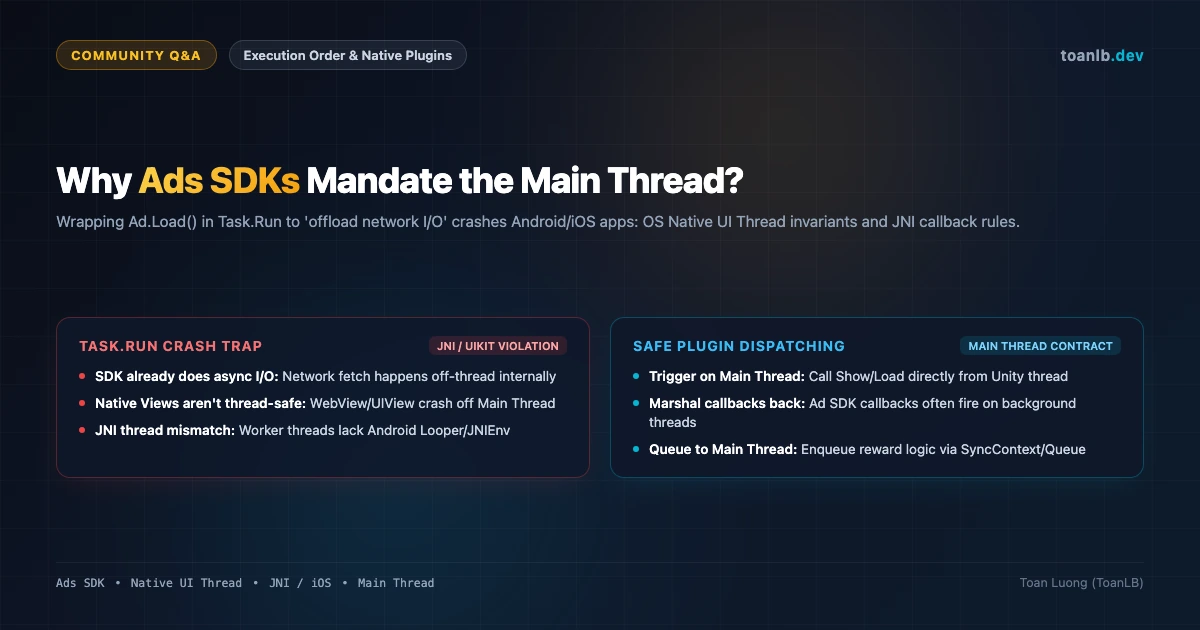
When first learning multithreading techniques in Unity, a natural reflex for many developers is simple: whenever an operation is time-consuming, touches disk storage, or retrieves assets across the network, immediately offload it to Task.Run or a background worker thread to keep the game’s main loop responsive.
Applying this intuitive mental model to mobile advertising networks (such as Google AdMob, AppLovin MAX, or Unity LevelPlay) leads to an understandable architectural question. Today’s deep dive stems from an insightful inquiry by reader @nanashi138 under our video on background task dispatching and Unity UI updates:
“Could you explain why ad SDKs mandate execution on the main thread? As far as I know, before an ad displays, it must send network requests to fetch XML and images into RAM. Wouldn’t offloading this entire step to a background thread make things much faster?”
At first glance, this concern seems entirely reasonable: fetching ads involves HTTP negotiations, real-time bidding, parsing VAST/VPAID XML payloads, and caching video assets weighing tens of megabytes into RAM. If all of this work were executed on the Main Thread, wouldn’t frame rates plummet? Why do official SDK guidelines from Google and AppLovin enforce this strict rule: “All SDK calls must be made on the main thread”?
If we casually wrap LoadAd() calls inside Task.Run(), what catastrophic failures actually trigger beneath the mobile operating system? Let us dissect the threading boundaries separating Unity, the JNI native bridge, and OS-level Native UI Threads across Android and iOS.
1. The Common Misconception: Trigger Calls vs. Background Execution
The fundamental misunderstanding stems from conflating the Trigger Call with the underlying Asynchronous Network Pipeline.
using System;

public static class MockRewardedAdApi
{
    public static void Load(string adUnitId, Action onLoaded)
    {
        // C# API call takes < 0.1ms to dispatch signal across the native bridge
    }
}

public class AdsInvocationExample
{
    public void RequestRewardedAd()
    {
        // Standard API invocation on the Unity Main Thread
        MockRewardedAdApi.Load("ca-app-pub-sample", onLoaded: () => { });
    }
}
When this statement executes within a Unity frame:
- This call is completely non-blocking. It does not halt CPU execution to wait for network handshakes, image downloads, or video streaming chunks before progressing to subsequent lines of code.
- The execution time of
Load()in C# is typically under0.1 milliseconds. Its sole responsibility is packing configuration parameters (Ad Unit ID, targeting metadata) and passing a lightweight signal across the native bridge into Java/Kotlin (Android) or Objective-C/Swift (iOS). Once that signal is dispatched, the method returns immediately, allowing Unity’s main thread to render the next frame without interruption.
Where Does Network I/O Actually Happen?
Deep within the native C++/Java/Objective-C layers of production ad SDKs, system architects have long incorporated dedicated background thread pools and executors:
- Every resource-heavy network task (real-time bidding handshakes, parsing VAST tags, downloading image assets, and caching video streams) is automatically dispatched to OS worker threads by the native SDK.
- This entire fetching process runs completely decoupled from Unity’s game loop. The Main Thread never bears the burden of heavy network I/O.
2. Operating System Realities: The Invariant of the Native UI Thread
If network operations already run on background threads, why do SDKs insist that initialization and loading must originate from the Main Thread?
The answer lies in the display architecture of mobile operating systems: Advertisements are not Unity UI elements.
flowchart LR
    subgraph UnityWorld["Unity C# Domain"]
        direction TB
        A["Unity Main Thread"]
        B["JNI / PInvoke Bridge"]
        C["C# Task.Run / ThreadPool"]
        A -->|"Issues Load / Show"| B
    end
    subgraph NativeOS["Android / iOS Operating System"]
        direction TB
        D["OS Main UI Thread (Looper)"]
        E["Native View / WebView"]
        F["Native Background Worker"]
        D -->|"Safe View Initialization"| E
        D -->|"Dispatches Heavy I/O"| F
        F -->|"Fetch XML, Images, Cache Video"| F
    end
    B -->|"Valid Dispatch"| D
    C -.->|"Triggers App Crash"| D
Ads Are Native OS Views Overlaid on Top of Unity
When a banner displays along the screen margin, or when an interstitial video plays, they are not rendered by Unity’s uGUI (Canvas, Image) or UI Toolkit:
- On Android, the advertisement is a native
android.webkit.WebView, an independentandroid.app.Activity, or a specializedandroid.view.SurfaceViewmanaged directly by the Android framework. - On iOS, the ad is a native
WKWebViewor aUIViewControllercomposited directly above theUnityAppController.
The Single-Threaded UI Rule of Mobile Operating Systems
Both Android OS and Apple iOS enforce a strict single-threaded UI model. On Android, all view hierarchy modifications are governed by Looper.getMainLooper():
// Classic thread assertion inside Android View source code:
void checkThread() {
    if (mThread != Thread.currentThread()) {
        throw new CalledFromWrongThreadException(
            "Only the original thread that created a view hierarchy can touch its views.");
    }
}
Whenever any instruction attempts to instantiate a View, touch an Activity context, or configure a WebView outside the operating system’s Main UI Thread, Android immediately throws an uncatchable exception:
android.view.ViewRootImpl$CalledFromWrongThreadException: Only the original thread that created a view hierarchy can touch its views.
Or on underlying WebView components:
java.lang.IllegalStateException: Calling View methods on another thread than the UI thread.
When invoking LoadAd(), the native SDK must prepare view containers, inspect display metrics, and initialize background web engines ready for rendering. All of these preparatory operations must occur on the OS Main UI Thread, otherwise the process terminates abruptly.
3. The JNI Trap: What Happens When Ads Are Wrapped in Task.Run?
Suppose a developer attempts to offload ad loading using C# asynchronous tasks:
using System.Threading.Tasks;

public class BadAsyncLoadExample
{
    public void TryLoadAdOnBackgroundThread()
    {
        // ANTI-PATTERN: Wrapping Load calls inside Task.Run
        Task.Run(() =>
        {
            SimulatedNativeAdsSdk.Load("ad-unit-id-sample");
        });
    }

    private static class SimulatedNativeAdsSdk
    {
        public static void Load(string adUnitId)
        {
            // Simulated native SDK invocation
        }
    }
}
This construct initiates a chain of severe runtime hazards:
1. Desynchronization Between .NET ThreadPool and the Java Native Interface (JNI)
On Android, Unity C# runs atop Mono or IL2CPP runtimes. When Task.Run() executes, the workload is assigned to a generic .NET ThreadPool worker thread:
- This thread is unattached to Android’s Java Virtual Machine (ART/Dalvik). To issue Java calls via JNI, the thread must explicitly attach via
AttachCurrentThread(). - If thread attachment encounters state mismatches or fails to cleanly detach upon returning to the thread pool, memory corruption (
SIGSEGV) or JNI environment leaks will occur.
2. Immediate Native Crash on Android
Even if the JNI call succeeds, the invocation arrives at the Java SDK on an arbitrary worker thread. As soon as the SDK touches window contexts or initializes view hierarchies outside the Main Looper, Android throws CalledFromWrongThreadException, instantly crashing the game to the device home screen.
3. Zero Upside, Total Catastrophe
The Load() method takes less than 0.1ms on the Main Thread, while actual asset downloading is already handled asynchronously by native workers. Wrapping it in Task.Run() yields zero performance improvement while introducing guaranteed crash risks into a core monetization pipeline.
4. The Return Journey: Thread-Safe Callback Dispatching
The Main Thread requirement applies not only to outbound API calls, but also to inbound event callbacks.
When a player finishes watching a rewarded video ad, the native SDK triggers a completion event:
using System;

public class RewardCallbackListener
{
    public void HandleAdCallback(MockRewardedAdSession session, Action<int> onRewardDispatched)
    {
        session.OnUserEarnedReward += (amount) =>
        {
            // Potential threading hazard if callback arrives on background thread
            onRewardDispatched?.Invoke(amount);
        };
    }
}

public class MockRewardedAdSession
{
    public event Action<int> OnUserEarnedReward;
}
If an ad plugin is poorly designed:
- The
OnUserEarnedRewardevent might be raised directly from a native network worker thread. - As the callback crosses JNI back into C#, it executes on a background thread.
- The moment your code updates an in-game UI counter or instantiates a reward prefab, Unity halts execution:
UnityException: Internal_CreateGameObject can only be called from the main thread.
Production-grade plugins (like the official Google Mobile Ads plugin) incorporate an Event Executor pattern. This mechanism captures native callbacks into a thread-safe queue, safely dispatching them onto Unity’s Main Thread via UnitySynchronizationContext or during the frame Update() cycle.
5. Architectural Implementation: Thread-Safe Callback Relay
To safeguard gameplay architecture against out-of-thread callbacks from third-party native plugins, we can construct an explicit ThreadSafeCallbackRelay.
Below is the verified production implementation with its complete NUnit test suite:
using System;
using System.Collections.Concurrent;
using System.Threading;
using System.Threading.Tasks;
using NUnit.Framework;

/// <summary>
/// Thread-safe dispatcher accepting callbacks from external native threads
/// and reliably marshaling execution onto a target thread (Unity Main Thread).
/// </summary>
public sealed class ThreadSafeCallbackRelay
{
    private readonly ConcurrentQueue<Action> _pendingCallbacks = new();
    private readonly int _expectedThreadId;

    public ThreadSafeCallbackRelay(int expectedThreadId)
    {
        _expectedThreadId = expectedThreadId;
    }

    public int PendingCount => _pendingCallbacks.Count;

    /// <summary>
    /// Invoked from any thread (Native SDK callback, worker thread).
    /// Enqueues the action safely without blocking the caller.
    /// </summary>
    public void EnqueueCallback(Action callback)
    {
        if (callback == null)
        {
            return;
        }

        _pendingCallbacks.Enqueue(callback);
    }

    /// <summary>
    /// Invoked periodically from Unity's Update() loop to drain queued actions.
    /// Returns the number of successfully executed callbacks.
    /// </summary>
    public int DispatchPending(int maxBatchSize = 50)
    {
        int currentThreadId = Thread.CurrentThread.ManagedThreadId;
        if (currentThreadId != _expectedThreadId)
        {
            throw new InvalidOperationException(
                $"DispatchPending must be invoked exclusively on Main Thread (ID: {_expectedThreadId}), but was called on Thread ID: {currentThreadId}.");
        }

        int processedCount = 0;
        while (processedCount < maxBatchSize && _pendingCallbacks.TryDequeue(out var action))
        {
            action.Invoke();
            processedCount++;
        }

        return processedCount;
    }
}

[TestFixture]
public sealed class ThreadSafeCallbackRelayTests
{
    [Test]
    public void EnqueueCallback_WhenInvokedFromMultipleBackgroundThreads_StoresAllCallbacksWithoutLoss()
    {
        int mainThreadId = Thread.CurrentThread.ManagedThreadId;
        var relay = new ThreadSafeCallbackRelay(mainThreadId);

        int totalThreads = 8;
        int callbacksPerThread = 50;
        int expectedTotal = totalThreads * callbacksPerThread;

        // Simulate 8 concurrent background threads pushing callbacks simultaneously
        Parallel.For(0, totalThreads, _ =>
        {
            for (int i = 0; i < callbacksPerThread; i++)
            {
                relay.EnqueueCallback(() => { });
            }
        });

        Assert.AreEqual(expectedTotal, relay.PendingCount);

        // Drain all callbacks on the active Main Thread
        int executedCount = relay.DispatchPending(maxBatchSize: expectedTotal + 10);
        Assert.AreEqual(expectedTotal, executedCount);
        Assert.AreEqual(0, relay.PendingCount);
    }

    [Test]
    public void DispatchPending_WhenCalledFromWrongThread_ThrowsInvalidOperationException()
    {
        int mainThreadId = Thread.CurrentThread.ManagedThreadId;
        var relay = new ThreadSafeCallbackRelay(mainThreadId);

        relay.EnqueueCallback(() => { });

        // Execute dispatch from an isolated background thread to verify safety assertions
        Task backgroundTask = Task.Run(() =>
        {
            Assert.Throws<InvalidOperationException>(() =>
            {
                relay.DispatchPending();
            });
        });

        backgroundTask.Wait();
    }

    [Test]
    public void DispatchPending_ExecutesActualPayloadLogicCorrectly()
    {
        int mainThreadId = Thread.CurrentThread.ManagedThreadId;
        var relay = new ThreadSafeCallbackRelay(mainThreadId);

        int rewardedGold = 0;
        bool uiUpdated = false;

        // Simulate incoming rewarded callback enqueued from native layer
        relay.EnqueueCallback(() =>
        {
            rewardedGold += 100;
            uiUpdated = true;
        });

        Assert.AreEqual(0, rewardedGold);
        Assert.IsFalse(uiUpdated);

        relay.DispatchPending();

        Assert.AreEqual(100, rewardedGold);
        Assert.IsTrue(uiUpdated);
    }
}
6. Architectural Trade-Off Analysis
The matrix below contrasts the operational characteristics of each plugin integration strategy:
| Evaluation Criteria | Direct Unity Main Thread Invocation | Unsafe Task.Run Wrapping | Dedicated ThreadSafe Relay Pattern |
|---|---|---|---|
| Runtime Stability | Fully stable, complies with OS thread requirements | Highly hazardous, triggers native OS crashes | Completely safe across bidirectional dispatches |
| Main Thread Impact | Completely negligible (< 0.1ms per call) | Zero performance gain over standard calls | Predictable per-frame callback processing limits |
| Native View Integrity | Initializes WebView/Activity on OS Looper correctly | Throws CalledFromWrongThreadException | Guarantees views remain bound to Main UI Thread |
| Callback Safety | Safe if official SDK includes event executors | Callbacks fail when touching Unity components | Isolates gameplay architecture from external threads |
| Code Complexity | Minimal (directly uses vendor APIs) | Erroneous complexity with zero benefits | Requires a lightweight mediator buffer |
| Production Context | Mandatory for standard commercial ad SDKs | Strictly prohibited across all architectures | Ideal when developing custom native plugins |
7. Key Takeaways: Native Plugin Threading Invariants
Bridging Unity with native mobile operating systems is a frequent source of obscure production defects, primarily because native threading exceptions do not appear inside the Unity Editor - they detonate only on physical devices.
Three foundational rules for integrating native plugins:
- Respect the Single-Threaded UI Rule of the OS: While you can spawn hundreds of threads in C#, mobile devices have exactly one Main UI Thread authorized to touch native views. All interactions involving native overlays (ads, web views, in-app billing sheets) must originate on the Main Thread.
- Do Not Over-Engineer Third-Party I/O: Leading SDK architects have already optimized background pipelines for network-intensive tasks. Never wrap vendor API calls inside speculative
Task.Runblocks. - Guard Inbound Callbacks Defensively: When receiving events from any native bridge, ensure data is marshaled back onto Unity’s Main Thread before allowing it to mutate
Transform,GameObject, or UI components.

