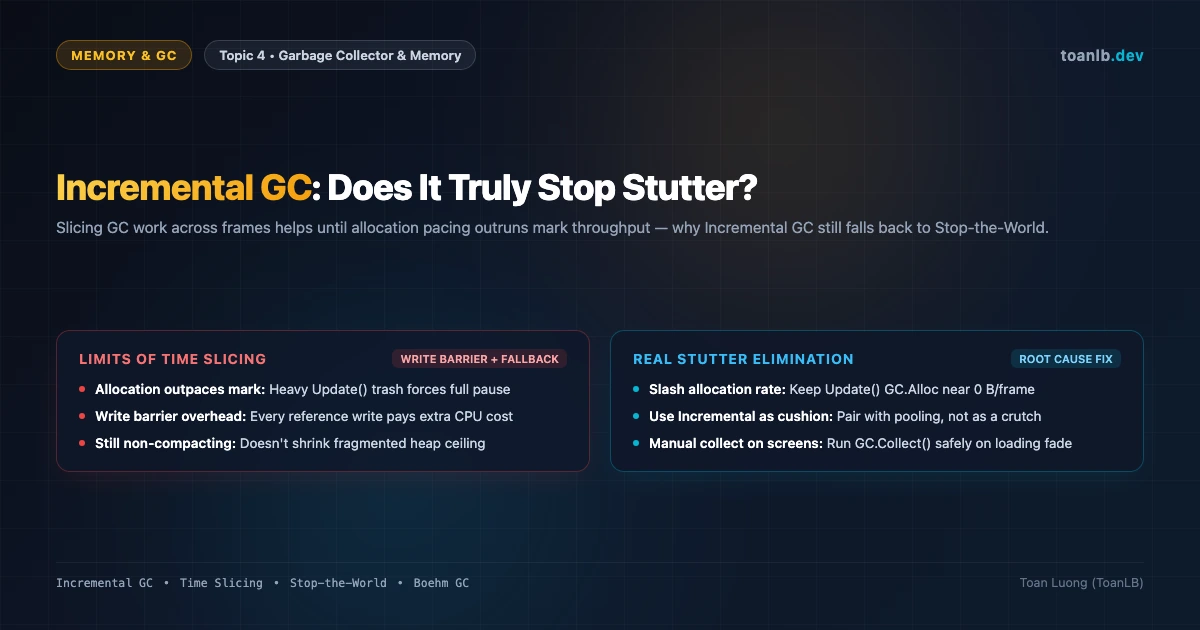
When Unity enabled Incremental Garbage Collection by default in Unity 2021 LTS and Unity 6, many game developers breathed a sigh of relief. The consensus across community forums was that the era of jarring 50ms to 100ms Stop-the-World garbage collection hitches on mobile devices had finally come to an end.
Many production teams began relaxing their memory hygiene: instantiating temporary objects in the main gameplay loop, carelessly concatenating HUD strings, and scattering LINQ queries across collision callbacks. The common rationale was simple: if Unity now slices garbage collection into 2ms to 3ms time slices per frame, how could a game possibly stutter?
Yet, real-world production testing tells a very different story. Put the project under high load - such as a Roguelike Swarm game with hundreds of enemies swarming the player - and trigger a screen-clearing ultimate skill. The entire game abruptly freezes for a noticeable fraction of a second. Open the Unity Profiler, and a towering red marker labeled GarbageCollector.CollectIncremental or GC.Collect reaches 60ms, shattering the 16.6ms frame budget required for 60 FPS.
Why does an engine feature specifically designed to eliminate Stop-the-World pauses still cause abrupt frame drops? How does Incremental GC truly operate under the hood, and what is the definitive architectural solution to memory stutter?
Under the Hood: Boehm GC and Time Slicing
To understand why frame drops persist, we must examine the architectural foundation of Unity’s memory runtime: the Boehm-Demers-Weiser Garbage Collector (Boehm GC).
flowchart LR
    subgraph STW["Stop-the-World GC (Classic)"]
        direction TB
        A1["Heap hits threshold"] -->|"Freeze Main Thread"| A2["Mark entire Root tree"]
        A2 -->|"Sweep unreferenced blocks"| A3["50ms - 100ms pause spike"]
    end

    subgraph IGC["Incremental GC (Modern Unity)"]
        direction TB
        B1["Mark sliced into 3ms chunks"] -->|"Moderate alloc rate"| B2["Smooth over multiple frames"]
        B1 -->|"Heavy burst alloc exceeds budget"| B3["Forced Full STW Spike"]
    end

    subgraph ZERO["Root Solution (Zero-Alloc)"]
        direction TB
        C1["Reusable Buffers"] -->|"Bypass Heap allocations"| C2["GC Alloc = 0 bytes"]
        C2 -->|"Never trigger GC cycle"| C3["Stable 60 FPS lock"]
    end

    STW -.->|"Evolves into"| IGC
    IGC -.->|"Fully solved by"| ZERO
Unlike modern desktop .NET CLR collectors that are generational and compacting, the Boehm GC employed by Unity is non-generational and non-compacting.
In classic Stop-the-World execution, garbage collection operates in two sequential phases:
- Mark Phase: The Main Thread freezes completely. The GC traverses references starting from GC Roots (static variables, thread stack pointers, native object handles) to identify every live object residing on the Managed Heap.
- Sweep Phase: The GC scans memory blocks across the Heap, collecting unreferenced memory into Free Lists for future reuse.
The primary bottleneck in this traditional approach is the Mark phase: when the Managed Heap contains millions of small objects, traversing the reference graph takes tens of milliseconds, forcing all gameplay logic and rendering to stall.
What Incremental GC Actually Accomplishes
Incremental GC modifies the Mark phase. Instead of traversing the entire reference graph in a single monolithic pause, Unity divides the marking workload into discrete time slices.
Each frame, after updating gameplay logic and rendering, Unity allocates an idle slice of frametime (configured at runtime via GarbageCollector.incrementalTimeSliceNanoseconds, defaulting to 3,000,000 nanoseconds or 3ms) during which the GC processes a portion of the live object graph. Once the 3ms slice expires, the GC suspends execution and yields control back to the engine. After multiple consecutive frames finish marking all reachable objects, the sweep phase executes to reclaim unreferenced memory. If VSync (QualitySettings.vSyncCount > 0) or target framerate (Application.targetFrameRate) is enabled, the runtime can also dynamically adapt and exploit available idle time before the next vertical blanking interval to complete incremental marking steps.
In theory, this smooths out GC overhead across consecutive frames, converting an occasional 50ms spike into manageable 2ms to 3ms increments.
4 Reasons Why Incremental GC Fails to Eliminate Stutter
If Incremental GC divides the marking workload, why do commercial games still experience periodic hitches? Here are the four underlying technical reasons every Unity developer must recognize.
1. Allocation Rate Outpacing Mark Throughput: Forced Stop-the-World
This is the most common cause of sudden frame drops in production games.
Suppose Incremental GC has a time slice of 3ms per frame. Within that window, the collector can only process a finite number of object pointers. If the gameplay loop produces 200 KB to 500 KB of garbage per frame - due to continuous spawning, closure captures, and functions returning new arrays - the rate of allocation dramatically exceeds the rate of garbage reclamation.
When code requests a memory allocation that cannot be satisfied by the contiguous blocks available in the Managed Heap’s Free List, the runtime cannot postpone the allocation to a subsequent frame. To prevent an unhandled OutOfMemoryException, the engine has no choice but to immediately halt all execution and trigger a Forced Synchronous Stop-the-World Collection.
Incremental time-slicing is instantly overridden. The Main Thread freezes to sweep the entire heap, producing a stuttering spike at the exact moment combat reaches peak intensity.
2. The Hidden Tax of Write Barriers
To allow the Mark phase to pause across frames while C# game code continues modifying objects in memory, the runtime must solve a critical concurrency issue: what happens if an object that the GC has already marked as reachable (black) receives a reference to a newly instantiated object that has not yet been marked (white)?
Without intervention, the collector would consider the new object unreachable during the sweep phase and prematurely deallocate it, causing memory corruption.
To prevent this data corruption, Incremental GC requires Write Barriers. Whenever C# code mutates an object reference (objectA.field = objectB), an internal check injected by the runtime intercepts the write to update GC tracking state.
The trade-offs of write barriers are substantial:
- Every reference assignment throughout the entire codebase incurs additional CPU instructions.
- The cumulative CPU time consumed by garbage collection over 1,000 frames with Incremental GC is actually higher than classic Stop-the-World. It trades a steep, isolated spike for a sustained, higher baseline CPU overhead across all frames.
3. Managed Heap Fragmentation
Boehm GC does not relocate surviving objects to consolidate contiguous memory (non-compacting).
When code repeatedly allocates and deallocates objects of varying sizes, the Managed Heap becomes heavily fragmented, resembling Swiss cheese. Even if the total free space across the heap amounts to 10 MB, it may be scattered across 10,000 isolated 1 KB fragments.
When the game requests a contiguous 64 KB buffer for an audio stream or mesh data array, the allocator traverses the Free List and finds no single contiguous slot capable of accommodating 64 KB.
Unity is forced to issue an operating system call to allocate a brand-new virtual memory block, expanding the Managed Heap. Requesting memory pages from mobile operating systems (iOS or Android) is an inherently slow system call that frequently results in a noticeable hitch. Furthermore, once expanded, Managed Heap memory is rarely released back to the operating system, increasing susceptibility to OS-level process termination (OOM Kill).
4. Sweep Phase and Native Shell Deallocation
While the Mark phase is sliced into intervals, the Sweep phase and the destruction of UnityEngine.Object wrappers (managed C# shells holding native C++ pointers) still require dedicated Main Thread processing. When a large wave of game objects is destroyed simultaneously, unregistering native handles and running cleanup routines can still produce unexpected frame time spikes.
Engineering Solution: Zero-Allocation Gameplay Architecture
Incremental GC serves as a shock absorber for baseline allocations, not a license to generate unconstrained garbage in gameplay loops.
The only permanent remedy for mobile hitching is maintaining GC Alloc = 0 bytes inside high-frequency update loops (Update, FixedUpdate, LateUpdate, and repeated event callbacks).
Consider a classic problem in a Roguelike Swarm title: scanning and applying area-of-effect damage to nearby targets among 1,000 active enemy entities.
Initial Approach: High Allocation Overhead
During early prototyping, developers frequently implement convenient patterns: using LINQ to filter targets, instantiating new lists on every sweep, and dispatching events via newly allocated event argument objects:
using System;
using System.Collections.Generic;
using System.Linq;
using UnityEngine;

// Data class causing Heap allocation on every hit event
public class DamageHitPayload
{
    public int TargetId { get; set; }
    public int DamageAmount { get; set; }

    public DamageHitPayload(int targetId, int damageAmount)
    {
        TargetId = targetId;
        DamageAmount = damageAmount;
    }
}

public class LegacyAreaDamageSystem : MonoBehaviour
{
    public event Action<DamageHitPayload> OnTargetDamaged;

    public void ProcessAreaDamage(float radius, List<int> allEnemyIds, Func<int, float> getDistanceFunc)
    {
        // LINQ Where and OrderBy instantiate delegate closures and enumerators on the Heap
        var targetsInRange = allEnemyIds
            .Where(id => getDistanceFunc(id) <= radius)
            .OrderBy(id => getDistanceFunc(id))
            .ToList(); // Allocates a brand new List every invocation

        foreach (var id in targetsInRange)
        {
            // Allocates a new payload object per target hit
            var payload = new DamageHitPayload(id, 50);
            OnTargetDamaged?.Invoke(payload);
        }
    }
}
If multiple explosions occur every second, each hitting 50 enemies, this code generates thousands of DamageHitPayload instances, numerous temporary lists, and multiple delegate closures. The allocation rate quickly overwhelms the 3ms Incremental GC slice, triggering a forced Stop-the-World pause right during combat.
Refactored Architecture: Zero-Alloc Spatial Damage Processor
To eliminate garbage generation entirely, we restructure the processing pipeline around Zero-Allocation principles:
- Replace the heap-allocated payload class with a
readonly structpassed by value orinreference. - Utilize a persistent reusable buffer instead of generating new lists.
- Encapsulate the spatial query logic inside an independent pure C# service class named
SpatialDamageProcessorto isolate computations from Unity’s managed heap allocations.
Here is the complete implementation:
using System;

// 1. Readonly struct residing on the Stack or inlined inside arrays without boxing
public readonly struct TargetHitResult : IEquatable<TargetHitResult>
{
    public readonly int TargetId;
    public readonly int DamageAmount;

    public TargetHitResult(int targetId, int damageAmount)
    {
        TargetId = targetId;
        DamageAmount = damageAmount;
    }

    public bool Equals(TargetHitResult other)
    {
        return TargetId == other.TargetId && DamageAmount == other.DamageAmount;
    }

    public override bool Equals(object obj)
    {
        return obj is TargetHitResult other && Equals(other);
    }

    public override int GetHashCode()
    {
        return HashCode.Combine(TargetId, DamageAmount);
    }
}

// 2. Pure C# processor designed to handle area damage calculations with zero GC allocations
public sealed class SpatialDamageProcessor
{
    private readonly TargetHitResult[] _resultBuffer;
    private readonly int _maxCapacity;
    private int _currentHitCount;

    public int MaxCapacity => _maxCapacity;
    public int CurrentHitCount => _currentHitCount;

    public SpatialDamageProcessor(int maxCapacity = 256)
    {
        _maxCapacity = maxCapacity > 0 ? maxCapacity : 256;
        _resultBuffer = new TargetHitResult[_maxCapacity];
        _currentHitCount = 0;
    }

    /// <summary>
    /// Evaluates targets within range and writes directly into the reusable internal buffer.
    /// Returns the exact count of evaluated items with zero heap allocations.
    /// </summary>
    public int EvaluateHits(int[] candidateIds, float[] candidateDistances, float radius, int baseDamage)
    {
        if (candidateIds == null || candidateDistances == null)
        {
            _currentHitCount = 0;
            return 0;
        }

        int totalCandidates = Math.Min(candidateIds.Length, candidateDistances.Length);
        int hitCount = 0;

        for (int i = 0; i < totalCandidates; i++)
        {
            if (candidateDistances[i] <= radius)
            {
                if (hitCount < _maxCapacity)
                {
                    _resultBuffer[hitCount] = new TargetHitResult(candidateIds[i], baseDamage);
                    hitCount++;
                }
                else
                {
                    // Buffer capacity reached; clamp safely to prevent array overflow
                    break;
                }
            }
        }

        _currentHitCount = hitCount;
        return hitCount;
    }

    /// <summary>
    /// Reads evaluated hit data from the buffer via index.
    /// Clamps bounds strictly against the valid evaluated hit count (_currentHitCount).
    /// </summary>
    public TargetHitResult GetHit(int index)
    {
        if (index < 0 || index >= _currentHitCount)
        {
            throw new ArgumentOutOfRangeException(nameof(index), "Index exceeds evaluated hit count.");
        }

        return _resultBuffer[index];
    }

    /// <summary>
    /// Resets used buffer slots to default values without releasing array memory.
    /// Uses runtime intrinsic Array.Clear for fast and clean buffer clearing.
    /// </summary>
    public void ClearBuffer(int countToClear)
    {
        int limit = Math.Min(countToClear, _maxCapacity);
        if (limit > 0)
        {
            Array.Clear(_resultBuffer, 0, limit);
        }
        _currentHitCount = 0;
    }
}
In this architecture, _resultBuffer is allocated exactly once during application startup. On every combat frame:
- Candidate distances are passed directly.
- The
EvaluateHitsmethod iterates using a standardforloop, populates the pre-allocated buffer, and returns a primitive integerhitCount. - Garbage allocations produced during combat queries remain at exactly 0 bytes.
Production Verification with NUnit Unit Tests
To verify that this reusable buffer architecture reliably preserves data and gracefully handles edge cases in production, we implement an automated NUnit test fixture:
using System;
using NUnit.Framework;

[TestFixture]
public class SpatialDamageProcessorTests
{
    [Test]
    public void EvaluateHits_NormalRange_PopulatesBufferCorrectly()
    {
        var processor = new SpatialDamageProcessor(maxCapacity: 10);
        int[] enemyIds = new int[] { 101, 102, 103, 104 };
        float[] distances = new float[] { 2.5f, 6.0f, 1.2f, 4.8f };
        float scanRadius = 3.0f;
        int baseDamage = 75;

        // Action: Scan with radius 3.0m, only ID 101 (2.5m) and ID 103 (1.2m) qualify
        int hits = processor.EvaluateHits(enemyIds, distances, scanRadius, baseDamage);

        Assert.AreEqual(2, hits);
        Assert.AreEqual(101, processor.GetHit(0).TargetId);
        Assert.AreEqual(75, processor.GetHit(0).DamageAmount);
        Assert.AreEqual(103, processor.GetHit(1).TargetId);
        Assert.AreEqual(75, processor.GetHit(1).DamageAmount);
    }

    [Test]
    public void EvaluateHits_ExceedingCapacity_ClampsSafelyWithoutOverflow()
    {
        // Initialize processor with a strict capacity of 2 items
        var processor = new SpatialDamageProcessor(maxCapacity: 2);
        int[] enemyIds = new int[] { 1, 2, 3, 4, 5 };
        float[] distances = new float[] { 1.0f, 1.0f, 1.0f, 1.0f, 1.0f };

        int hits = processor.EvaluateHits(enemyIds, distances, radius: 5.0f, baseDamage: 100);

        // Verify hit count is safely clamped to capacity without throwing IndexOutOfRangeException
        Assert.AreEqual(2, hits);
        Assert.AreEqual(1, processor.GetHit(0).TargetId);
        Assert.AreEqual(2, processor.GetHit(1).TargetId);
    }

    [Test]
    public void EvaluateHits_NullOrEmptyInputs_ReturnsZeroHits()
    {
        var processor = new SpatialDamageProcessor(maxCapacity: 16);

        int nullHits = processor.EvaluateHits(null, null, 10.0f, 50);
        int emptyHits = processor.EvaluateHits(new int[0], new float[0], 10.0f, 50);

        Assert.AreEqual(0, nullHits);
        Assert.AreEqual(0, emptyHits);
    }

    [Test]
    public void ClearBuffer_ReusedAcrossFrames_ResetsBufferStateCleanly()
    {
        var processor = new SpatialDamageProcessor(maxCapacity: 4);
        int[] frame1Ids = new int[] { 201, 202 };
        float[] frame1Distances = new float[] { 1.0f, 2.0f };

        int hits1 = processor.EvaluateHits(frame1Ids, frame1Distances, 5.0f, 30);
        Assert.AreEqual(2, hits1);
        Assert.AreEqual(2, processor.CurrentHitCount);

        // Reset buffer for the subsequent frame: CurrentHitCount resets to 0 and guards stale reads
        processor.ClearBuffer(hits1);
        Assert.AreEqual(0, processor.CurrentHitCount);
        Assert.Throws<ArgumentOutOfRangeException>(() => processor.GetHit(0));

        // Frame 2 completely reuses the pre-allocated memory
        int[] frame2Ids = new int[] { 301 };
        float[] frame2Distances = new float[] { 0.5f };
        int hits2 = processor.EvaluateHits(frame2Ids, frame2Distances, 5.0f, 90);

        Assert.AreEqual(1, hits2);
        Assert.AreEqual(1, processor.CurrentHitCount);
        Assert.AreEqual(301, processor.GetHit(0).TargetId);
        Assert.AreEqual(90, processor.GetHit(0).DamageAmount);
    }
}
Architectural Trade-offs: Incremental GC vs Active Zero-Alloc Design
Every technical decision involves trade-offs. The table below outlines the core engineering considerations when comparing reliance on Incremental GC against active Zero-Allocation design:
| Engineering Dimension | Relying Exclusively on Incremental GC | Active Zero-Allocation Architecture |
|---|---|---|
| Initial Implementation Speed | High velocity, unconstrained use of LINQ, string format, and new | Requires upfront planning for data layouts and buffer management |
| Frame Time Stability | Vulnerable to micro-stutter and forced GC pauses during bursts | Consistently flat frametimes, completely eliminating GC pause spikes |
| Total CPU Overhead | Incurs continuous Write Barrier overhead and state management tax | CPU cycles are strictly dedicated to pure gameplay calculations |
| RAM Pressure and Footprint | Managed heap continuously expands due to non-compacting fragmentation | Managed heap size remains fixed, dramatically reducing OOM risk |
| Codebase Complexity | Accessible for beginners, standard idiom code | Requires team understanding of structs, memory lifecycles, and NonAlloc APIs |
| Automated Testing | Frequently coupled to MonoBehaviour instances and Scene lifecycles | Trivially decoupled into testable Pure C# services |
Practical Takeaways
Incremental GC represents an engineering improvement in Unity’s runtime, but it functions primarily as a shock absorber, not as an authorization to generate unchecked garbage.
To achieve a consistent 60 FPS on mid-range mobile hardware, keep these core principles in mind:
- Understand the collector’s limits: Incremental GC only slices the Mark phase. When allocation volume outpaces the 3ms time slice budget, the engine still executes a forced Stop-the-World collection.
- Prevent heap fragmentation: Boehm GC does not compact memory. Constantly creating and discarding arrays fragments the heap, forcing slow operating system page allocations that freeze execution.
- Enforce zero allocations in hot paths: Keep
Update,FixedUpdate, and recurrent callbacks operating atGC Alloc = 0 bytes. Utilize reusable buffers, Unity’s NonAlloc APIs (Physics.OverlapSphereNonAlloc,RaycastNonAlloc), and pass structs by value orinparameters. - Reserve Incremental GC for peripheral workloads: Let the incremental collector handle inevitable allocations during scene transitions, static UI loading, and menu interactions, rather than placing the burden of per-frame combat allocations on its shoulders.

