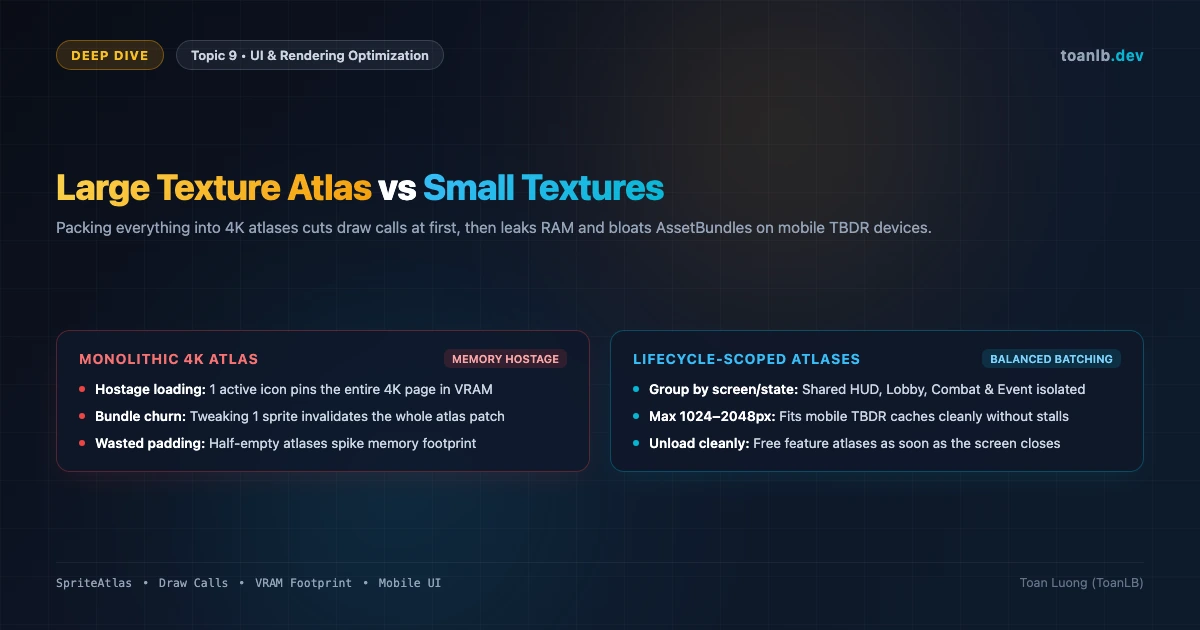
When tackling user interface performance (UI Performance) across production Unity projects, most engineers can readily recite standard industry best practices: split dynamic and static Canvases, avoid frequent LayoutRebuilder invocations, disable SetNativeSize on animating elements, and always pack individual sprites into Texture Atlases.
Yet, a deceptively simple fundamental question frequently catches experienced developers off guard:
“Why can loading a single massive Texture Atlas (such as 2048x2048) be significantly more performant than loading dozens of small individual textures (such as 128x128 or 256x256)?”
That inquiry exposes the critical divide between memorizing best-practice checklists and genuinely commanding the underlying graphics pipeline. Optimization in Unity is never merely about shrinking file sizes or reducing asset counts on disk. Every architectural decision represents a delicate balancing act between CPU driver overhead, GPU state submission pipelines, and device VRAM constraints.
1. Graphics Pipeline Mechanics: Why Texture Switching Breaks Batching
To understand why a large texture atlas confers substantial rendering performance advantages, we must trace the path a 2D sprite takes from Unity engine code to GPU hardware execution.
flowchart TD
    subgraph Case1_LooseMode["Scenario 1: Disjoint Individual Textures"]
        direction TB
        T1_1["Sprite A: Bind Texture A -> Draw Call #1"]
        T1_2["Sprite B: Bind Texture B -> Pipeline Flush -> Draw Call #2"]
        T1_3["Sprite C: Bind Texture C -> Pipeline Flush -> Draw Call #3"]
        T1_4["Outcome: CPU Driver Overload, Batching Completely Broken"]
        T1_1 --> T1_2 --> T1_3 --> T1_4
    end

    subgraph Case2_AtlasMode["Scenario 2: Consolidated Texture Atlas"]
        direction TB
        T2_1["Sprite A, B, C: Identical Material & Texture Pointer"]
        T2_2["Sole Variance: UV Coordinates Within the Packed Atlas"]
        T2_3["Canvas Combines Quads Into a Single Contiguous Mesh"]
        T2_4["Outcome: 1 Single Batched Draw Call, Minimal CPU Overhead"]
        T2_1 --> T2_2 --> T2_3 --> T2_4
    end
Deconstructing a Draw Call: The Driver Burden
Many developers mistakenly believe that a Draw Call represents heavy computational arithmetic executed by the GPU. In reality, the opposite is true: a Draw Call is primarily a heavy coordination burden imposed on the CPU and the Graphics Driver.
Before the GPU renders geometry, the CPU Render Thread must execute several synchronous setup steps:
- Pipeline State Object (PSO) Configuration: Set shaders, blend modes, depth testing, and rasterizer states.
- Buffer Binding: Bind Vertex and Index Buffers containing coordinates, vertex colors, and UVs for UI quads.
- Resource Binding: Bind texture memory handles into GPU texture units via graphics APIs (
glBindTexturein OpenGL,[renderEncoder setFragmentTexture:atIndex:]in Metal, or Descriptor Set updates in Vulkan and DirectX 12). - Issue Command: Dispatch the draw command (such as
glDrawElementsordrawIndexedPrimitives).
The Cost of State Switches
Among these steps, switching a Texture Binding Slot is an expensive Pipeline State Change.
When a UI screen displays 30 individual icons, each backed by an isolated texture asset:
- The engine cannot submit them as a continuous stream.
- The CPU driver must interrupt execution, bind Texture B to the active texture unit, and re-validate pipeline state.
- This state switch forces pipeline stalls, preventing the GPU from reusing cached texture samplers and descriptors.
- Consequently, 30 isolated icons yield 30 distinct Draw Calls. The CPU becomes hopelessly bottlenecked submitting driver commands, dropping frames even when the GPU has ample fill-rate headroom.
How a Texture Atlas Solves the Problem via UV Coordinates
Consolidating those 30 icons into a single 2048x2048 Texture Atlas completely alters the pipeline dynamics:
- All 30 sprites now reference the exact same Texture Pointer and Material.
- The distinction between a sword icon, a shield icon, or a close button is reduced to normalized UV coordinate offsets (ranging from 0.0 to 1.0) defining sub-rectangles across the atlas surface.
- Unity’s UI Canvas system (UGUI) detects identical graphic states across elements, batching all 30 quad meshes into a single contiguous Vertex Buffer.
- The CPU issues exactly one texture bind and one batched Draw Call for the entire set, reducing driver submission overhead up to thirty-fold.
2. Mobile GPU Architectures (TBDR): Why State Switches Are Doubly Dangerous
On mobile platforms (Android and iOS), modern GPUs from Qualcomm (Adreno), ARM (Mali), and Apple Silicon rely on Tile-Based Deferred Rendering (TBDR).
flowchart LR
    subgraph FramePipeline["Mobile TBDR Execution Lifecycle"]
        direction TB
        T1["Phase 1: Binning Pass (Sort Geometry Into Tiles)"]
        T2["Phase 2: Rasterization in Ultra-Fast On-Chip SRAM"]
        T3["Phase 3: Flush Completed Framebuffer to LPDDR RAM"]
        T1 --> T2 --> T3
    end

    subgraph HardwareImpact["State Switch Penalties"]
        direction TB
        H1["Frequent Texture Switches Break Binning Streams"]
        H2["Amplified External Memory Bus Read/Write Traffic"]
        H3["Device Overheats, Triggering Thermal Throttling"]
        H1 --> H2 --> H3
    end

    T2 -.->|"Premature Tile Eviction"| H1
On-Chip SRAM vs Memory Bus Bandwidth
Unlike desktop GPUs with dedicated high-speed GDDR memory yielding hundreds of GB/s, mobile GPUs share low-power LPDDR system memory with the CPU. External memory bus transactions consume substantial battery power and generate noticeable heat.
To circumvent this constraint, TBDR partitions the screen into microscopic tiles (typically 16x16 or 32x32 pixels), rendering each tile completely within tiny, lightning-fast On-Chip SRAM Tile Memory:
- Phase 1 (Binning Pass): The GPU evaluates scene geometry, sorting primitive coordinates into intersecting tile bins.
- Phase 2 (Rendering Pass): Individual tiles are rasterized, depth-tested, and shaded entirely within on-chip SRAM before flushing final pixel colors to main system RAM.
When a scene introduces excessive individual textures:
- Draw call counts surge, causing primitive binning command lists to overflow available on-chip parameter buffers.
- Mid-frame state changes can force premature flushes of tile buffers out to slow external LPDDR RAM.
- This creates severe memory bus saturation, leading to rapid device heating and triggering Thermal Throttling, dropping 60 FPS gameplay into severe stutter within minutes.
3. The Double-Edged Sword: VRAM Footprints and AssetBundle Retention Traps
Recognizing the draw call advantages of texture atlasing frequently tempts engineers toward a naive assumption: “If large atlases are so effective, why not pack the entire game’s UI into a single 4096x4096 or 8192x8192 atlas to minimize draw calls globally?”
This introduces a critical production trap: The engineering trade-off between CPU Draw Calls and GPU VRAM footprint.
The Concrete VRAM Cost of Texture Atlases
GPU VRAM is allocated as an indivisible monolithic block spanning the entire texture dimension, regardless of how many individual pixels are actively visible on screen:
| Atlas Dimensions | Compression Format | Concrete VRAM Footprint | Mobile Production Impact |
|---|---|---|---|
| 1024 x 1024 | ASTC 6x6 (Compressed) | ~0.45 MB | Highly safe, rapid load time, optimal for isolated modals |
| 2048 x 2048 | ASTC 6x6 (Compressed) | ~1.78 MB | Golden standard for HUD and primary screen atlases |
| 2048 x 2048 | RGBA32 (Uncompressed) | 16.00 MB | Extremely hazardous if uncompressed, high risk of OOM |
| 4096 x 4096 | ASTC 6x6 (Compressed) | 7.11 MB | Heavy on budget devices, high initial memory allocation |
| 4096 x 4096 | RGBA32 (Uncompressed) | 64.00 MB | Almost guaranteed low-memory crash on 2GB RAM devices |
Vital Note on UI Mipmaps: All VRAM metrics above assume that Generate Mip Maps is disabled (false). For 2D Canvas UI elements rendered at a 1:1 pixel ratio, enabling Mipmaps is entirely redundant and inflates VRAM consumption by an additional 33.33% (the full mip chain occupies exactly one-third of the base texture size). Always verify that this toggle remains disabled in the Atlas Texture Import Settings!
The Single-Icon Memory Retention Trap
Consider a production Action RPG containing a standard Settings Dialog. This modal requires only three small sprites:
- An audio speaker icon (64x64 pixels).
- A globe language icon (64x64 pixels).
- A close button frame (128x64 pixels).
The raw visual data consumed by these three elements is under 50 KB.
However, if an asset author bundles these three icons into a monolithic atlas shared with:
- The Character Shop (hundreds of high-resolution cosmetic skins).
- The Inventory System (hundreds of weapon and equipment icons).
- Guild and Leaderboard banners.
The operational consequence is immediate: The moment the player opens the Settings Dialog, Unity must load the entire multi-megabyte atlas into VRAM! Up to 64 MB of graphic memory remains pinned merely to present three tiny icons.
AssetBundle and Addressables Retention Deadlocks
In modern modular architectures using Addressables or AssetBundles:
- A Texture Atlas is an indivisible runtime asset. Every Sprite within that atlas holds an implicit dependency pointer to the parent texture.
- When the Shop screen unloads and invokes
Addressables.Release, Unity inspects the reference count of the underlying atlas. - If the Settings modal (still visible in the background) holds an active reference to even a single icon on that atlas, Unity cannot evict the atlas from VRAM!
- This pattern represents the number-one culprit behind Memory Retention Leaks in commercial Unity titles.
4. Production Architecture: Lifecycle-Driven Atlas Partitioning
To harmonize draw call reduction with disciplined VRAM consumption, enterprise game studios implement Lifecycle-Driven Atlas Partitioning.
The Golden Rule: Elements That Coexist Are Packed Together
Rather than grouping sprites by visual taxonomy (putting all buttons in one atlas and all icons in another), atlases must be partitioned by runtime presence and screen lifecycle:
- Global Common Atlas (1024x1024 or 2048x2048 maximum):
- Houses sprites permanently present across 80% or more of the user journey: generic modal backdrops, title bars, currency indicators (Gold, Gems), close buttons, and energy bars.
- Loaded at startup and retained permanently in memory without risk of idle waste.
- Feature / Screen-Specific Atlases (1024x1024 or 2048x2048):
- Each major isolated screen owns dedicated atlases:
Atlas_Shop,Atlas_Inventory,Atlas_Gacha. - When the Shop opens,
Atlas_Shoploads; when the Shop closes, the atlas completely evicts from memory.
- Each major isolated screen owns dedicated atlases:
- Dynamic / Live-Ops Atlases (512x512 or 1024x1024):
- Reserved for seasonal promotions (Halloween, Holiday events) downloaded on demand via Addressables. Transient event assets must never contaminate core game atlases.
5. Production Implementation: C# Atlas Budget Auditor and Lifecycle Tracker
Consider an Action RPG targeting mid-range mobile devices with 30 distinct UI screens. QA reports frequent Out-Of-Memory crashes on 2GB RAM devices whenever players toggle lightweight notification popups.
Investigation reveals that several auxiliary modals hold references to 2048x2048 atlases intended exclusively for the Shop. To enforce strict budget boundaries, we construct a Pure C# AtlasBudgetAuditor that calculates exact VRAM footprints, evaluates screen area utilization ratios, and warns developers when an atlas is improperly retained.
Pure C# Domain Layer
The module below is completely independent of UnityEngine.dll, calculating exact VRAM allocation sizes across modern compression formats and detecting retention risks algorithmically:
using System;
using System.Collections.Generic;

// Standard texture compression formats in modern mobile game development
public enum TextureCompressionFormat
{
    RGBA32_Uncompressed, // 4 bytes per pixel (heavy memory footprint)
    ASTC_4x4,           // 8.00 bits/pixel (1.00 byte/pixel)
    ASTC_6x6,           // 3.56 bits/pixel (~0.444 bytes/pixel - industry standard)
    ASTC_8x8            // 2.00 bits/pixel (0.25 bytes/pixel - low-frequency UI)
}

// Immutable audit report capturing memory footprint and utilization efficiency
public readonly struct AtlasMemoryAuditReport
{
    public string AtlasName { get; }
    public int Width { get; }
    public int Height { get; }
    public double TotalVramMegabytes { get; }
    public double UsedPixelsArea { get; }
    public double TotalPixelsArea { get; }
    public double UtilizationRatio { get; }
    public bool HasRetentionRisk { get; }

    public AtlasMemoryAuditReport(
        string atlasName,
        int width,
        int height,
        double totalVramMb,
        double usedPixelsArea,
        double totalPixelsArea,
        double utilizationRatio,
        bool hasRetentionRisk)
    {
        AtlasName = atlasName;
        Width = width;
        Height = height;
        TotalVramMegabytes = totalVramMb;
        UsedPixelsArea = usedPixelsArea;
        TotalPixelsArea = totalPixelsArea;
        UtilizationRatio = utilizationRatio;
        HasRetentionRisk = hasRetentionRisk;
    }
}

// Pure C# evaluation engine for Texture Atlas memory budgeting
public class AtlasBudgetAuditor
{
    // Threshold below which an atlas loaded on an isolated screen is flagged as a retention hazard
    public const double LowUtilizationThreshold = 0.15; // 15% surface area

    public static double CalculateVramMegabytes(int width, int height, TextureCompressionFormat format)
    {
        if (width <= 0 || height <= 0)
            throw new ArgumentOutOfRangeException(nameof(width), "Texture dimensions must exceed zero");

        double totalPixels = (double)width * height;
        double totalBytes = format switch
        {
            TextureCompressionFormat.RGBA32_Uncompressed => totalPixels * 4.0,
            TextureCompressionFormat.ASTC_4x4 => totalPixels * 1.0,
            TextureCompressionFormat.ASTC_6x6 => totalPixels * (16.0 / 36.0), // 16 bytes per 6x6 block (36 pixels)
            TextureCompressionFormat.ASTC_8x8 => totalPixels * (16.0 / 64.0), // 16 bytes per 8x8 block (64 pixels)
            _ => totalPixels * 4.0
        };

        // Convert raw bytes to Megabytes (1 MB = 1024 * 1024 bytes)
        return totalBytes / (1024.0 * 1024.0);
    }

    public AtlasMemoryAuditReport AuditScreenAtlasUsage(
        string atlasName,
        int atlasWidth,
        int atlasHeight,
        TextureCompressionFormat format,
        IReadOnlyList<(int spriteWidth, int spriteHeight)> activeDistinctSpritesOnScreen)
    {
        if (string.IsNullOrEmpty(atlasName))
            throw new ArgumentNullException(nameof(atlasName));
        if (activeDistinctSpritesOnScreen == null)
            throw new ArgumentNullException(nameof(activeDistinctSpritesOnScreen));

        double totalVramMb = CalculateVramMegabytes(atlasWidth, atlasHeight, format);
        double totalPixels = (double)atlasWidth * atlasHeight;

        double usedPixels = 0;
        // Calculate footprint exclusively across distinct unique sprites to prevent false inflation when an icon repeats across slots
        for (int i = 0; i < activeDistinctSpritesOnScreen.Count; i++)
        {
            var (w, h) = activeDistinctSpritesOnScreen[i];
            usedPixels += (double)w * h;
        }

        double utilization = totalPixels > 0 ? usedPixels / totalPixels : 0;
        // Flag retention risk if active sprites consume under 15% of the total atlas surface
        bool hasRisk = utilization < LowUtilizationThreshold;

        return new AtlasMemoryAuditReport(
            atlasName,
            atlasWidth,
            atlasHeight,
            totalVramMb,
            usedPixels,
            totalPixels,
            utilization,
            hasRisk);
    }
}
Integration with Unity MonoBehaviour
To wire this diagnostic auditing into active runtime workflows, we encapsulate it within a ScreenAtlasLifecycleTracker component that evaluates screen composition during initialization:
using System.Collections.Generic;
using UnityEngine;

// Component monitoring atlas memory utilization on active UI screens
public class ScreenAtlasLifecycleTracker : MonoBehaviour
{
    [SerializeField] private string screenName = "Popup_Settings";
    [SerializeField] private int atlasDimension = 2048;
    [SerializeField] private TextureCompressionFormat compression = TextureCompressionFormat.ASTC_6x6;

    private readonly AtlasBudgetAuditor _auditor = new();

    public AtlasMemoryAuditReport EvaluateCurrentScreenFootprint(IReadOnlyList<(int w, int h)> activeDistinctSprites)
    {
        var report = _auditor.AuditScreenAtlasUsage(
            $"Atlas_{screenName}",
            atlasDimension,
            atlasDimension,
            compression,
            activeDistinctSprites);

        if (report.HasRetentionRisk)
        {
            Debug.LogWarning(
                $"[Atlas Warning] Screen '{screenName}' utilizes only {report.UtilizationRatio * 100:F1}% " +
                $"of Atlas {atlasDimension}x{atlasDimension} ({report.TotalVramMegabytes:F2} MB VRAM). " +
                "Consider migrating these sprites to Global Common Atlas to avoid retention bloat!");
        }

        return report;
    }
}
By decoupling memory telemetry from rendering components, unit test suites can audit atlas distribution during automated CI/CD builds, catching memory hazards before builds reach mobile staging devices.
Automated Verification via NUnit
The test fixture below validates VRAM mathematical models and verifies accurate flagging of retention vulnerabilities:
using System;
using System.Collections.Generic;
using NUnit.Framework;

[TestFixture]
public class AtlasBudgetAuditorTests
{
    [Test]
    public void CalculateVramMegabytes_CalculatesAccurately()
    {
        // 2048x2048 RGBA32 uncompressed: 2048 * 2048 * 4 bytes = 16.0 MB
        double vramRgba = AtlasBudgetAuditor.CalculateVramMegabytes(2048, 2048, TextureCompressionFormat.RGBA32_Uncompressed);
        Assert.AreEqual(16.0, vramRgba, 0.01);

        // 2048x2048 ASTC 6x6: ~1.78 MB (4 Mpix * 3.56 bits / 8 = 1.78 MB)
        double vramAstc = AtlasBudgetAuditor.CalculateVramMegabytes(2048, 2048, TextureCompressionFormat.ASTC_6x6);
        Assert.AreEqual(1.78, vramAstc, 0.01);
    }

    [Test]
    public void AuditScreenAtlasUsage_WhenLowUtilization_FlagsRetentionRisk()
    {
        var auditor = new AtlasBudgetAuditor();
        // Screen consumes only two tiny 64x64 icons on a 2048x2048 atlas
        var smallSprites = new List<(int, int)>
        {
            (64, 64),
            (64, 64)
        };

        var report = auditor.AuditScreenAtlasUsage(
            "Atlas_Shop_Shared",
            2048,
            2048,
            TextureCompressionFormat.ASTC_6x6,
            smallSprites);

        Assert.IsTrue(report.HasRetentionRisk, "Must flag retention risk when surface utilization is negligible");
        Assert.IsTrue(report.UtilizationRatio < 0.01, "Utilization ratio for 2 icons on a 2048 atlas must be below 1%");
    }

    [Test]
    public void AuditScreenAtlasUsage_WhenHealthyUtilization_PassesWithoutRisk()
    {
        var auditor = new AtlasBudgetAuditor();
        // Screen consumes multiple icons exceeding 40% surface area on a 1024x1024 atlas
        var shopSprites = new List<(int, int)>();
        for (int i = 0; i < 20; i++)
        {
            shopSprites.Add((150, 150)); // 20 * 22,500 = 450,000 pixels / 1,048,576 pixels ~= 42.9%
        }

        var report = auditor.AuditScreenAtlasUsage(
            "Atlas_Shop",
            1024,
            1024,
            TextureCompressionFormat.ASTC_6x6,
            shopSprites);

        Assert.IsFalse(report.HasRetentionRisk, "Must not flag warning when utilization exceeds 40%");
        Assert.IsTrue(report.UtilizationRatio > 0.40);
    }

    [Test]
    public void CalculateVramMegabytes_InvalidDimension_ThrowsException()
    {
        Assert.Throws<ArgumentOutOfRangeException>(() =>
        {
            AtlasBudgetAuditor.CalculateVramMegabytes(0, 2048, TextureCompressionFormat.ASTC_6x6);
        });
    }
}
6. Architectural Trade-offs
No single texture arrangement is optimal across all deployment contexts. The comparison matrix below details the trade-offs across three leading sprite packaging strategies:
| Evaluation Metric | Disjoint Loose Textures | Single Monolithic Atlas (4096+) | Lifecycle-Partitioned Atlases |
|---|---|---|---|
| Draw Call Count | Extremely high (1 draw call per sprite) | Minimal (collapsed into 1-2 calls) | Balanced (1-3 calls per distinct screen) |
| GPU State Switches | Frequent texture rebinding stalls CPU | Nearly zero state changes | Low, switching only between Common and Screen |
| VRAM Footprint | Allocates strictly what is currently drawn | Massive, pins entire project graphics in RAM | Optimal, loads on open and unloads on close |
| Memory Retention Risk | Zero risk of retaining unneeded sprites | Critical, single icon retains entire atlas | Minimal, screen modules remain isolated |
| AssetBundle Impact | Fragmented small files, slow I/O | Severe coupling, difficult Live-Ops patching | Clean feature boundaries, rapid patching |
| Optimal Use Case | Remote dynamic user avatars from URLs | Fast prototypes, Hyper-casual mini-games | Commercial Mid-Core and Live-Ops titles |
7. Decision Tree: Structuring Texture Atlases in Production
The decision workflow below provides a disciplined roadmap for assigning newly authored sprites to the correct packaging container:
flowchart TD
    StartNode["New Sprite Introduced to Project"]
    Q1{"Is this sprite present on 3 or more distinct screens?"}
    Q2{"Does this sprite belong to an isolated functional module?"}
    Q3{"Is the texture oversized or dynamically streamed from network?"}

    ActCommon["Pack Into Global Common Atlas (1024x1024 / 2048x2048)"]
    ActFeature["Pack Into Feature-Specific Atlas for That Subsystem"]
    ActStandalone["Retain as Independent Asset (Addressables / RawImage)"]

    StartNode --> Q1
    Q1 -->|"Yes (Buttons, Currency Icons, Modal Frames)"| ActCommon
    Q1 -->|"No"| Q2
    Q2 -->|"Yes (Shop, Inventory, Gacha Screen)"| ActFeature
    Q2 -->|"No"| Q3
    Q3 -->|"Yes (Player Avatars, Event Banners)"| ActStandalone
    Q3 -->|"No (Auxiliary Visuals)"| ActFeature
8. Practical Takeaways for Unity Engineers
Reflecting on this foundational graphics architecture topic yields four durable engineering principles:
- Understand Pipeline Mechanics Before Reciting Best Practices: Atlasing is not arbitrary dogma. Atlases reduce Draw Calls because they eliminate GPU Driver state switches by unifying geometry under a shared Material and Texture Handle.
- Optimization Is Not Merely Making Assets Smaller: A 2048x2048 Texture Atlas may look substantial on storage, but it represents the most CPU-efficient and TBDR-friendly rendering path when drawing multiple UI elements simultaneously.
- Beware the VRAM Retention Trap: Draw call efficiency turns catastrophic if assets are bundled indiscriminately. VRAM is allocated as an undivided block; a misplaced 32x32 icon can lock a 16MB atlas into memory indefinitely.
- Partition by Screen Lifecycle: The ultimate rule of asset packaging: elements that appear together must be packed together; elements belonging to disjoint screens must be strictly isolated. That discipline ensures games sustain a rock-solid 60 FPS while keeping memory footprints securely capped.

