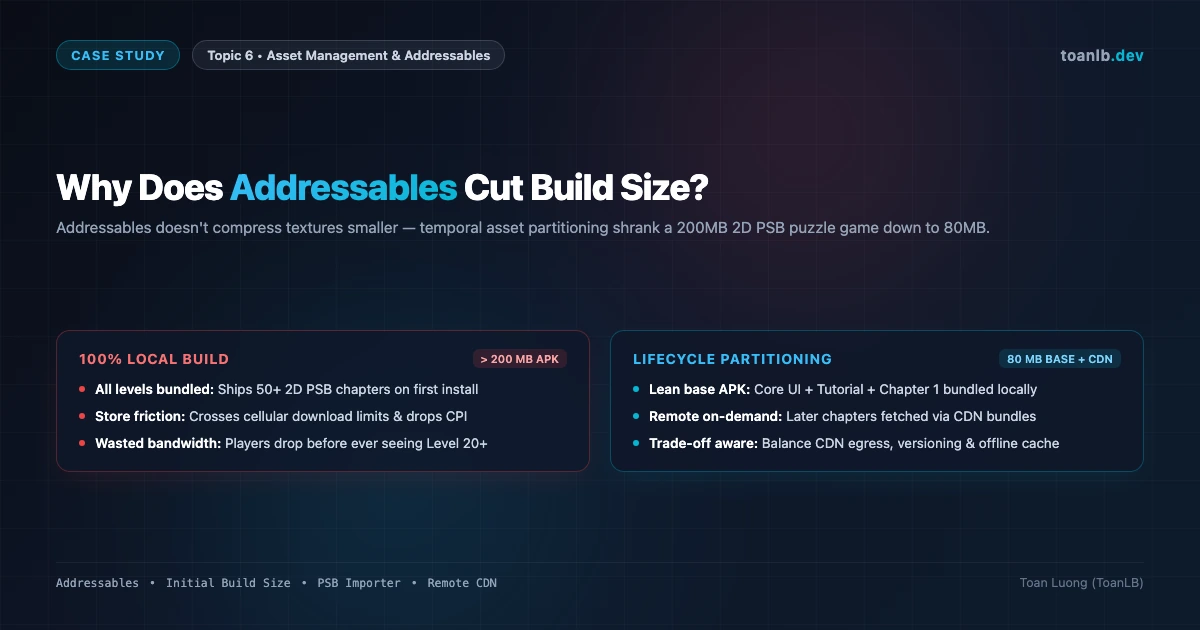
When tackling Initial Build Size optimization for a mobile game, most Unity engineers follow a well-rehearsed checklist. We start by inspecting the Build Report to identify which asset categories dominate the binary, apply ASTC 6x6 block compression to textures, switch audio compression to Vorbis or ADPCM, configure Managed Code Stripping, and purge unreferenced assets.
Alongside those standard measures, developers frequently propose another solution: adopting a resource management mindset with Addressables to reduce the build size. On the surface, that sounds completely reasonable. Yet when we pause and ask a fundamental architectural follow-up: Why does an asynchronous asset loading and memory management system like Addressables actually reduce initial build size?
Without a clear mental model of how Unity packages binaries, it is easy to talk about Addressables as if it were a compression tool. In reality, if you migrate an entire project into Addressables and leave every group on its default configuration, your store binary will not shrink by a single megabyte; in fact, it may grow slightly larger. Understanding the boundary between compressing individual assets and deferring when assets are delivered to the device is the exact shift that allowed us to cut a 2D mobile game from over 200 MB down to 80 MB.
1. The Core Misconception: Addressables Is Not a Compression Algorithm
First, let us establish a fundamental hardware and build-pipeline truth: Addressables does not inherently make any asset smaller.
- It does not reduce the bits-per-pixel of a 2048x2048 texture.
- It does not shrink the audio stream of a background music track.
- The LZ4 or LZMA compression applied to AssetBundles is no miracle compressor compared to the standard binary compression Unity already applies to
sharedassets,resources.assets, and outer APK, AAB, and IPA container packages.
So what happens if an engineering team migrates 200 MB of project assets into Addressables, but leaves every single group configured as Build & Load Paths: Local?
flowchart LR
    subgraph SG_ALL_LOCAL["Model 1: Traditional Build or 100% Local Addressables"]
        direction TB
        L1["Core UI + First 5 Levels (80 MB)"]
        L2["Subsequent 25 Levels (130 MB)"]
        L3["Packed into StreamingAssets<br/>Initial Store Build swells > 200 MB"]
        L1 --> L3
        L2 --> L3
    end
    subgraph SG_HYBRID["Model 2: Lifecycle-Based Delivery (Local + Remote)"]
        direction TB
        H1["Core UI + First 5 Levels<br/>Kept in Local Group"]
        H2["Lean Store Build ~80 MB<br/>Instant play with zero wait screen"]
        H3["Level 6 Onward (130 MB)<br/>Hosted on Remote CDN & prefetched"]
        H1 --> H2
        H3 -.->|"Streamed on progression"| H2
    end
    L3 -.->|"Partition by lifecycle"| H1
When an Addressables Group uses a Local build path, Unity compiles those .bundle files directly into StreamingAssets/aa/ and packages them straight inside the store binary uploaded to Google Play or the App Store. Every new player must still download all 200 MB before opening the app for the first time. Worse yet, because of the added catalog.json (or catalog.bin) index, bundle headers, and potential duplicate dependencies across bundles, an all-local Addressables build can end up slightly larger than the original build.
What Addressables excels at is not squeezing asset bytes smaller, but giving engineers fine-grained control over which assets must exist inside the app at install time versus which assets can be downloaded later. Put simply, Addressables reduces initial build size only when we use it to shift the point in time at which an asset is delivered to the player’s device.
2. Production Case Study: Cutting a 2D PSB Puzzle Game from Over 200 MB to 80 MB
To see how this paradigm shift plays out in production, let us walk through a real optimization case from a commercial mobile project.
The project was a 2D puzzle/casual title featuring high-resolution, hand-illustrated artwork. Each level was authored as a multi-layered PSB file (Photoshop Large Document Format) imported through Unity’s 2D PSD Importer into generated level prefabs and sprite atlases. Every level was essentially a massive multi-layer painting with dozens of independent interactive sprites, causing each compiled level asset set to weigh roughly 15 MB to 30 MB.
Initially, all levels were built locally into the application binary. As the level count grew, those PSB-generated level assets alone pushed the initial store download size past 200 MB.
When “Compressing a Little More” Is No Longer the Answer
For mobile puzzle and casual games, crossing the 200 MB initial download threshold creates severe friction for distribution and User Acquisition (UA):
- Store Conversion Drop-off: When prospective players click an ad and land on the store page over cellular data, a >200 MB download triggers cellular size warnings or long download waits, driving up install abandonment and inflating Cost Per Install (CPI).
- The First-Session Player Funnel Reality: Looking at actual player progression, a new user installing the game only plays the first handful of levels (Levels 1 through 5) during their First-Time User Experience (FTUE). Dozens of later levels sit untouched on flash storage, yet every single player is forced to pay the bandwidth and wait-time penalty for them upfront.
At that stage, cranking texture compression harder (for example, forcing crisp 2D artwork down to aggressive lossy block sizes) degrades visual quality and makes the art look blurry without solving the structural issue as new levels are added every update.
The right engineering question is no longer: “Can we compress these files a little further?” Instead, it becomes: “Why are we forcing players to download levels they have not even reached yet?”
Partitioning Assets by Usage Lifecycle (Temporal Partitioning)
We restructured the asset pipeline using the 4-tier Addressables Group partitioning strategy aligned directly with the player progression funnel:
flowchart TD
    Start["Audit each Asset / Level in the project"] --> Q1{"Required at boot or within Levels 1 - 5?"}
    Q1 -->|"Yes (Boot, Core UI, Levels 1 - 5)"| A1["Assign to Local FTUE Group<br/>Bundled in StreamingAssets (~80 MB)"]
    Q1 -->|"No (Level 6 onward)"| Q2{"Shared across multiple Levels?"}
    Q2 -->|"Yes (Common UI frames, VFX, shared audio)"| A2["Isolate in dedicated Shared Group<br/>(Shared_Local if used in L1-5, else Shared_Remote)"]
Q2 -->|"No (Standalone per-level PSB prefab)"| A3["Assign to Remote Level Group (Pack Separately)<br/>Host on CDN & prefetch via sliding window"]- Keeping the First 5 Levels in a Local FTUE Group:
We kept Core UI, boot dependencies, and the first 5 levels (
Level_01throughLevel_05) in aLocalAddressables Group. When players install the game from the App Store or Google Play and launch it, they enter Level 1 immediately - with zero secondary download progress bar blocking the entrance. Day-1 onboarding remains instant even on unstable connections. - Moving Level 6 Onward into Remote Bundles:
All PSB level prefabs from
Level_06onward were separated intoRemoteAddressables Groups (Pack Separatelyor small level chunks). The initial store binary only carries a lightweight catalog mapping keys to remote bundle hashes. - Sliding-Window Background Prefetching:
Rather than waiting until a player finishes Level 5 to pop up a blocking download screen for Level 6, a low-priority background prefetcher kicks in while the player is actively solving Level 3 or Level 4. It queries
Addressables.GetDownloadSizeAsyncand pre-downloads the upcoming 2 to 3 levels from the CDN into Unity’s local bundle cache (Caching).
The result was immediate: Initial build size dropped from over 200 MB down to roughly 80 MB (a >60% reduction in initial install size) without sacrificing a single pixel of 2D illustration fidelity.
3. Two Technical Traps That Can Sabotage Your Build Size Reduction
When migrating from a monolithic local build to a Hybrid Local + Remote Addressables setup, two common mistakes can cause your binary to stay at 200 MB even after marking groups as Remote:
Trap 1: Residual Direct References from the Boot Scene
Suppose you place the Level_06 prefab into a Group configured with RemoteBuildPath. However, a LevelDatabase ScriptableObject or a manager in your startup scene still holds a direct GameObject or Sprite reference to Level_06 instead of an AssetReference or string address key.
During player build packaging, Unity’s scene dependency walker follows that hard reference and pulls Level_06 and its textures directly into sharedassets0.assets (or resources.assets / sharedassetsN.assets) inside the local binary, while the Addressables build processor simultaneously packs a second copy into the Remote .bundle file. Not only does your initial install size fail to shrink, but the asset is compiled twice.
Trap 2: Implicit Dependency Duplication Across Bundles
Suppose Level_01 (Local) and Level_06 through Level_20 (Remote) all reference a shared 5 MB victory particle texture or decorative frame sprite, and that shared sprite is not marked as Addressable in its own group.
Unity’s build pipeline will duplicate that 5 MB sprite into the local Level_01 bundle, and then duplicate it again into every single remote level bundle (Level_06, Level_07, and so on). Across 20 levels, players end up downloading the exact same 5 MB texture 20 times over the CDN. Running Addressables Analyze with the Check Duplicate Bundle Dependencies rule and isolating common assets into a dedicated Shared group is mandatory before shipping: place assets shared with Levels 1 - 5 into Shared_Local, and place assets shared exclusively among Level 6+ into Shared_Remote so late-game dependencies never bloat the initial binary.
4. Implementing a Build-Size Budget Calculator and Sliding-Window Prefetcher with NUnit
To enforce initial install budgets automatically and coordinate background level streaming without guesswork, we can decouple the partitioning math and prefetching rules into testable C# classes. This allows the team to verify build-size savings and sliding-window boundaries in automated unit tests without spinning up a live CDN.
The architecture below comprises the following core components designed for this workflow:
LevelBundleManifestEntryandBuildPartitionReport: Pure C# data structures modeling per-level compressed sizes, remote/local placement, and direct-reference leak flags (HasDirectReferenceFromBootScene).BuildSizePartitionCalculator: A pure C# calculator that computes the exactInitialInstallBytes,DeferredRemoteBytes, and install size reduction percentage, while flagging remote assets accidentally pulled back into the binary via direct references.SlidingWindowLevelPrefetchPolicy: A pure C# policy engine that determines which upcoming remote level keys (Level_06,Level_07…) should be prefetched based on the player’s current level, the local FTUE cutoff, and the look-ahead window size.AddressablesLevelPrefetchController: A productionMonoBehaviourcontroller that executesAddressables.GetDownloadSizeAsyncandAddressables.DownloadDependenciesAsync, linkingthis.destroyCancellationTokento prevent Zombie Tasks on scene teardown, guarding against concurrent duplicate downloads with_inFlightKeys, and releasing everyAsyncOperationHandleinsidefinallyblocks.
Below is the complete implementation along with its NUnit [TestFixture] test suite:
using System;
using System.Collections.Generic;
using System.Threading;
using System.Threading.Tasks;
using NUnit.Framework;
using UnityEngine;
using UnityEngine.AddressableAssets;
using UnityEngine.ResourceManagement.AsyncOperations;

public sealed class LevelBundleManifestEntry
{
    public int LevelIndex { get; }
    public string AddressableKey { get; }
    public long CompressedBundleBytes { get; }
    public bool IsConfiguredAsRemote { get; }
    public bool HasDirectReferenceFromBootScene { get; }

    public LevelBundleManifestEntry(
        int levelIndex,
        string addressableKey,
        long compressedBundleBytes,
        bool isConfiguredAsRemote,
        bool hasDirectReferenceFromBootScene = false)
    {
        if (levelIndex <= 0)
        {
            throw new ArgumentOutOfRangeException(nameof(levelIndex), "Level index must be greater than zero.");
        }

        if (string.IsNullOrWhiteSpace(addressableKey))
        {
            throw new ArgumentException("Addressable key cannot be null or empty.", nameof(addressableKey));
        }

        if (compressedBundleBytes < 0)
        {
            throw new ArgumentOutOfRangeException(nameof(compressedBundleBytes), "Bundle size cannot be negative.");
        }

        LevelIndex = levelIndex;
        AddressableKey = addressableKey;
        CompressedBundleBytes = compressedBundleBytes;
        IsConfiguredAsRemote = isConfiguredAsRemote;
        HasDirectReferenceFromBootScene = hasDirectReferenceFromBootScene;
    }
}

public readonly struct BuildPartitionReport
{
    public long BaselineAllLocalBytes { get; }
    public long InitialInstallBytes { get; }
    public long DeferredRemoteBytes { get; }
    public long LeakedDirectReferenceBytes { get; }
    public float ReductionPercentage { get; }

    public BuildPartitionReport(
        long baselineAllLocalBytes,
        long initialInstallBytes,
        long deferredRemoteBytes,
        long leakedDirectReferenceBytes)
    {
        BaselineAllLocalBytes = baselineAllLocalBytes;
        InitialInstallBytes = initialInstallBytes;
        DeferredRemoteBytes = deferredRemoteBytes;
        LeakedDirectReferenceBytes = leakedDirectReferenceBytes;
        ReductionPercentage = baselineAllLocalBytes > 0
            ? (float)(baselineAllLocalBytes - initialInstallBytes) * 100f / baselineAllLocalBytes
            : 0f;
    }
}

/// <summary>
/// Computes Initial Build Size vs Deferred CDN footprint and detects direct-reference leaks
/// when partitioning PSB level bundles between Local FTUE and Remote CDN groups.
/// </summary>
public sealed class BuildSizePartitionCalculator
{
    public BuildPartitionReport EvaluateBuildFootprint(
        long coreEngineAndSharedLocalBytes,
        IReadOnlyList<LevelBundleManifestEntry> levels)
    {
        if (coreEngineAndSharedLocalBytes < 0)
        {
            throw new ArgumentOutOfRangeException(nameof(coreEngineAndSharedLocalBytes));
        }

        if (levels == null)
        {
            throw new ArgumentNullException(nameof(levels));
        }

        long baselineAllLocal = coreEngineAndSharedLocalBytes;
        long initialInstall = coreEngineAndSharedLocalBytes;
        long deferredRemote = 0;
        long leakedBytes = 0;

        for (int i = 0; i < levels.Count; i++)
        {
            LevelBundleManifestEntry entry = levels[i];
            if (entry == null)
            {
                continue;
            }

            baselineAllLocal += entry.CompressedBundleBytes;

            if (!entry.IsConfiguredAsRemote)
            {
                // Level is placed in a Local Group -> packaged inside the initial store binary
                initialInstall += entry.CompressedBundleBytes;
            }
            else if (entry.HasDirectReferenceFromBootScene)
            {
                // Technical trap: configured as Remote, but a hard reference from the boot scene
                // forces Unity to pull the asset into the initial install binary anyway!
                initialInstall += entry.CompressedBundleBytes;
                leakedBytes += entry.CompressedBundleBytes;
            }
            else
            {
                // Cleanly offloaded to Remote CDN; zero cost on initial store install size
                deferredRemote += entry.CompressedBundleBytes;
            }
        }

        return new BuildPartitionReport(
            baselineAllLocal,
            initialInstall,
            deferredRemote,
            leakedBytes);
    }
}

/// <summary>
/// Resolves upcoming Remote level keys to prefetch within a sliding look-ahead window
/// while the user plays earlier levels.
/// </summary>
public sealed class SlidingWindowLevelPrefetchPolicy
{
    private readonly int _localFtueLevelCount;
    private readonly int _lookAheadWindow;
    private readonly int _maxLevelCount;

    public SlidingWindowLevelPrefetchPolicy(int localFtueLevelCount, int lookAheadWindow, int maxLevelCount)
    {
        if (localFtueLevelCount < 0) throw new ArgumentOutOfRangeException(nameof(localFtueLevelCount));
        if (lookAheadWindow <= 0) throw new ArgumentOutOfRangeException(nameof(lookAheadWindow));
        if (maxLevelCount <= 0) throw new ArgumentOutOfRangeException(nameof(maxLevelCount));

        _localFtueLevelCount = localFtueLevelCount;
        _lookAheadWindow = lookAheadWindow;
        _maxLevelCount = maxLevelCount;
    }

    public List<string> ResolveKeysToPrefetch(int currentPlayingLevel, ISet<int> alreadyCachedLevels)
    {
        if (currentPlayingLevel <= 0)
        {
            throw new ArgumentOutOfRangeException(nameof(currentPlayingLevel));
        }

        var keysToDownload = new List<string>();
        int startCandidate = Math.Max(currentPlayingLevel + 1, _localFtueLevelCount + 1);
        int endCandidate = Math.Min(currentPlayingLevel + _lookAheadWindow, _maxLevelCount);

        for (int levelIdx = startCandidate; levelIdx <= endCandidate; levelIdx++)
        {
            if (alreadyCachedLevels != null && alreadyCachedLevels.Contains(levelIdx))
            {
                continue;
            }

            keysToDownload.Add($"Level_{levelIdx:D2}");
        }

        return keysToDownload;
    }
}

/// <summary>
/// Production MonoBehaviour controller that prefetches upcoming Remote level bundles,
/// preventing concurrent duplicate downloads (_inFlightKeys), linking destroyCancellationToken, and releasing handles safely.
/// </summary>
public sealed class AddressablesLevelPrefetchController : MonoBehaviour
{
    [SerializeField] private int _localFtueLevels = 5;
    [SerializeField] private int _lookAheadWindow = 2;
    [SerializeField] private int _totalLevels = 30;

    private readonly HashSet<int> _cachedRemoteLevels = new HashSet<int>();
    private readonly HashSet<string> _inFlightKeys = new HashSet<string>();
    private SlidingWindowLevelPrefetchPolicy _policy;

    private void Awake()
    {
        _policy = new SlidingWindowLevelPrefetchPolicy(_localFtueLevels, _lookAheadWindow, _totalLevels);
    }

    public async Task PrefetchUpcomingLevelsAsync(int currentLevel, CancellationToken cancellationToken = default)
    {
        if (_policy == null)
        {
            _policy = new SlidingWindowLevelPrefetchPolicy(_localFtueLevels, _lookAheadWindow, _totalLevels);
        }

        using var linkedCts = CancellationTokenSource.CreateLinkedTokenSource(
            cancellationToken,
            destroyCancellationToken);
        CancellationToken ct = linkedCts.Token;

        List<string> keys = _policy.ResolveKeysToPrefetch(currentLevel, _cachedRemoteLevels);
        for (int i = 0; i < keys.Count; i++)
        {
            ct.ThrowIfCancellationRequested();
            string key = keys[i];

            // Prevent duplicate concurrent requests if this key is already downloading
            if (!_inFlightKeys.Add(key))
            {
                continue;
            }

            try
            {
                (bool sizeCheckSucceeded, long bytesToDownload) = await CheckRequiredDownloadBytesAsync(key, ct);
                if (!sizeCheckSucceeded)
                {
                    continue;
                }

                if (bytesToDownload <= 0)
                {
                    // Bundle is already present in local disk cache from a previous session -> mark cached
                    if (TryParseLevelIndex(key, out int cachedLevel))
                    {
                        _cachedRemoteLevels.Add(cachedLevel);
                    }
                    continue;
                }

                bool downloaded = await DownloadBundleKeyAsync(key, ct);
                if (downloaded && TryParseLevelIndex(key, out int parsedLevel))
                {
                    _cachedRemoteLevels.Add(parsedLevel);
                }
            }
            finally
            {
                _inFlightKeys.Remove(key);
            }
        }
    }

    private static async Task<(bool Succeeded, long Bytes)> CheckRequiredDownloadBytesAsync(string key, CancellationToken ct)
    {
        AsyncOperationHandle<long> sizeHandle = Addressables.GetDownloadSizeAsync(key);
        try
        {
            long bytes = await sizeHandle.Task;
            ct.ThrowIfCancellationRequested();
            bool succeeded = sizeHandle.Status == AsyncOperationStatus.Succeeded;
            return (succeeded, succeeded ? bytes : 0L);
        }
        finally
        {
            if (sizeHandle.IsValid())
            {
                Addressables.Release(sizeHandle);
            }
        }
    }

    private static async Task<bool> DownloadBundleKeyAsync(string key, CancellationToken ct)
    {
        AsyncOperationHandle downloadHandle = Addressables.DownloadDependenciesAsync(key, autoReleaseHandle: false);
        try
        {
            await downloadHandle.Task;
            ct.ThrowIfCancellationRequested();
            return downloadHandle.Status == AsyncOperationStatus.Succeeded;
        }
        finally
        {
            if (downloadHandle.IsValid())
            {
                Addressables.Release(downloadHandle);
            }
        }
    }

    private static bool TryParseLevelIndex(string key, out int levelIndex)
    {
        levelIndex = 0;
        if (string.IsNullOrEmpty(key) || !key.StartsWith("Level_", StringComparison.Ordinal))
        {
            return false;
        }

        return int.TryParse(key.Substring(6), out levelIndex);
    }
}

[TestFixture]
public sealed class BuildSizePartitionAndPrefetchTests
{
    private const long OneMegabyte = 1024L * 1024L;

    [Test]
    public void EvaluateBuildFootprint_WhenKeeping5LevelsLocalAndRestRemote_Reduces210MbTo80Mb()
    {
        var calculator = new BuildSizePartitionCalculator();
        long coreAndSharedBytes = 30 * OneMegabyte; // 30 MB Core UI & Shared Assets

        var levels = new List<LevelBundleManifestEntry>();
        // First 5 levels kept in Local FTUE Group (10 MB each -> 50 MB total)
        for (int i = 1; i <= 5; i++)
        {
            levels.Add(new LevelBundleManifestEntry(
                levelIndex: i,
                addressableKey: $"Level_{i:D2}",
                compressedBundleBytes: 10 * OneMegabyte,
                isConfiguredAsRemote: false));
        }

        // Next 8 levels moved to Remote CDN Group (16.25 MB each -> 130 MB total)
        long remoteLevelBytes = (long)(16.25 * OneMegabyte);
        for (int i = 6; i <= 13; i++)
        {
            levels.Add(new LevelBundleManifestEntry(
                levelIndex: i,
                addressableKey: $"Level_{i:D2}",
                compressedBundleBytes: remoteLevelBytes,
                isConfiguredAsRemote: true));
        }

        BuildPartitionReport report = calculator.EvaluateBuildFootprint(coreAndSharedBytes, levels);

        // Happy path: 210 MB baseline build drops to 80 MB initial store install, offloading 130 MB to CDN
        Assert.AreEqual(210 * OneMegabyte, report.BaselineAllLocalBytes);
        Assert.AreEqual(80 * OneMegabyte, report.InitialInstallBytes);
        Assert.AreEqual(130 * OneMegabyte, report.DeferredRemoteBytes);
        Assert.AreEqual(0, report.LeakedDirectReferenceBytes);
        Assert.AreEqual(61.90f, report.ReductionPercentage, 0.05f);
    }

    [Test]
    public void EvaluateBuildFootprint_WhenAllAddressablesMarkedLocal_YieldsZeroReduction()
    {
        var calculator = new BuildSizePartitionCalculator();
        long coreBytes = 30 * OneMegabyte;

        var allLocalLevels = new List<LevelBundleManifestEntry>
        {
            new LevelBundleManifestEntry(1, "Level_01", 25 * OneMegabyte, isConfiguredAsRemote: false),
            new LevelBundleManifestEntry(2, "Level_02", 25 * OneMegabyte, isConfiguredAsRemote: false),
            new LevelBundleManifestEntry(3, "Level_03", 25 * OneMegabyte, isConfiguredAsRemote: false)
        };

        BuildPartitionReport report = calculator.EvaluateBuildFootprint(coreBytes, allLocalLevels);

        // Boundary case: using Addressables with everything marked Local yields 0% install size reduction
        Assert.AreEqual(105 * OneMegabyte, report.BaselineAllLocalBytes);
        Assert.AreEqual(105 * OneMegabyte, report.InitialInstallBytes);
        Assert.AreEqual(0, report.DeferredRemoteBytes);
        Assert.AreEqual(0f, report.ReductionPercentage, 0.001f);
    }

    [Test]
    public void EvaluateBuildFootprint_WhenRemoteLevelHasDirectReferenceLeak_IncludesLeakedBytesInInitialInstall()
    {
        var calculator = new BuildSizePartitionCalculator();
        long coreBytes = 30 * OneMegabyte;

        var levelsWithLeak = new List<LevelBundleManifestEntry>
        {
            new LevelBundleManifestEntry(1, "Level_01", 20 * OneMegabyte, isConfiguredAsRemote: false),
            // Level 6 is marked Remote but leaked via a direct reference in the boot scene
            new LevelBundleManifestEntry(6, "Level_06", 25 * OneMegabyte, isConfiguredAsRemote: true, hasDirectReferenceFromBootScene: true),
            new LevelBundleManifestEntry(7, "Level_07", 25 * OneMegabyte, isConfiguredAsRemote: true, hasDirectReferenceFromBootScene: false)
        };

        BuildPartitionReport report = calculator.EvaluateBuildFootprint(coreBytes, levelsWithLeak);

        Assert.AreEqual(75 * OneMegabyte, report.InitialInstallBytes);
        Assert.AreEqual(25 * OneMegabyte, report.LeakedDirectReferenceBytes);
        Assert.AreEqual(25 * OneMegabyte, report.DeferredRemoteBytes);
    }

    [Test]
    public void SlidingWindowPrefetchPolicy_ResolvesOnlyUncachedRemoteLevelsWithinWindow()
    {
        // First 5 levels are Local, look-ahead window of 3 levels, 10 levels total
        var policy = new SlidingWindowLevelPrefetchPolicy(localFtueLevelCount: 5, lookAheadWindow: 3, maxLevelCount: 10);
        var cached = new HashSet<int>();

        // Playing Level 2 (window reaches Level 5): Levels 1..5 are Local, so 0 remote downloads needed
        List<string> atLevel2 = policy.ResolveKeysToPrefetch(currentPlayingLevel: 2, cached);
        Assert.AreEqual(0, atLevel2.Count);

        // Playing Level 4 (window reaches Level 7): Prefetches Level_06 and Level_07
        List<string> atLevel4 = policy.ResolveKeysToPrefetch(currentPlayingLevel: 4, cached);
        CollectionAssert.AreEqual(new[] { "Level_06", "Level_07" }, atLevel4);

        // Once Level 6 is cached and player advances to Level 5 (window reaches Level 8): Prefetches Level_07 and Level_08
        cached.Add(6);
        List<string> atLevel5 = policy.ResolveKeysToPrefetch(currentPlayingLevel: 5, cached);
        CollectionAssert.AreEqual(new[] { "Level_07", "Level_08" }, atLevel5);

        // Boundary case near end of content (Level 9, max 10): Clamps cleanly to Level_10
        List<string> atLevel9 = policy.ResolveKeysToPrefetch(currentPlayingLevel: 9, cached);
        CollectionAssert.AreEqual(new[] { "Level_10" }, atLevel9);
    }

    [Test]
    public void ValidationAndNullBoundaries_ThrowExpectedExceptions_AndHandleNullCacheSet()
    {
        var calculator = new BuildSizePartitionCalculator();
        Assert.Throws<ArgumentNullException>(() => calculator.EvaluateBuildFootprint(1024, null));
        Assert.Throws<ArgumentOutOfRangeException>(() => calculator.EvaluateBuildFootprint(-1, new List<LevelBundleManifestEntry>()));
        Assert.Throws<ArgumentOutOfRangeException>(() => _ = new LevelBundleManifestEntry(0, "Level_00", 100, false));
        Assert.Throws<ArgumentException>(() => _ = new LevelBundleManifestEntry(1, "", 100, false));

        var policy = new SlidingWindowLevelPrefetchPolicy(localFtueLevelCount: 5, lookAheadWindow: 2, maxLevelCount: 10);
        Assert.Throws<ArgumentOutOfRangeException>(() => policy.ResolveKeysToPrefetch(0, null));

        // Boundary case: passing a null cache set still resolves remote keys without throwing
        List<string> keysWithNullSet = policy.ResolveKeysToPrefetch(currentPlayingLevel: 5, alreadyCachedLevels: null);
        CollectionAssert.AreEqual(new[] { "Level_06", "Level_07" }, keysWithNullSet);
    }
}
5. Engineering and Operational Trade-offs
Cutting a mobile build from over 200 MB down to 80 MB with Addressables provides a clear advantage for store conversion and user acquisition, but it is still an engineering trade-off. Moving assets from Local to Remote shifts cost from initial store binary size to CDN infrastructure and operational maintenance:
| Trade-off Dimension | 100% Local Build (Traditional or All-Local Addressables) | 100% Remote Level Bundles on CDN | Hybrid Lifecycle Model (Levels 1-5 Local + Level 6+ Remote) |
|---|---|---|---|
| Initial Store Install Size | Heavy (> 200 MB); triggers cellular download friction and hurts UA conversion | Ultra-light (~30 - 40 MB); fast initial store install | Balanced (~80 MB); strong store conversion without sacrificing art quality |
| First-Time User Experience (FTUE) | Instant entry into gameplay after store install | Poor: blocks new players with a secondary download bar before Level 1 | Instant entry into Levels 1 - 5 with zero secondary wait screen |
| Offline Playability | 100% of levels playable offline immediately after install | Unplayable if the player launches offline or on flaky reception | Levels 1 - 5 and any prefetched levels work seamlessly offline |
| CDN Bandwidth & Hosting Cost | Zero (Google Play and App Store absorb 100% of binary hosting costs) | High: pays CDN egress bandwidth for 100% of installs right at Level 1 | Cost-efficient: only pays CDN bandwidth for engaged players who progress past Level 3 - 5 |
| Versioning & DevOps Overhead | Minimal; single AAB/IPA upload to the store | High: requires CDN hosting, catalog versioning, and boot-level network error handling | Moderate-High: requires CI/CD bundle deployment and background prefetch orchestration |
One often-overlooked financial benefit of the Hybrid model sits in the fourth row: in casual and puzzle games, a sizeable percentage of users install a game, try Level 1 or 2, and churn. By bundling the first 5 levels locally, the studio pays zero CDN egress bandwidth for early-churning users; remote bandwidth is only consumed by retained players who progress deeper into the game.
6. Key Engineering Takeaways
Reflecting on the 200 MB to 80 MB PSB optimization case, three principles stand out for mobile build size management:
- Build size optimization is not just about compressing assets harder: Texture compression, audio encoding, and code stripping all hit a diminishing-returns ceiling where further compression visibly degrades the game. Once assets are properly compressed, the biggest wins come from asking: Does this asset genuinely need to reside in the app binary the moment a player installs it from the store?
- Addressables only reduces build size when paired with lifecycle partitioning: Migrating everything to Addressables while leaving every group marked as
Localdoes not reduce install size. Partition assets deliberately between install-time essentials (Boot, Core UI, and the initial FTUE levels) in Local groups and progression-dependent content in Remote groups. - Balance technical architecture against company unit economics: Introducing a CDN or custom remote server brings real operational costs: egress bandwidth bills, catalog versioning, cache invalidation, and engineering maintenance. The right architecture balances UA conversion gains (lower CPI from a leaner store binary) against the team’s operational capacity.

