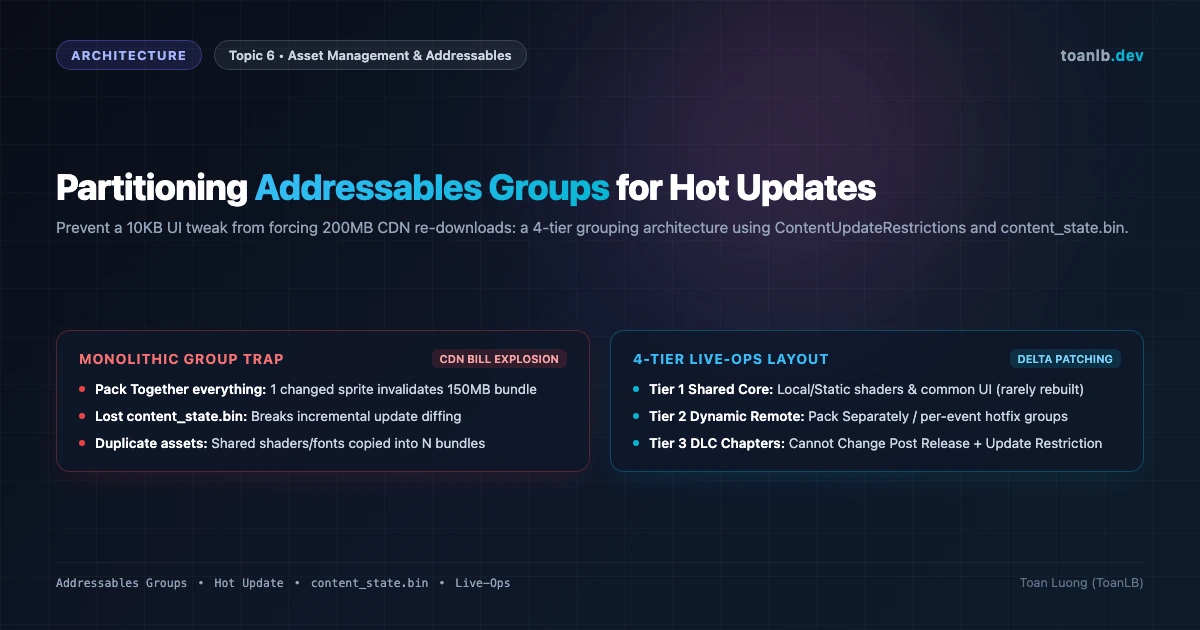
When integrating Addressables into a greenfield Unity project, the path of least resistance is tempting: dump all prefabs, textures, and audio clips into a single group named Default Local Group.
During early prototyping or initial Alpha builds, this shortcut works flawlessly. Assets stream asynchronously through clean C# tasks. The team assures themselves: “We only have a dozen stages and a small footprint; keep everything in Local for now, and we will figure out CDN delivery after launch”.
Yet when the title transitions into commercial Live-ops, the technical debt strikes violently.
Live-ops schedules a seasonal in-game event featuring seasonal banners and a minor typo fix on a stage background. The artist alters a single 200KB texture. But when the engineering team triggers the content update build pipeline, reality sets in: The entire 300MB AssetBundle recomputes with a brand-new hash.
Upon launching the game, players are greeted by an unexpected 300MB download bar over cellular networks. Day-one event churn rates spike. At month’s end, the studio’s cloud CDN egress bill arrives at quadruple the projected budget.
Worse, if your initial store release disabled remote catalogs or discarded the internal compilation state binary, differential patch updates collapse completely.
How should you partition Addressables Groups to support instantaneous onboarding, smooth DLC streaming, and seamless live patching without bankrupting the studio on CDN bandwidth?
1. Two Classic Live-ops Pitfalls with Addressables
Across mobile productions scaling across hundreds of levels, two configuration oversights routinely sabotage live operations:
Pitfall 1: Keeping Everything in Local and Discarding content_state.bin
Many teams assume: “For our v1.0 release, pack everything into the local binary so players can jump in immediately. We will configure Remote hosting when we publish DLC later”.
Consequently, developers uncheck Build Remote Catalog in Addressables Settings. When players download v1.0, the game client never polls remote endpoints for catalog updates.
More critically, when building player content, Unity generates a vital state artifact:
addressables_content_state.bin (located by default in Assets/AddressableAssetsData/<Platform>/, configurable via Content State Build Path in System Settings).
This binary artifact catalogs hash maps and dependency trees for every asset shipped in that release. If developers add this file to .gitignore or discard it during CI/CD workspace teardowns:
- You permanently lose the capability to produce differential content patches.
- Attempting to fix a single sprite requires executing
Build Player Content(a full rebuild), scrambling hash values across every bundle and forcing existing players to redownload the entire game library from scratch. - The team’s only recourse is submitting a full client update to Google Play and Apple App Store, enduring multi-day review queues.
Treat addressables_content_state.bin as the cryptographic root key of your live distribution architecture. You must commit this file into version control (Git / Git LFS) or preserve it within CI/CD build artifacts upon compiling any production release candidate!
Pitfall 2: Packing All Remote Assets into One Monolithic Group via Pack Together
The second common error is consolidating hundreds of stages, backgrounds, and character assets into a single group named Remote_Content with the default setting Bundle Mode: Pack Together.
Unity AssetBundles operate under an all-or-nothing delivery model:
- An AssetBundle is compressed into a single monolithic archive.
- When an artist modifies a single 50KB icon inside, the CRC hash of the entire archive changes.
- The client cannot download individual files from inside a bundle; it must re-download the entire 300MB archive.
2. Two Schemas That Dictate Group Packaging Architecture
To master group partitioning, you must inspect the two primary configuration schemas attached to each Addressables Group Inspector:
Schema 1: BundledAssetGroupSchema
This schema controls physical archive generation and target storage paths:
-
BuildPath and LoadPath:
- Local: Archives are baked directly into the application’s
StreamingAssetsdirectory (LocalBuildPathandLocalLoadPath). Players access data locally without internet connectivity. - Remote: Bundles compile into a staging directory (
RemoteBuildPath) for upload to CDN buckets, loaded by clients via URL endpoints (RemoteLoadPath).
- Local: Archives are baked directly into the application’s
-
Bundle Mode:
- Pack Together: All assets in the group compile into a single AssetBundle archive.
- Pros: Minimal file count, reduced HTTP request overhead, fewer operating system file descriptors.
- Cons: Modifying a single asset forces players to redownload the entire archive.
- Pack Separately: Each asset in the group produces an independent AssetBundle archive.
- Pros: Surgical patching; updates download strictly the modified asset.
- Cons: Massive bundle explosion (thousands of tiny files), severe I/O contention, high RAM overhead for bundle headers, and risks exhausting OS file handle limits.
- Pack Together By Label: Bundles assets sharing identical labels into common archives.
- Pros: High architectural flexibility, grouping related assets into logical units (e.g.,
Chapter_01,Chapter_02). - Important Nuance: If an asset has two distinct labels (e.g.,
Chapter_01andBoss), Addressables compiles that asset into a third distinct bundle specific to that label combination.
- Pros: High architectural flexibility, grouping related assets into logical units (e.g.,
- Pack Together: All assets in the group compile into a single AssetBundle archive.
-
AssetBundle Compression:
- LZ4: The industry standard for production. Uses chunk-based compression, allowing partial decompression from disk directly into RAM without Main Thread hitches.
- LZMA: Offers 15-20% higher compression ratios, but requires decompressing the entire bundle payload into memory upfront. Induces CPU spikes and transient RAM bloat; strictly reserved for massive initial background downloads.
Schema 2: ContentUpdateGroupSchema (Update Restrictions)
This schema controls how the build pipeline handles modified assets during content updates:
- Prevent Updates (Formerly Cannot Change Post Release):
- Designed for local assets shipped in client binaries or immutable DLC packs.
- When enabled, Addressables recognizes that base archives reside on client storage and must not be overwritten in place.
- When an asset in this group changes, run Tools > Check for Content Update Restrictions (or via the Analyze window). Addressables automatically moves modified assets into a new remote patch group (typically suffixed with
_content_update). - Outcome: The base local archive stays intact on the player’s device; the client downloads a microscopic remote patch containing only the modified assets!
- Can Change Post Release (Prevent Updates Disabled):
- Designed for volatile remote groups (seasonal live events, rotating shop offerings).
- During updates, the entire bundle re-compiles with a new hash, and clients download the complete replacement bundle.
3. The 4-Tier Group Partitioning Architecture
To strike an optimal balance between instant player onboarding, live-ops agility, and minimal CDN costs, professional game studios apply a 4-tier group partitioning architecture:
flowchart TB
    subgraph LOCAL["Initial Binary: Local App"]
        direction TB
        L1["Tier 1: Core Local (Onboarding)"]
        L2["Boot Scene, UI Audio, First 20 Levels"]
        L1 --> L2
    end

    subgraph REMOTE["Remote Delivery: Cloud CDN"]
        direction TB
        R1["Tier 2: Dynamic Live-Ops (Short Lifespan)"]
        R2["Tier 3: Level Packs & DLC (Paced Progression)"]
        R1 -.->|"Independent Streams"| R2
    end

    subgraph SHARED["Shared Foundations: Dependencies"]
        direction TB
        S1["Tier 4: Global Shaders & Materials"]
        S2["Shared Sprite Atlases & Core HUD"]
        S1 --> S2
    end

    LOCAL -->|"Instant Launch Offline"| CLIENT["Game Client (Player Device)"]
    R1 -.->|"Stream Event Assets"| CLIENT
    R2 -.->|"Background Stream by Progression"| CLIENT
    SHARED ==>|"Provides Foundation"| LOCAL
    SHARED -.->|"Shared Reference"| REMOTE
Tier 1: Core Local (Instant Play & Onboarding)
- Configuration:
BuildPath: Local,LoadPath: Local,BundleMode: Pack Together,Prevent Updates: Enabled. - Contents: Boot scene, primary typography fonts, baseline UI sound effects, tutorial sequences, and the first 20-30 levels.
- Objective: Protect Day 1 Retention. Players launching the app from the store experience immediate gameplay, even in airplane mode. Never force players to endure a 500MB download bar upon first launch.
Tier 2: Dynamic Live-Ops & Events (High Volatility / Short Lifespan)
- Configuration:
BuildPath: Remote,LoadPath: Remote,BundleMode: Pack Together,Prevent Updates: Disabled, distinct group per event (Event_Halloween,Event_LunarNewYear). - Contents: Promotional banners, seasonal character skins, event shop items, event music.
- Objective: These events run for 2-3 weeks then retire. Group sizes are small (5-15MB). We disable
Prevent Updatesso adjustments recompile the entire archive. Redownloading a 5MB payload is entirely acceptable and isolates event changes from core gameplay assets.
Tier 3: Level Packs & DLC (Paced Progression & Background Download)
- Configuration:
BuildPath: Remote,LoadPath: Remote,BundleMode: Pack Together By Label(or one group per chapter),Prevent Updates: Enabled. - Contents: Stage definitions, environment 2K textures, and 3D assets for Chapter 31 onwards.
- Objective: Stream on demand. While a player explores Chapter 1, the client quietly downloads Chapter 2 in the background. If a visual bug in Chapter 2 needs fixing,
Prevent Updatesextracts only that single texture into a lightweight patch without forcing redownloads of the entire chapter.
Tier 4: Shared Dependencies & The Duplicate Asset Trap
This is the most dangerous technical pitfall when partitioning multiple groups:
Suppose you have a shared texture Noise_Texture.png or custom shader Custom_Dissolve.shader. This texture is referenced by a prefab in Group_Core and another prefab in Group_Chapter_02.
If Noise_Texture.png is not explicitly placed in an Addressable Group:
- Unity’s build pipeline automatically clones the texture into the
Group_Corebundle. - It also clones the texture into the
Group_Chapter_02bundle. - When the client loads both stages, two independent copies of the identical texture load into native RAM, doubling memory consumption and download bandwidth.
Golden Rule: Consolidate cross-referenced assets into an explicit group named Shared_Dependencies.
- If these assets are required by Tier 1 (Core Local), the Shared Group must reside in Local. Placing it in Remote causes missing shaders (magenta screens) when players open the game offline!
- Prior to finalizing release builds, open
Addressables > Analyzeand execute: Check Duplicate Bundle Dependencies to purge silent cross-bundle duplication.
4. Production Code: Content Update and Delta Download Manager
In a mobile Puzzle RPG featuring over 200 chapters and weekly live events, the client binary is capped below 120MB to optimize organic store conversions. Subsequent chapters stream dynamically based on player progression.
To deliver a polished experience, the client utilizes a centralized content update service. This service polls remote catalogs, computes exact download deltas (skipping cached bundles), and reports real-time download progress.
Production Example: ContentUpdateManager
Below is a production ContentUpdateManager handling catalog synchronization, size estimation, and resilient background downloading via Addressables APIs:
using System;
using System.Collections.Generic;
using System.Threading;
using System.Threading.Tasks;
using UnityEngine;
using UnityEngine.AddressableAssets;
using UnityEngine.ResourceManagement.AsyncOperations;

public class ContentUpdateManager : MonoBehaviour
{
    // Polls the remote CDN to determine if catalog updates are available
    public async Task<List<string>> CheckForUpdateCatalogsAsync(CancellationToken cancellationToken = default)
    {
        var checkHandle = Addressables.CheckForCatalogUpdates(autoReleaseHandle: false);
        try
        {
            var catalogs = await checkHandle.Task;
            cancellationToken.ThrowIfCancellationRequested();

            if (checkHandle.Status == AsyncOperationStatus.Failed)
            {
                Debug.LogError($"[ContentUpdate] Catalog check failed: {checkHandle.OperationException}");
                throw checkHandle.OperationException ?? new Exception("Unable to connect to content server.");
            }

            return catalogs ?? new List<string>();
        }
        finally
        {
            Addressables.Release(checkHandle);
        }
    }

    // Applies updated catalog manifests and clears obsolete bundle caches
    public async Task<bool> UpdateCatalogsAsync(
        List<string> catalogs,
        bool autoCleanBundleCache = true,
        CancellationToken cancellationToken = default)
    {
        if (catalogs == null || catalogs.Count == 0) return true;

        var updateHandle = Addressables.UpdateCatalogs(autoCleanBundleCache, catalogs, autoReleaseHandle: false);
        try
        {
            await updateHandle.Task;
            cancellationToken.ThrowIfCancellationRequested();
            return updateHandle.Status == AsyncOperationStatus.Succeeded;
        }
        finally
        {
            Addressables.Release(updateHandle);
        }
    }

    // Queries actual remaining download size for a given address or label
    public async Task<long> GetDownloadSizeAsync(string key, CancellationToken cancellationToken = default)
    {
        var sizeHandle = Addressables.GetDownloadSizeAsync(key);
        try
        {
            long downloadSize = await sizeHandle.Task;
            cancellationToken.ThrowIfCancellationRequested();
            return downloadSize;
        }
        finally
        {
            Addressables.Release(sizeHandle);
        }
    }

    // Downloads dependencies with progress reporting and cancellation support
    public async Task<bool> DownloadContentWithProgressAsync(
        string key,
        Action<float, long, long> onProgressUpdated,
        CancellationToken cancellationToken = default)
    {
        long totalBytes = await GetDownloadSizeAsync(key, cancellationToken);
        if (totalBytes <= 0)
        {
            onProgressUpdated?.Invoke(1.0f, 0, 0);
            return true;
        }

        var downloadHandle = Addressables.DownloadDependenciesAsync(key, autoReleaseHandle: false);
        try
        {
            while (!downloadHandle.IsDone)
            {
                cancellationToken.ThrowIfCancellationRequested();
                var status = downloadHandle.GetDownloadStatus();
                onProgressUpdated?.Invoke(status.Percent, status.DownloadedBytes, status.TotalBytes);
                await Task.Yield();
            }

            cancellationToken.ThrowIfCancellationRequested();
            bool isSuccess = downloadHandle.Status == AsyncOperationStatus.Succeeded;
            if (isSuccess)
            {
                onProgressUpdated?.Invoke(1.0f, totalBytes, totalBytes);
            }
            return isSuccess;
        }
        finally
        {
            Addressables.Release(downloadHandle);
        }
    }
}
Pure C# Architecture Simulator and Unit Testing
To verify group extraction rules and delta download calculations independently of the Unity Engine, we encapsulate partitioning logic into testable C# models:
using System;
using System.Collections.Generic;
using System.Linq;
using NUnit.Framework;

public enum GroupStorageLocation
{
    LocalStreamingAssets,
    RemoteCdn
}

public enum GroupUpdatePolicy
{
    PreventUpdates,
    CanChangePostRelease
}

public class MockAssetRecord
{
    public string AssetAddress { get; set; }
    public string ContentHash { get; set; }
    public long ByteSize { get; set; }
}

public class MockGroupConfig
{
    public string GroupName { get; set; }
    public GroupStorageLocation StorageLocation { get; set; }
    public GroupUpdatePolicy UpdatePolicy { get; set; }
    public List<MockAssetRecord> Assets { get; set; } = new();

    public long TotalSize => Assets.Sum(a => a.ByteSize);
}

public class ContentUpdateCalculator
{
    // Determines if a modified asset must be extracted into a separate patch group
    public static bool ShouldExtractToUpdateGroup(MockGroupConfig group, MockAssetRecord baseAsset, string newHash)
    {
        if (baseAsset.ContentHash == newHash) return false;

        // Assets inside PreventUpdates groups must be extracted to preserve base archives
        return group.UpdatePolicy == GroupUpdatePolicy.PreventUpdates;
    }

    // Calculates delta download size by comparing local installed catalog with remote latest
    public static long CalculateDeltaDownloadSize(
        List<MockAssetRecord> localInstalledAssets,
        List<MockAssetRecord> remoteLatestAssets)
    {
        long patchBytes = 0;
        var localMap = localInstalledAssets.ToDictionary(a => a.AssetAddress, a => a.ContentHash);

        foreach (var remoteAsset in remoteLatestAssets)
        {
            if (!localMap.TryGetValue(remoteAsset.AssetAddress, out var localHash) || localHash != remoteAsset.ContentHash)
            {
                patchBytes += remoteAsset.ByteSize;
            }
        }

        return patchBytes;
    }
}

[TestFixture]
public class ContentUpdateStrategyTests
{
    [Test]
    public void PreventUpdates_WhenAssetModified_RequiresExtractionToPatchGroup()
    {
        var coreLocalGroup = new MockGroupConfig
        {
            GroupName = "CoreLocal",
            StorageLocation = GroupStorageLocation.LocalStreamingAssets,
            UpdatePolicy = GroupUpdatePolicy.PreventUpdates,
            Assets = new List<MockAssetRecord>
            {
                new MockAssetRecord { AssetAddress = "UI/TitleScreen", ContentHash = "hash_v1", ByteSize = 2_500_000 }
            }
        };

        var asset = coreLocalGroup.Assets[0];
        bool needExtract = ContentUpdateCalculator.ShouldExtractToUpdateGroup(coreLocalGroup, asset, "hash_v2");

        Assert.IsTrue(needExtract, "Local assets under PreventUpdates must be extracted to a remote patch group upon modification.");
    }

    [Test]
    public void CanChangePostRelease_WhenAssetModified_DoesNotRequireExtraction()
    {
        var liveOpsEventGroup = new MockGroupConfig
        {
            GroupName = "Event_Halloween",
            StorageLocation = GroupStorageLocation.RemoteCdn,
            UpdatePolicy = GroupUpdatePolicy.CanChangePostRelease,
            Assets = new List<MockAssetRecord>
            {
                new MockAssetRecord { AssetAddress = "Event/Banner", ContentHash = "hash_v1", ByteSize = 500_000 }
            }
        };

        var asset = liveOpsEventGroup.Assets[0];
        bool needExtract = ContentUpdateCalculator.ShouldExtractToUpdateGroup(liveOpsEventGroup, asset, "hash_v2");

        Assert.IsFalse(needExtract, "Dynamic event groups allow in-place bundle rebuilds without group extraction.");
    }

    [Test]
    public void CalculateDeltaDownloadSize_WhenOnlyOneAssetModified_OnlyDownloadsModifiedBytes()
    {
        var localInstalled = new List<MockAssetRecord>
        {
            new MockAssetRecord { AssetAddress = "Chapter1/Background", ContentHash = "hash_bg_v1", ByteSize = 15_000_000 },
            new MockAssetRecord { AssetAddress = "Chapter1/Music", ContentHash = "hash_audio_v1", ByteSize = 5_000_000 }
        };

        var remoteLatest = new List<MockAssetRecord>
        {
            new MockAssetRecord { AssetAddress = "Chapter1/Background", ContentHash = "hash_bg_v2", ByteSize = 15_200_000 },
            new MockAssetRecord { AssetAddress = "Chapter1/Music", ContentHash = "hash_audio_v1", ByteSize = 5_000_000 }
        };

        long deltaBytes = ContentUpdateCalculator.CalculateDeltaDownloadSize(localInstalled, remoteLatest);

        Assert.AreEqual(15_200_000, deltaBytes, "Client should only download the delta for the modified background file.");
    }

    [Test]
    public void CalculateDeltaDownloadSize_WhenAllAssetsIdentical_DownloadSizeIsZero()
    {
        var localInstalled = new List<MockAssetRecord>
        {
            new MockAssetRecord { AssetAddress = "HUD/Coins", ContentHash = "hash_same", ByteSize = 100_000 }
        };

        var remoteLatest = new List<MockAssetRecord>
        {
            new MockAssetRecord { AssetAddress = "HUD/Coins", ContentHash = "hash_same", ByteSize = 100_000 }
        };

        long deltaBytes = ContentUpdateCalculator.CalculateDeltaDownloadSize(localInstalled, remoteLatest);

        Assert.AreEqual(0, deltaBytes, "Delta size must equal zero when hashes match perfectly.");
    }
}
5. Architectural Trade-off Matrix: Bundle Packaging Modes
| Criteria | Pack Together | Pack Separately | Pack Together By Label |
|---|---|---|---|
| Generated Bundle Count | Minimal (1 archive per group) | Excessive (1 archive per asset) | Balanced (1 archive per label) |
| Download Cost to Patch 1 Asset | Very High; downloads entire archive | Minimal; downloads only changed asset | Low; downloads only labeled bundle |
| HTTP Request Count | Minimal (1 request per group) | High; network queue contention | Moderate; controlled per module |
| Bundle Header RAM Overhead | Minimal; single bundle metadata | High; hundreds of bundle headers in RAM | Moderate; structured by screen flow |
| Risk of Unintended Hybrid Bundles | None | None | Present if assets share multiple labels |
| Optimal Use Case | Core Local, Tutorial, Short Events | Massive single assets (4K Cutscenes) | Chapter packs, DLC, Character skins |
6. Production Takeaways
- Enable Remote Catalogs and Preserve content_state.bin from Day One: Do not wait until DLC is scheduled. Enable remote paths and commit the compilation state binary to Git LFS starting with v1.0.
- Local Assets Can Be Patched Remotely: Through
Prevent Updates, local binary assets are not frozen. Upon discovering modified assets, Addressables redirects the client to download remote patches without requiring native app store updates. - Never Trust Automatic Grouping Blindly: Prior to release milestones, audit dependency graphs via the Analyze tool to catch cross-bundle duplicate shaders and textures.
- Addressables Patches Data, Not C# Code: AssetBundles store serialized data and prefabs. Compiled IL2CPP C# logic cannot be hot-patched via Addressables (unless using specialized interpreter solutions like HybridCLR or Lua). If prefab adjustments modify field types or delete serialized properties before native app updates occur, deserialization will fail with null reference errors. Never promise stakeholders that gameplay logic can be patched through Addressables alone!

