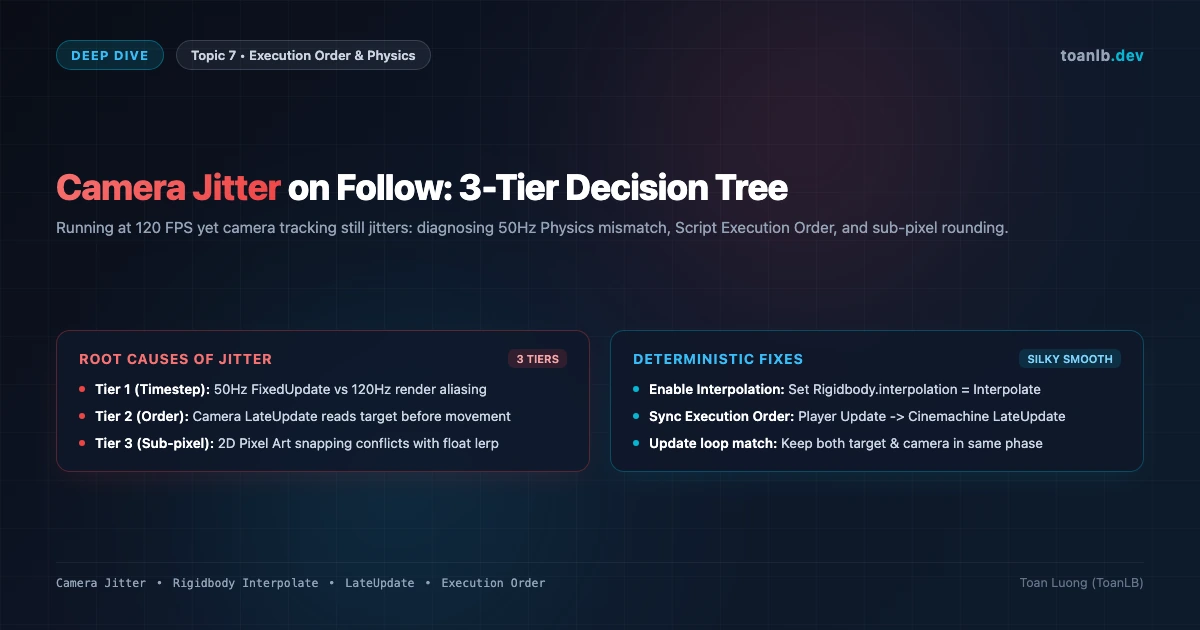
During game development in Unity, whether building 2D platformers, action brawlers, or 3D open-world titles, there is an infamous visual defect that plagues almost every engineer: The character moves smoothly, the on-screen FPS counter displays a rock-solid 60 or 120 FPS, but the follow camera stutters and jitters violently.
When confronted with this artifact, developers often resort to desperate trial-and-error:
- Noticing the character uses a Rigidbody, they casually move camera logic from
UpdateintoFixedUpdate-> A 120Hz display suddenly degrades into 50Hz cinematic stutter! - Moving the camera logic to
LateUpdate-> The character’s sprite borders still flicker with micro-jitters. - Inserting
Vector3.Lerpto smooth tracking -> The camera drags sluggishly and tracking speed fluctuates wildly based on the player’s frame rate.
Camera jitter is rarely an isolated bug; it is the collision of disparate subsystems across the Unity Engine. To permanently eliminate this artifact, we must traverse a 3-Tier Troubleshooting Decision Tree to identify and resolve root causes systematically.
1. High-Level Decision Tree: 3 Diagnostic Tiers
Before modifying code, walk through this 3-tier diagnostic framework to isolate the culprit:
flowchart TD
    START{"Camera jitters when following player?"}

    START -->|"TIER 1: Physics-Driven Movement"| T1["Character moved via Rigidbody in FixedUpdate"]
    T1 -->|"50Hz vs 60/120Hz Mismatch"| FIX1["TIER 1 SOLUTION:<br/>• Keep Camera in LateUpdate<br/>• Enable Rigidbody.interpolation = Interpolate"]

    START -->|"TIER 2: Transform-Driven Movement"| T2["Character moved via Transform.position in Update"]
    T2 -->|"Script Execution Order Race"| FIX2["TIER 2 SOLUTION:<br/>• Move player in Update<br/>• Follow camera in LateUpdate<br/>• Tune DefaultExecutionOrder"]

    START -->|"TIER 3: 2D Pixel Art Artifacts"| T3["LateUpdate enabled but sprite borders still jitter"]
    T3 -->|"Sub-pixel Float Snapping"| FIX3["TIER 3 SOLUTION:<br/>• Apply 2D Pixel Perfect Camera<br/>• Snap coordinates to Pixel Per Unit (PPU)"]
2. Tier 1: Frequency Mismatch Between Physics Timestep and Display Refresh Rate
This is the most common culprit in projects utilizing physical simulation (PhysX or Box2D):
flowchart LR
    subgraph PHYS["Physics Loop: FixedUpdate (50Hz)"]
        direction TB
        P1["Frame 1: 0ms (Step 1)"]
        P2["Frame 2: 20ms (Step 2)"]
        P3["Frame 3: 40ms (Step 3)"]
        P1 --> P2 --> P3
    end

    subgraph DISP["Display Loop: Render Frame (60Hz / 120Hz)"]
        direction TB
        R1["Frame 1: 0.0ms (Render)"]
        R2["Frame 2: 16.6ms (Aliased!)"]
        R3["Frame 3: 33.3ms (Aliased!)"]
        R1 --> R2 --> R3
    end

    PHYS -.->|"Unsynchronized Frequencies"| DISP
The Nature of Frequency Aliasing
- Time Accumulator on Main Thread:
FixedUpdatedoes not run on a separate background thread; it executes sequentially on the Main Thread inside the PlayerLoop’s physics phase. Unity maintains an internal time accumulator: each time real elapsed time exceedsTime.fixedDeltaTime(default0.02s = 50Hz), the engine triggers aFixedUpdatestep. - The Character: Moves via
Rigidbody.velocityorRigidbody.MovePositioninsideFixedUpdate(orRigidbody2Din 2D). Physical positions update strictly at these discrete 20ms boundaries. - Display and Camera: The camera tracks and renders at the monitor’s display refresh rate (
60Hz = 16.6ms,120Hz = 8.3ms, or144Hz = 6.9ms). - Phase Clashing: 50Hz does not divide evenly into 60Hz or 120Hz. At high refresh rates (such as 120Hz or 144Hz), consecutive render frames occur where the time accumulator has not filled, resulting in zero
FixedUpdatesteps being executed. On those frames, the character’s physical transform remains completely static. But on the following frame, physics takes a double step. The human eye perceives the entity alternately stopping and leaping forward, creating visible stutter despite high reported frame rates.
The Fatal Mistake: Moving the Camera to FixedUpdate
Developers often hypothesize: “If the player updates in FixedUpdate, simply move the camera to FixedUpdate so they share the same clock!”.
This is a severe mistake:
- Cameras serve human perception; they do not participate in collision detection.
- Placing the camera in
FixedUpdaterestricts its position updates to 50 times per second. On a 120Hz display, the entire visual world stutters at 50Hz, discarding the fluidity of high-refresh displays!
The Production Standard: Camera in LateUpdate with Rigidbody Interpolation
Keep the camera in LateUpdate and activate interpolation on the character’s Rigidbody (or Rigidbody2D for 2D):
Rigidbody.interpolation = RigidbodyInterpolation.Interpolate(orRigidbodyInterpolation2D.Interpolate):- Unity buffers physical positions from the two most recent physics frames.
- During rendering, Unity smoothly interpolates the visual Transform position between those two coordinates based on the exact render timestamp.
- Trade-off: Visual rendering lags behind physics by exactly one simulation step (
20ms), but motion becomes completely fluid.
Rigidbody.interpolation = RigidbodyInterpolation.Extrapolate(orRigidbodyInterpolation2D.Extrapolate):- Unity uses current velocity to extrapolate where the entity will be on the next frame.
- Trade-off: Eliminates the 20ms latency, but unexpected collisions or rapid direction reversals cause snapback jitter.
3. Tier 2: Script Execution Order Races
If your character bypasses physics and moves strictly via Transform.position, why does the follow camera still jitter?
The culprit is non-deterministic script execution order within the same frame.
flowchart LR
    subgraph FAIL["RACE SCENARIO (Both scripts in Update)"]
        direction TB
        F1["1. CameraFollow executes FIRST:<br/>Reads stale Player pos (Frame N-1)"]
        F2["2. PlayerMovement executes SECOND:<br/>Updates to new pos (Frame N)"]
        F3["OUTCOME: Camera perpetually lags 1 frame behind!"]
        F1 --> F2 --> F3
    end

    subgraph PASS["STANDARD ARCHITECTURE (Decoupled Phases)"]
        direction TB
        S1["1. Update Phase: Player movement finishes"]
        S2["2. 100% of all Scene Update loops complete"]
        S3["3. LateUpdate Phase: Camera reads latest position"]
        S1 --> S2 --> S3
    end
The Invisible Update Race
When both PlayerMovement and CameraFollow place tracking routines in Update():
- By default, Unity’s execution order between different scripts is non-deterministic.
- If
CameraFollowis scheduled ahead ofPlayerMovement:- The camera reads the player’s position, but this is stale data from frame .
- Immediately after,
PlayerMovementexecutes, translating the entity to frame . - The result: The camera is perpetually looking at the past, oscillating one frame behind and inducing continuous visual jitter.
The Solution: Decouple via LateUpdate
A foundational tenet of PlayerLoop architecture:
UpdatePhase: Reserved for processing input and translating gameplay entities (Player, Enemies, NPCs).LateUpdatePhase: Reserved for Cameras and dependent presentation systems. The engine guarantees that 100% of allUpdateloops across the entire Scene complete before anyLateUpdatebegins.- Role of
[DefaultExecutionOrder(100)]: This attribute does not replaceLateUpdate; it governs ordering among components within theLateUpdatephase itself (ensuringSmoothCameraFollowerruns after camera shake or occlusion avoidance scripts).
4. Tier 3: Sub-pixel Float Snapping in 2D Pixel Art
You configured LateUpdate and tuned interpolation, yet in a 2D Pixel Art title, slow camera pans cause tilemap seams and character outlines to visibly vibrate.
This is Sub-pixel Float Snapping:
[Physical Display: Integer Pixel Grid]
Actual Camera Floating Position: 10.35f
Without half-pixels, GPU rasterizer rounds to pixel 10
Next frame, Camera creeps to 10.51f
GPU rasterizer leaps to pixel 11 -> Induces a 1-pixel visual pop!- The Nature: In Unity, coordinates are floating-point values (
float). During slow movement, positions advance by fractional increments (, , ). However, physical displays comprise discrete integer pixels. - Discontinuous Rasterization: The GPU rasterizer cannot render fractional pixels; it rounds coordinates to the nearest physical display pixel. This rounding causes sprite borders to jitter back and forth between adjacent pixel lines.
- The Solution:
- Install Unity’s official 2D Pixel Perfect package and attach
PixelPerfectCamerato the Main Camera. This locks the viewport to discrete pixel art grid boundaries. - If developing a custom camera, snap coordinates to the sprite’s Pixel Per Unit (PPU) grid:
- Crucial Architectural Rule (Eliminating Quantization Noise): Never feed the snapped coordinate back into the smoothing algorithm’s state (such as the
currentparameter ofVector3.SmoothDamp). Damped spring algorithms require continuous velocity derivatives. Feeding quantized values into the dampener injects quantization noise, causing micro-stutter at low velocities. Maintain a private continuous tracking coordinate, and snap strictly when outputting totransform.position.
- Install Unity’s official 2D Pixel Perfect package and attach
5. Mathematical Pitfalls: Frame-rate Dependent Lerp vs SmoothDamp
A frequent bug when authoring camera tracking is applying Vector3.Lerp casually with Time.deltaTime:
// CLASSIC ANTI-PATTERN: Frame-rate dependent tracking!
public class NaiveCameraFollow : MonoBehaviour
{
    [SerializeField] private Transform _target;
    [SerializeField] private float _followSpeed = 5f;

    private void Update()
    {
        // Step size varies with FPS, causing stutter when frame rate fluctuates
        transform.position = Vector3.Lerp(transform.position, _target.position, _followSpeed * Time.deltaTime);
    }
}
Why This Formula Induces Stutter
- Mathematically, inside
Lerpdoes not produce consistent exponential decay across variable . - At 30 FPS (), the camera takes a massive leap. At 120 FPS (), it takes tiny steps.
- When frame rates fluctuate during gameplay, tracking responsiveness wobbles in lockstep!
Two Production Solutions:
- Use
Vector3.SmoothDamp(Unity’s Standard Recommendation): Utilizes a critically damped spring simulation. Guarantees smooth, continuous tracking that is entirely independent of frame rates. - Use Exponential Decay (Frame-rate Independent Lerp):
If you require
Lerp, calculate using an exponential decay curve:
6. Production Code and Mathematical Verification
In a 2D Pixel Action-Platformer featuring 3D hybrid elements (physics-driven entities, pixel art environments, multi-platform targets from 144Hz PC to 60Hz Mobile), the technical requirements are strict: smooth tracking across frame-rate spikes, zero sub-pixel seam shimmering, zero per-frame GC allocations, and automated warnings if interpolation is disabled on target Rigidbodies.
Production Example: SmoothCameraFollower
using UnityEngine;

[DefaultExecutionOrder(100)] // Ensures execution after other scripts in the LateUpdate phase
public class SmoothCameraFollower : MonoBehaviour
{
    public enum FollowMode
    {
        SmoothDampSpring,
        ExponentialDecayLerp
    }

    [Header("Target Tracking")]
    [SerializeField] private Transform _target;
    [SerializeField] private Vector3 _offset = new Vector3(0f, 2f, -10f);

    [Header("Smoothing Algorithms")]
    [SerializeField] private FollowMode _mode = FollowMode.SmoothDampSpring;
    [Tooltip("Smooth time (SmoothDamp) or Decay rate (ExpDecay)")]
    [SerializeField] private float _smoothTime = 0.15f;
    [SerializeField] private float _decayRate = 10f;

    [Header("2D Pixel Art Grid Support")]
    [SerializeField] private bool _enablePixelSnapping;
    [SerializeField] private float _pixelsPerUnit = 16f;

    private Vector3 _currentVelocity;
    private Vector3 _continuousPosition; // Maintained separately to prevent quantization noise in SmoothDamp

    private void Awake()
    {
        _continuousPosition = transform.position;
    }

    private void Start()
    {
        if (_target == null) return;

        // Verify interpolation across both 3D and 2D physics systems
        if (_target.TryGetComponent<Rigidbody>(out var rb) && rb.interpolation == RigidbodyInterpolation.None)
        {
            Debug.LogWarning($"[SmoothCameraFollower] Target 3D '{_target.name}' uses Rigidbody without Interpolation!");
        }
        else if (_target.TryGetComponent<Rigidbody2D>(out var rb2d) && rb2d.interpolation == RigidbodyInterpolation2D.None)
        {
            Debug.LogWarning($"[SmoothCameraFollower] Target 2D '{_target.name}' uses Rigidbody2D without Interpolation!");
        }
    }

    private void LateUpdate()
    {
        if (_target == null) return;

        Vector3 targetPosition = _target.position + _offset;

        // 1. Calculate continuous smooth position without pixel grid interruption
        if (_mode == FollowMode.SmoothDampSpring)
        {
            _continuousPosition = Vector3.SmoothDamp(
                _continuousPosition,
                targetPosition,
                ref _currentVelocity,
                Mathf.Max(0.0001f, _smoothTime));
        }
        else
        {
            float t = CameraMathHelper.CalculateExpDecayFactor(_decayRate, Time.deltaTime);
            _continuousPosition = Vector3.Lerp(_continuousPosition, targetPosition, t);
        }

        // 2. Snap to sub-pixel grid strictly for final render presentation
        Vector3 renderPosition = _continuousPosition;
        if (_enablePixelSnapping && _pixelsPerUnit > 0f)
        {
            renderPosition.x = CameraMathHelper.SnapToPixelGrid(renderPosition.x, _pixelsPerUnit);
            renderPosition.y = CameraMathHelper.SnapToPixelGrid(renderPosition.y, _pixelsPerUnit);
        }

        transform.position = renderPosition;
    }
}
Pure C# Unit Tests and Algorithm Verification
using System;
using NUnit.Framework;

public class CameraMathHelper
{
    // Exponential decay interpolation factor independent of frame rate
    public static float CalculateExpDecayFactor(float decayRate, float deltaTime)
    {
        return 1f - (float)Math.Exp(-decayRate * deltaTime);
    }

    // Snaps coordinate to discrete Pixel Per Unit boundaries
    public static float SnapToPixelGrid(float position, float pixelsPerUnit)
    {
        if (pixelsPerUnit <= 0f) return position;
        return (float)Math.Round(position * pixelsPerUnit) / pixelsPerUnit;
    }
}

[TestFixture]
public class CameraFollowAlgorithmTests
{
    [Test]
    public void CalculateExpDecayFactor_WhenElapsedSameTotalTime_ReachesIdenticalDistanceRegardlessOfFps()
    {
        float decayRate = 5f;
        float currentPositionAt30Fps = 0f;
        float currentPositionAt120Fps = 0f;
        float targetPosition = 100f;

        // Simulate 1 second at 30 FPS (30 steps at ~0.0333s)
        float dt30 = 1f / 30f;
        for (int i = 0; i < 30; i++)
        {
            float t = CameraMathHelper.CalculateExpDecayFactor(decayRate, dt30);
            currentPositionAt30Fps += (targetPosition - currentPositionAt30Fps) * t;
        }

        // Simulate 1 second at 120 FPS (120 steps at ~0.00833s)
        float dt120 = 1f / 120f;
        for (int i = 0; i < 120; i++)
        {
            float t = CameraMathHelper.CalculateExpDecayFactor(decayRate, dt120);
            currentPositionAt120Fps += (targetPosition - currentPositionAt120Fps) * t;
        }

        Assert.AreEqual(currentPositionAt30Fps, currentPositionAt120Fps, 0.01f,
            "Exponential decay guarantees frame-rate independent camera tracking.");
    }

    [Test]
    public void SnapToPixelGrid_WhenGivenSubpixelCoordinates_SnapsToDiscreteGridBoundary()
    {
        float ppu = 16f; // 1 world unit = 16 pixels

        float rawPos1 = 10.03f;
        float rawPos2 = 10.08f; // Near 1/16 (0.0625)

        float snapped1 = CameraMathHelper.SnapToPixelGrid(rawPos1, ppu);
        float snapped2 = CameraMathHelper.SnapToPixelGrid(rawPos2, ppu);

        Assert.AreEqual(10.0f, snapped1, 1e-4f, "10.03 must snap to 10.0.");
        Assert.AreEqual(10.0625f, snapped2, 1e-4f, "10.08 must snap to 1/16 unit (10.0625).");
    }
}
7. Architectural Trade-off Matrix
| Technique | Core Advantage | Trade-off Penalty | Optimal Use Case |
|---|---|---|---|
| Rigidbody Interpolate | Eliminates physical tracking stutter | Lags rendering by 1 fixed step (20ms) | Physical player characters |
| Rigidbody Extrapolate | Zero latency penalty | Snapback jitter on collisions/turns | High-speed straight-line vehicles |
| Camera in LateUpdate | Guaranteed to execute after player | Requires disciplined lifecycle separation | Universal standard across all games |
| DefaultExecutionOrder | Establishes order among late scripts | Codebase maintenance overhead if overused | Complex multi-pass camera systems |
| Pixel Perfect Camera | Eliminates 2D sub-pixel jitter | Restricts rendering resolution | Retro 2D Pixel Art games |
8. Production Takeaways
- Cameras Do Not Belong in FixedUpdate: Never push follow cameras into
FixedUpdateto appease physics. The camera is the player’s visual gateway; execute it smoothly inLateUpdateat the display’s maximum refresh rate. - Always Enable Interpolation on Player Rigidbodies: For player-controlled entities, the 20ms latency of
Interpolateis imperceptible to humans, while the resulting motion smoothness is invaluable. - Respect PlayerLoop Phasing: Player movement belongs in
Update, camera tracking belongs inLateUpdate. Disciplined lifecycle phasing eliminates 90% of tracking bugs. - Avoid Frame-Rate Dependent Lerp: Make
Vector3.SmoothDampor Exponential Decay your default choice for smoothed camera tracking.

