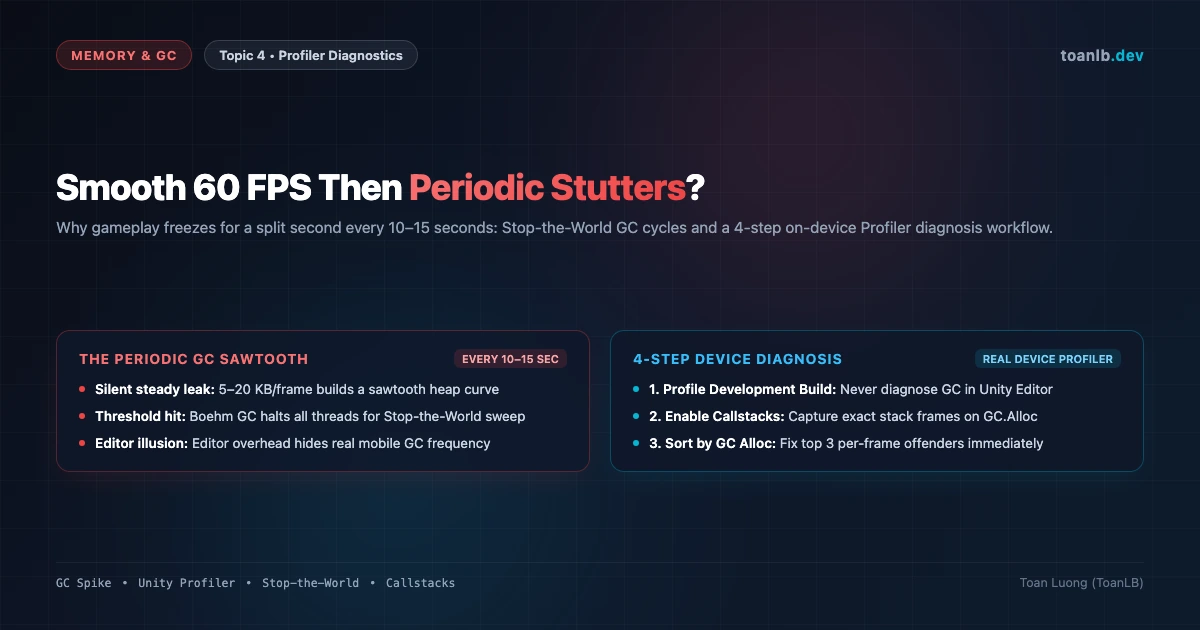
During mobile game development, especially for reflex-intensive genres such as top-down shooters, hack-and-slash, or endless runners, there is a signature performance anomaly that almost every game developer encounters sooner or later:
When you launch the game, the display runs at a buttery-smooth 60 FPS. Character movement and touch inputs respond with instantaneous precision. However, every 3 to 5 seconds like clockwork, the screen suffers a pronounced hitch: frame time spikes violently from 16.6ms up to 70ms - 100ms, only to immediately resume silky-smooth 60 FPS gameplay as if nothing happened.
This periodic, rhythmic stuttering fractures player immersion. Without understanding the engine’s underlying execution pipeline, developers often guess blindly at the culprit: suspecting graphics overhead, they aggressively slash texture resolutions, decimate 3D model polygon counts, or disable real-time shadows. Yet after stripping visual fidelity down to bare bones, the rhythmic hitch persists at exact, predictable intervals.
To permanently eradicate this issue, we must understand the precise on-device profiling methodology and the memory management mechanics under Unity’s hood.
Diagnostic Methodology: Why You Should Never Profile in the Unity Editor
The most common trap in performance profiling is hitting Play Mode inside the Unity Editor and staring at the Profiler window.
The Unity Editor executes an immense volume of background overhead that does not exist in standalone release builds:
- The Editor UI is rendered constantly via IMGUI or UI Toolkit, consuming significant Main Thread CPU cycles.
- The Scene View, Inspector, and Console continuously marshal reflection data and format console log strings.
- The Editor’s Mono Runtime garbage collector operates inside a separate memory domain with allocation triggers fundamentally distinct from the IL2CPP AOT runtime on mobile silicon.
Profiling inside the Editor yields distorted metrics, leading engineers to spend days optimizing routines that were never bottlenecks in release builds.
flowchart LR
    A["1. Package Development Build<br/>(Autoconnect & GC Callstacks)"] --> B["2. Tether Target Device<br/>(Profile on Real Hardware)"]
    B --> C["3. Switch to Timeline View<br/>(Locate GC.Collect Marker)"]
    C --> D["4. Inspect Allocation Callstacks<br/>(Trace Garbage in Update)"]
The standard production diagnostic workflow requires these steps:
- Package a Development Build: In Build Settings, check
Development BuildandAutoconnect Profiler. In Player Settings, enableEnable Allocation Callstacksrather than full Deep Profile, avoiding the massive frame-rate distortion of deep instrumentation. - Tether the Target Device: Connect the physical phone or test device via USB cable, open the Unity Profiler, and select the hardware device as the active recording target.
- Inspect Timeline View Instead of Hierarchy View: The Hierarchy view displays function averages over time, smoothing out transient spikes. When you observe a severe frame drop on the CPU Usage graph, switch to Timeline View to inspect sequential Main Thread slice execution.
- Identify Bottleneck Markers:
- If you see
GC.CollectorGarbageCollector.CollectIncremental, 95% of rhythmic stutters stem from memory heap accumulation triggering garbage collection passes. - If you see
Resources.Load,AssetBundle.LoadAsset, or synchronousInstantiate, the culprit is synchronous disk I/O or heavy prefab cloning mid-gameplay. - If you see
Physics.Simulate, spikes originate from collision calculation clusters or stackedFixedUpdateiterations.
- If you see
Anatomy of a GC Spike: Why Does Stutter Occur at Regular Intervals?
In Unity, C# managed memory is governed by the Boehm-Demers-Weiser Garbage Collector across both Mono and IL2CPP runtimes.
Whenever you instantiate reference types (class, arrays, string, lambda closures) inside an Update() loop, these chunks are allocated directly onto the managed heap.
Unlike compacting garbage collectors (such as the standard .NET CLR which utilizes bump pointers and relocates objects during compaction), Unity’s Boehm GC is a non-moving, non-compacting collector. It refuses to relocate memory chunks in order to protect native C++ pointers referenced across the engine boundary. It manages free memory chunks using segregated free lists indexed by size classes. During the initial seconds of gameplay, locating empty slots in these free lists is virtually instant, preserving 60 FPS (16.6ms per frame).
However, unreferenced garbage does not magically vanish:
flowchart LR
    Step1["Frames 1 - 240: 60 FPS<br/>(25 KB / frame accumulated)"] --> Step2["Managed Heap Threshold Reached<br/>(Free Lists Exhausted)"]
    Step2 --> Step3["GC Stop-The-World<br/>(Main Thread Blocked 80ms)"]
    Step3 --> Step4["Free Lists Reclaimed<br/>(Smooth Gameplay for 3-5s)"]
Imagine an action game running at 60 FPS where your Update() loop casually generates 25KB of temporary allocations every frame:
- Every elapsed second: of garbage dumped onto the heap.
- After approximately 4 seconds: Heap garbage balloons to 6MB.
While modern Unity versions (Unity 2021 LTS and Unity 6) enable Incremental GC by default to slice garbage marking into tiny windows (~3ms per frame), Incremental GC is not an absolute panacea. When garbage generation in Update() outpaces the incremental marking budget, or when heap fragmentation forces an emergency Heap Expansion from the operating system, Boehm GC cancels incremental mode and executes an emergency Full GC Stop-The-World pass:
- All Main Thread execution halts completely so that the object graph remains static during traversal.
- The GC inspects all GC Roots: static fields, active thread stacks, CPU registers, and strong GCHandles anchoring alive scene entities from native C++.
- Marking surviving objects and sweeping dead slots takes anywhere from 60ms to 120ms depending on overall heap object density.
This 80ms freeze forces the current frame duration to stretch five times beyond its 16.6ms budget. The player perceives a jarring screen pause. Once sweep completes, the Main Thread resumes and the game returns to 60 FPS until the heap threshold fills again 4 seconds later, producing a rhythmic stutter cycle.
4 Common Silent Garbage Allocators in the Game Loop
To permanently extinguish rhythmic frame drops, the golden rule in optimizing the game loop (Update, LateUpdate, FixedUpdate) is simple: drive allocation down to 0 bytes / frame.
Here are 4 subtle habits that generate massive heap churn:
1. String Concatenation and Interpolation in UI Displays
Strings in C# are immutable reference types. Every time you concatenate or interpolate $"{score}", an entirely new string object is allocated on the managed heap:
public class StringConcatenationSnippet : MonoBehaviour
{
    public string displayedHealthText;
    private int _currentHealth = 100;
    private int _maxHealth = 100;

    // Generates heap garbage every frame: allocates 3 to 4 temporary strings
    private void Update()
    {
        displayedHealthText = "HP: " + _currentHealth + " / " + _maxHealth;
    }
}
2. Boxing via Enum and Object Parameter Passing
Passing a value type (struct or enum) into an API expecting object or System.Enum forces the C# runtime to wrap the value inside a heap-allocated box:
[System.Flags]
public enum CharacterCombatState
{
    None = 0,
    Stunned = 1 << 0,
    Poisoned = 1 << 1,
    Invulnerable = 1 << 2
}

public static class EnumBoxingSnippet
{
    // HasFlag takes System.Enum (object reference), triggering heap boxing
    public static bool CheckStatus(CharacterCombatState state, CharacterCombatState flag)
    {
        return state.HasFlag(flag);
    }

    // Zero-allocation approach using direct bitwise operators
    public static bool CheckStatusOptimized(CharacterCombatState state, CharacterCombatState flag)
    {
        return (state & flag) == flag;
    }
}
3. Unity APIs Returning New Arrays on Every Call
Several built-in Unity APIs allocate fresh arrays on the managed heap upon invocation rather than populating a caller-provided buffer:
Physics.RaycastAll(...)orPhysics.OverlapSphere(...): Allocates freshRaycastHit[]orCollider[]arrays.GetComponents<T>(): Allocates a new array unless passing a pre-allocatedList<T>.mesh.verticesormesh.triangles: Clones vertex arrays from native C++ onto the C# managed heap.
4. LINQ Queries and Lambda Closures in Update Loops
LINQ prioritizes code conciseness over zero-allocation budgets. Chaining .Where(), .OrderBy(), or .FirstOrDefault() instantiates enumerators and iterator classes on the heap. Furthermore, if a lambda captures outer local scope variables, the compiler synthesizes a hidden display class instance on the managed heap every frame.
Production Case Study: Combat Target Radar Scanner
Consider a practical production scenario: A top-down mobile shooter where the player character maintains a tactical radar. Every frame, the radar scans for monsters within a 15-meter radius, calculates distances, and renders the nearest enemy’s name and health percentage onto the HUD. The technical constraint is strict: sustain 60 FPS on mid-range Android devices, with an allocation budget of strictly 0 bytes inside the radar’s Update() loop.
Naive Implementation: Concise but Churning Heap Memory
In early prototype stages, engineers often assemble scanning and UI updates using convenient built-in helpers and LINQ:
using System.Linq;
using UnityEngine;

public class NaiveCombatRadar : MonoBehaviour
{
    [SerializeField] private float _scanRadius = 15f;
    [SerializeField] private LayerMask _enemyLayer;

    public string displayedTargetText;

    private void Update()
    {
        // 1. OverlapSphere allocates a fresh Collider[] array on the heap every frame
        Collider[] hits = Physics.OverlapSphere(transform.position, _scanRadius, _enemyLayer);

        if (hits != null && hits.Length > 0)
        {
            Vector3 currentPos = transform.position;

            // 2. LINQ OrderBy and lambda closures instantiate delegates and iterators on the heap
            Collider nearestEnemy = hits
                .OrderBy(c => Vector3.Distance(currentPos, c.transform.position))
                .FirstOrDefault();

            if (nearestEnemy != null)
            {
                float distance = Vector3.Distance(currentPos, nearestEnemy.transform.position);

                // 3. String concatenation allocates new string objects every frame
                displayedTargetText = "Target: " + nearestEnemy.name + " (" + distance.ToString("F1") + "m)";
            }
        }
        else
        {
            displayedTargetText = "No Target";
        }
    }
}
Every single frame, this snippet triggers at least three managed heap allocations:
Collider[]array fromPhysics.OverlapSphere.- LINQ delegate and enumerator objects from
OrderBy. - Newly concatenated string objects assigned to the HUD text field.
At 60 FPS, this single component generates dozens of kilobytes of garbage per second, triggering periodic GC hitches every few moments.
Production Solution: Zero-Allocation Game Loop Architecture
To drive allocations down to zero, we implement three architectural adjustments:
- Use
Physics.OverlapSphereNonAllocpaired with a reusable pre-allocated buffer. - Replace LINQ with an index-based
forloop and evaluate squared distances (sqrMagnitude) to bypass costlyMathf.Sqrtcalls. - Introduce dirty-checking on the UI: only reformat strings when the active target ID changes or the distance variance exceeds a tolerance threshold.
To make the scanning algorithm testable without loading heavy Unity scenes, we isolate the logic into a pure C# resolver class named TargetScanResolver:
using System;
using UnityEngine;

// Value type representing candidates, decoupled from GameObject for unit testing
public readonly struct TargetCandidate
{
    public readonly int Id;
    public readonly string Name;
    public readonly Vector3 Position;

    public TargetCandidate(int id, string name, Vector3 position)
    {
        Id = id;
        Name = name;
        Position = position;
    }
}

// Zero-allocation scan result struct
public readonly struct TargetScanResult : IEquatable<TargetScanResult>
{
    public readonly int TargetId;
    public readonly float Distance;
    public readonly bool HasTarget;

    public TargetScanResult(int targetId, float distance, bool hasTarget)
    {
        TargetId = targetId;
        Distance = distance;
        HasTarget = hasTarget;
    }

    public bool Equals(TargetScanResult other)
    {
        return TargetId == other.TargetId &&
               HasTarget == other.HasTarget &&
               Math.Abs(Distance - other.Distance) < 0.01f;
    }

    public override bool Equals(object obj) => obj is TargetScanResult other && Equals(other);

    public override int GetHashCode()
    {
        unchecked
        {
            int hash = TargetId.GetHashCode();
            hash = (hash * 397) ^ HasTarget.GetHashCode();
            return hash;
        }
    }

    public static bool operator ==(TargetScanResult left, TargetScanResult right) => left.Equals(right);
    public static bool operator !=(TargetScanResult left, TargetScanResult right) => !left.Equals(right);
}

// Pure C# static solver operating on pre-allocated buffers
public static class TargetScanResolver
{
    // Testable overload operating on pure structs
    public static TargetScanResult FindNearestTarget(
        Vector3 origin,
        TargetCandidate[] buffer,
        int count)
    {
        if (count <= 0 || buffer == null)
        {
            return new TargetScanResult(-1, 0f, false);
        }

        int bestIndex = -1;
        float minSqrDistance = float.MaxValue;

        for (int i = 0; i < count; i++)
        {
            Vector3 diff = buffer[i].Position - origin;
            float sqrDist = diff.sqrMagnitude;

            if (sqrDist < minSqrDistance)
            {
                minSqrDistance = sqrDist;
                bestIndex = i;
            }
        }

        if (bestIndex < 0)
        {
            return new TargetScanResult(-1, 0f, false);
        }

        float actualDistance = Mathf.Sqrt(minSqrDistance);
        TargetCandidate best = buffer[bestIndex];
        return new TargetScanResult(best.Id, actualDistance, true);
    }

    // Overload for Unity Collider[] buffers in runtime gameplay (0 bytes GC Alloc)
    public static TargetScanResult FindNearestTarget(
        Vector3 origin,
        Collider[] buffer,
        int hitCount,
        out Collider bestCollider)
    {
        bestCollider = null;

        if (hitCount <= 0 || buffer == null)
        {
            return new TargetScanResult(-1, 0f, false);
        }

        float minSqrDistance = float.MaxValue;

        for (int i = 0; i < hitCount; i++)
        {
            Collider col = buffer[i];
            if (col == null) continue;

            Vector3 diff = col.transform.position - origin;
            float sqrDist = diff.sqrMagnitude;

            if (sqrDist < minSqrDistance)
            {
                minSqrDistance = sqrDist;
                bestCollider = col;
            }
        }

        if (bestCollider == null)
        {
            return new TargetScanResult(-1, 0f, false);
        }

        float actualDistance = Mathf.Sqrt(minSqrDistance);
        int targetId = bestCollider.gameObject.GetInstanceID();

        // Avoid querying bestCollider.name here to prevent string allocation every frame
        return new TargetScanResult(targetId, actualDistance, true);
    }
}
Next, we establish the runtime MonoBehaviour component and presenter. The buffer is pre-allocated during initialization, and UI text reformatting occurs only upon validated dirty-state changes:
using System;
using UnityEngine;

public interface ITargetHudView
{
    void SetTargetText(string text);
}

public class RadarHudPresenter
{
    private readonly ITargetHudView _view;
    private TargetScanResult _lastResult;
    private string _cachedTargetName = string.Empty;

    public int FormatCount { get; private set; }
    public int CurrentTargetId => _lastResult.TargetId;

    public RadarHudPresenter(ITargetHudView view)
    {
        _view = view;
        _lastResult = new TargetScanResult(-1, 0f, false);
    }

    private bool ShouldUpdateView(TargetScanResult current, TargetScanResult last)
    {
        if (current.TargetId != last.TargetId || current.HasTarget != last.HasTarget)
        {
            return true;
        }

        // Distance delta must exceed 0.1m tolerance to justify re-formatting string
        return Math.Abs(current.Distance - last.Distance) >= 0.1f;
    }

    public void OnScanResult(TargetScanResult result, string newTargetName = null)
    {
        if (ShouldUpdateView(result, _lastResult))
        {
            if (result.TargetId != _lastResult.TargetId)
            {
                _cachedTargetName = newTargetName ?? string.Empty;
            }

            _lastResult = result;
            FormatCount++;

            if (_view == null) return;

            if (result.HasTarget)
            {
                _view.SetTargetText($"Target: {_cachedTargetName} ({result.Distance:F1}m)");
            }
            else
            {
                _view.SetTargetText("No Target");
            }
        }
    }
}

public class ZeroAllocCombatRadar : MonoBehaviour
{
    [SerializeField] private float _scanRadius = 15f;
    [SerializeField] private LayerMask _enemyLayer;

    private RadarHudPresenter _presenter;
    private readonly Collider[] _hitBuffer = new Collider[32];

    public void Initialize(ITargetHudView hudView)
    {
        _presenter = new RadarHudPresenter(hudView);
    }

    private void Awake()
    {
        if (_presenter == null)
        {
            _presenter = new RadarHudPresenter(null);
        }
    }

    public void TickScan(Vector3 currentPos)
    {
        // NonAlloc overwrites existing buffer in-place -> 0 bytes GC Alloc
        int hitCount = Physics.OverlapSphereNonAlloc(
            currentPos,
            _scanRadius,
            _hitBuffer,
            _enemyLayer
        );

        Collider bestCollider;
        TargetScanResult currentResult = TargetScanResolver.FindNearestTarget(
            currentPos,
            _hitBuffer,
            hitCount,
            out bestCollider
        );

        // Access bestCollider.name strictly when TargetId changes
        string newName = null;
        if (currentResult.HasTarget && currentResult.TargetId != _presenter.CurrentTargetId && bestCollider != null)
        {
            newName = bestCollider.name;
        }

        _presenter?.OnScanResult(currentResult, newName);
    }

    private void Update()
    {
        TickScan(transform.position);
    }

    private void OnDisable()
    {
        // Clear references to prevent managed shell leaks while inactive
        System.Array.Clear(_hitBuffer, 0, _hitBuffer.Length);
    }
}
Beyond zero-allocation game loops, we also establish a proactive garbage collection strategy (Proactive GC Orchestration) during designated safe windows. We construct a static orchestrator named GCOrchestrator to coordinate GC sweeps during loading screens, level transitions, or pause states:
using System;
using UnityEngine;

public static class GCOrchestrator
{
    private static DateTime _lastCollectTime = DateTime.MinValue;
    private static readonly TimeSpan MinCollectInterval = TimeSpan.FromSeconds(15);

    // Call during Safe Windows (Loading screens, stage completion, opening pause menu)
    public static bool TriggerSafeGarbageCollection(bool force = false)
    {
        DateTime now = DateTime.UtcNow;

        if (!force && (now - _lastCollectTime) < MinCollectInterval)
        {
            return false;
        }

        _lastCollectTime = now;
        GC.Collect();
        return true;
    }

    // Support Fast Enter Play Mode (Disable Domain Reload) in Unity 6 & 2022 LTS
    [RuntimeInitializeOnLoadMethod(RuntimeInitializeLoadType.SubsystemRegistration)]
    public static void ResetCollectTimerForTesting()
    {
        _lastCollectTime = DateTime.MinValue;
    }
}
Automated Verification via NUnit Test Suite
To verify that the target selection algorithm behaves properly under diverse edge cases (empty buffers, varying distance tiers) and that the throttle timer enforces collection spacing, we build an isolated NUnit test fixture:
using NUnit.Framework;
using UnityEngine;

[TestFixture]
public class ZeroAllocRadarTests
{
    private class FakeTargetHudView : ITargetHudView
    {
        public string LastText { get; private set; }
        public int CallCount { get; private set; }

        public void SetTargetText(string text)
        {
            LastText = text;
            CallCount++;
        }
    }

    [SetUp]
    public void SetUp()
    {
        GCOrchestrator.ResetCollectTimerForTesting();
    }

    [Test]
    public void FindNearestTarget_WithMultipleCandidates_ReturnsClosest()
    {
        Vector3 playerPos = Vector3.zero;
        var candidates = new TargetCandidate[]
        {
            new TargetCandidate(1, "Enemy_A", new Vector3(5f, 0f, 0f)),
            new TargetCandidate(2, "Enemy_B", new Vector3(2f, 0f, 0f)),
            new TargetCandidate(3, "Enemy_C", new Vector3(10f, 0f, 0f))
        };

        TargetScanResult result = TargetScanResolver.FindNearestTarget(playerPos, candidates, 3);

        Assert.IsTrue(result.HasTarget);
        Assert.AreEqual(2, result.TargetId);
        Assert.AreEqual(2.0f, result.Distance, 0.01f);
    }

    [Test]
    public void FindNearestTarget_EmptyBuffer_ReturnsNoTarget()
    {
        Vector3 playerPos = Vector3.zero;
        var candidates = new TargetCandidate[8];

        TargetScanResult result = TargetScanResolver.FindNearestTarget(playerPos, candidates, 0);

        Assert.IsFalse(result.HasTarget);
        Assert.AreEqual(-1, result.TargetId);
    }

    [Test]
    public void TargetScanResult_Equals_ReturnsTrueForSameValues()
    {
        var result1 = new TargetScanResult(101, 5.0f, true);
        var result2 = new TargetScanResult(101, 5.0f, true);

        Assert.IsTrue(result1.Equals(result2));
        Assert.IsTrue(result1 == result2);
        Assert.AreEqual(result1.GetHashCode(), result2.GetHashCode());
    }

    [Test]
    public void TargetScanResult_Equals_ReturnsFalseWhenTargetChanges()
    {
        var result1 = new TargetScanResult(101, 5.0f, true);
        var result2 = new TargetScanResult(102, 5.0f, true);

        Assert.IsFalse(result1.Equals(result2));
        Assert.IsTrue(result1 != result2);
    }

    [Test]
    public void RadarHudPresenter_DirtyCheck_OnlyResolvesNameOnTargetChange()
    {
        var fakeHud = new FakeTargetHudView();
        var presenter = new RadarHudPresenter(fakeHud);

        // Frame 1: Target Enemy_B (ID: 2) at 2.0m -> Format "Enemy_B"
        var result1 = new TargetScanResult(2, 2.0f, true);
        presenter.OnScanResult(result1, "Enemy_B");

        Assert.AreEqual(1, presenter.FormatCount);
        Assert.AreEqual(1, fakeHud.CallCount);
        Assert.IsTrue(fakeHud.LastText.Contains("Enemy_B"));

        // Frame 2: Same Target Enemy_B at 2.04m (within 0.1m tolerance) -> No reformat
        var result2 = new TargetScanResult(2, 2.04f, true);
        presenter.OnScanResult(result2, "Ignored_Name");

        Assert.AreEqual(1, presenter.FormatCount, "Dirty-check must prevent updates when target distance delta is within tolerance.");
        Assert.AreEqual(1, fakeHud.CallCount);

        // Frame 3: Switch to new target (ID: 3) -> Reformat and update name
        var result3 = new TargetScanResult(3, 6.0f, true);
        presenter.OnScanResult(result3, "Enemy_C");

        Assert.AreEqual(2, presenter.FormatCount);
        Assert.AreEqual(2, fakeHud.CallCount);
        Assert.IsTrue(fakeHud.LastText.Contains("Enemy_C"));
    }

    [Test]
    public void GCOrchestrator_RespectsThrottleInterval()
    {
        bool firstCall = GCOrchestrator.TriggerSafeGarbageCollection(force: false);
        bool immediateCall = GCOrchestrator.TriggerSafeGarbageCollection(force: false);

        Assert.IsTrue(firstCall, "First collection invocation must succeed.");
        Assert.IsFalse(immediateCall, "Immediate subsequent invocation must be throttled by timer.");
    }
}
Trade-off Matrix: Approaches to Combat GC Stuttering
| Strategy | Incremental GC (Default) | Zero-Alloc Loop Optimization | Proactive GC Orchestration |
|---|---|---|---|
| Technical Mechanism | Slices garbage marking phases (~3ms) into spare frame budgets. | Eliminates allocations inside Update, FixedUpdate, and LateUpdate. | Manually triggers GC.Collect during player idle moments. |
| Hitch Mitigation | Softens spike spikes, but emergency Full GC still triggers if allocation rate exceeds budget. | Completely eliminates GC spikes throughout active gameplay. | Prevents unscheduled GC sweeps mid-combat. |
| Implementation Cost | Minimal; just enable the project settings checkbox. | Moderate; requires code audits, NonAlloc APIs, and object pooling. | Low; requires hooks into menu transitions, loading, and stage completion. |
| Codebase Impact | Zero architecture changes required. | Transition towards pre-allocated buffers, value types, and cached states. | Requires integration with game lifecycle state machines. |
| Recommended Context | Rapid prototyping, static puzzles, or emergency stabilization prior to launch. | Mandatory for all commercial 60 FPS action/reflex mobile productions. | Highly recommended alongside Zero-Alloc loops to keep memory cleanly maintained. |
Production Takeaways
When a game exhibits periodic stutters despite reporting high frame rates, never guess by blindly stripping graphics or tweaking shaders. Ground your optimization in hard data:
- Always Profile on Target Hardware: Never rely on Unity Editor metrics. Produce tethered Development Builds to observe the genuine IL2CPP runtime profile.
- Inspect the Timeline View: Scrutinize Main Thread markers. If
GC.Collectappears at the onset of a hitch, the bottleneck is heap churn in the game loop. - Commit to a 0-Byte Game Loop Budget: Replace array-generating APIs with
NonAllocoverloads, eliminate string concatenation via dirty-checking caches, and ban LINQ from routines executing every frame. - Proactively Clear Garbage in Safe Windows: Trigger manual garbage collection and asset unloading during loading screens or scene transitions, ensuring memory sweeps remain entirely within your architectural control.

